
See More About: , ,

4 Tips for Using Gmail’s Priority Inbox

by

It’s been over a week since Google launched Priority Inbox and already they have posted tips on how to maximize its effectiveness. In the guide below I will show each of the tips along with an explanation on how each works. If you have any comments or questions please use the comments form at the end of the article.

1. Customize Sections

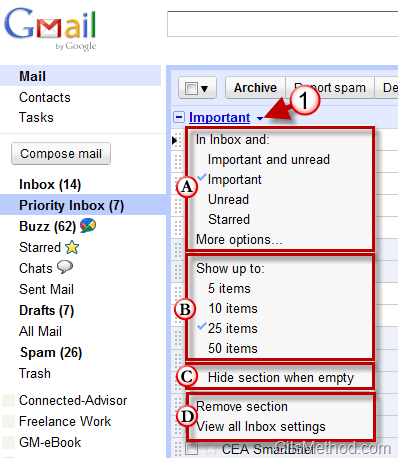
By default, Priority Inbox has three sections: Important and Unread, Starred and Everything Else, but you are free to customize it however you want. You can change what items are displayed by clicking on the Important menu and choosing one of the options below.
priorityinboxtip1 thumb 4 Tips for Using Gmails Priority Inbox

1. Click on Important to open the menu.

A. You can customize which messages are displayed along with the Inbox.


B. Select the number of items to display on the list.

C. Choose to hide the Important section if it is empty.

D. You can remove the section entirely or view all settings.

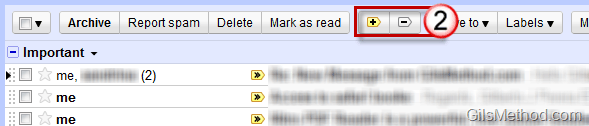
2. Train the Priority System

Gmail is not perfect so there will be times when a message will slip through the Priority Inbox or it will end up in the Priority Inbox when it’s really not that important. That’s where you come in, the trainer.
priorityinboxtip2 thumb 4 Tips for Using Gmails Priority Inbox

2. To mark a message unimportant click on the [-> symbol, to mark a message important click on the [+> symbol. For those of you who like shortcuts you will be pleased to know you can use the [+] and [-] keys on your keyboard.

3. See Important Filtered Messages

Priority Inbox does a good job of showing you the important messages, but you can also filter the messages you might miss when you enable filters for your messages. In order to use this option you must select Override filters in the Priority Inbox settings page.

priorityinboxtip3 thumb 4 Tips for Using Gmails Priority Inbox

With this option turned on, you can use filters to be more aggressive with message archiving, thus clearing out your inbox more efficiently.

4. Archive Unimportant Messages Quickly

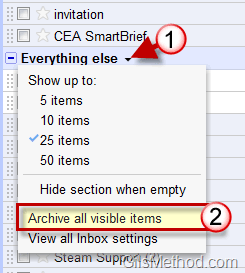
If you find that all of the messages in the Everything Else section are not that important you can quickly archive them all by clicking on Archive all visible items.
priorityinboxtip5 thumb 4 Tips for Using Gmails Priority Inbox

1. Click on Everything else.

2. Click on Archive all visible items.

You can increase the number of items archived using this method by increasing the number of messages.

Do you have any Priority Inbox tips to share? Use the comments section below.

See More About: , ,
Originally posted Sep 24, 2010

We close comments after 30 days on GilsMethod.com and ask that you post questions and issues on our Answers website.

This helps us better serve you by allowing us to keep track of unanswered questions that are usually hidden in long comment threads.

Answers.GilsMethod.com is a community-powered support website where you will be able to post questions, and other users including us will respond with expert advice.

So if you are having trouble with your PC, Mac, iPad, iPhone, or other piece of technology, head over to Answers.GilsMethod.com and ask away.

  • http://www.jackcola.org/ Jack Cola

    Hey Gil,
    Thanks for these tips. When Priority Inbox first launched, I was like, how would this work. After using it for a while, it’s quite simple and really good. It’s just a pitty I use POP3 and Thunderbird for my gmail accounts.

  • Angela

    I absolutely love the Priority In Box! I am one of those people with 1000 emails in my in-box and no desire to keep unsubscribing to items. For the last year my only way to clean it out was to create a “Month Dump” folder and put everything in it — thinking if I have not needed anything from there in a year trash it. I know, I know….I’m not a techie.

    Thank You!!

    • http://www.gilsmethod.com Gilberto J Perera

      Angela,

      I too love Priority Inbox, Gmail won me over again. Would love to see something similar in other email clients. I’m loving the competition.

  • Bob Martin

    awesome tips! I appreciate the way you have written all these essentials…Thanks so much, i will adapt this well saying teaching tips..Keep it up..

    http://www.tmjremedyadvice.com/tmj-treatments/tmj-help-program-will-it-cure-me-permanently

  • Sy Weiss

    Hi
    One of my first reads every day.
    Do you ever sleep . ?
    Big value to all, and what a price.
    Thanks
    Sy Fort Lee. NJ

    • http://www.gilsmethod.com Gilberto J Perera

      Sy,

      Thanks for the compliments…yes I sleep. Glad you find the site useful any suggestions or tips would be greatly appreciated.

