
How many of you have more than one Gmail account? Like me, you probably got a silly Gmail email address when Gmail was first launched years ago, and you later got a more serious email account as Gmail matured. Yet you are still receiving messages on both email accounts and switching between them requires that you sign out of one and sign in to the other.
A new feature introduced by Google allows you to sign in to multiple accounts without having to go back and forth signing in and out of your Google accounts.
In order to use this feature you must first enable it (instructions below), but before you run on over to Google and change everything there are a couple of things you need to be aware of.
- The following products are supported; Google Calendar, Gmail, Code, Reader, Sites, and Voice.
- Offline Mail and Offline Calendar is NOT available (as of this writing).
- Google products not listed above will default to the first account that you signed in to using your current web browser session.
- The account you’re currently using is displayed at the top of most Google product pages, or at the bottom of most pages on mobile devices. Always check to make sure you’re using the account you want.
OK, now that we got that out-of-the-way, let’s enable multiple sign-in’s for Google.
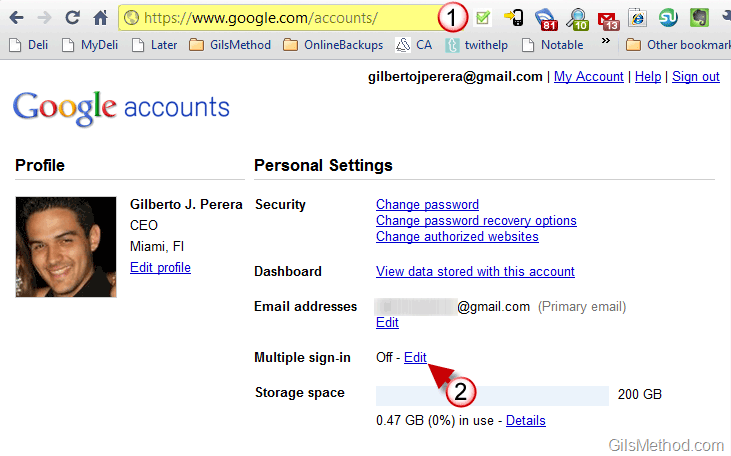
1. Visit the Google Account page (may require sign-in) – http://www.google.com/accounts
2. When the Accounts page opens click on the Edit link next to Multiple sign-in.
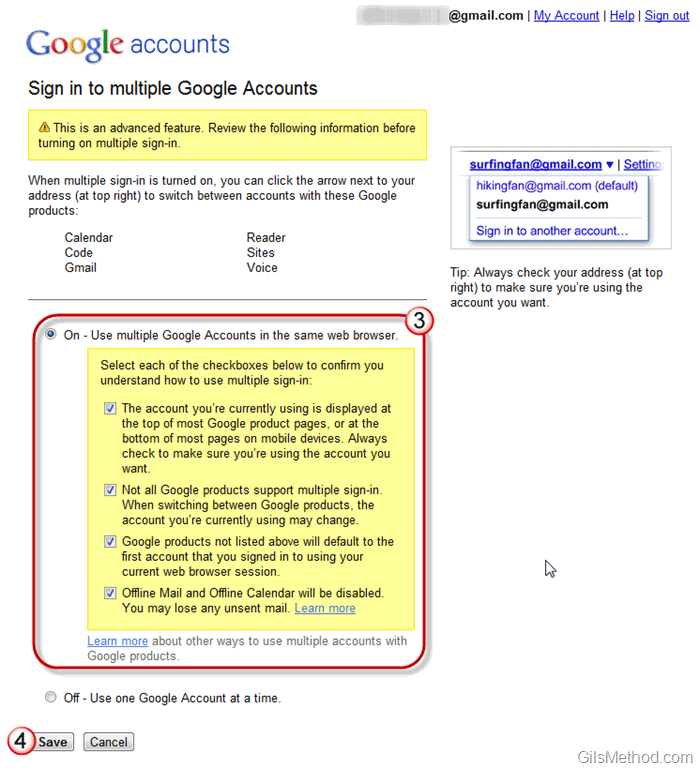
3. Check ON and all of the check boxes to confirm you understand how to use multiple sign-in.
4. Click on the Save button.
You’re done. When you return to Gmail or one of the supported products, follow the instructions below.
How to Add and Access Multiple Google Accounts
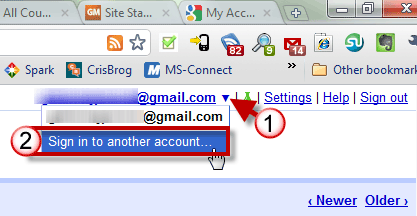
1. To sign in to another Google Account, click on the small arrow next to your email address on the top right corner of the page.
2. Click on Sign in to another account from the list.

3. You will be warned about limitations and how to use this feature again. Sign in to the other account.
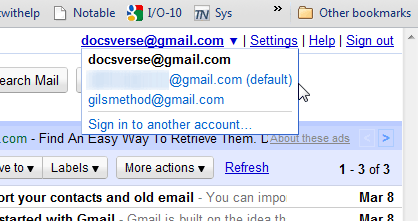
When you sign in and click on the small arrow next to your email address again you will notice that the email addresses you have added to your account will appear. To switch between accounts simply select it from the list of accounts available.



