
Do you know the lyrics to the song you’re playing on your iPod/iPhone? If you don’t know them, don’t worry…there’s a hidden setting in iTunes which allows you to add the lyrics to any song in your iTunes library. The guide below will show you how to add lyrics to songs in iTunes.
If you have any comments or questions please post them in the comments section below.
Note: I used iTunes 9.2 running on Windows 7 for this guide.
Before proceeding with this guide make sure that copied the lyrics for the selected song to the clipboard.
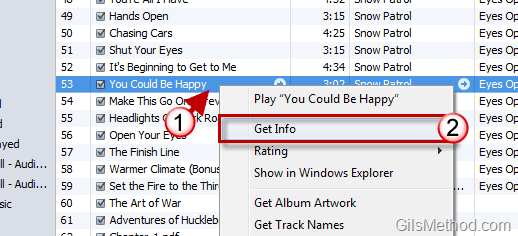
1. Click on the song that wish to add lyrics to.
2. Click on Get Info from the menu.
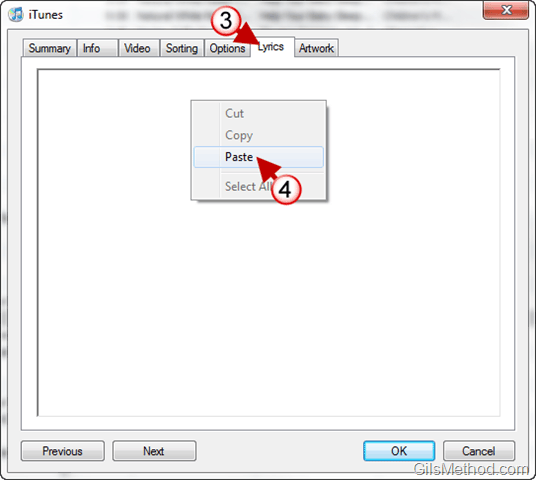
3. When the window opens, click on the Lyrics tab.
4. Right-click on the white area and click on Paste to insert the lyrics you copied from a lyrics site.
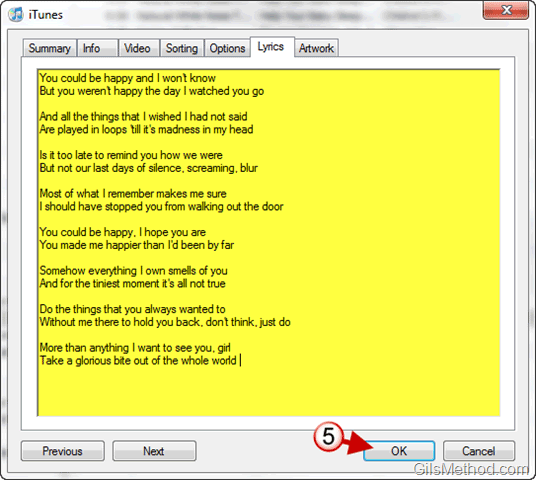
5. Once the lyrics are included, click OK to save the changes.
The lyrics you added to the song should appear on your iPad or iPhone while playing the song.



