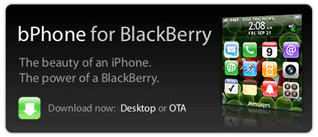
I absolutely love my BlackBerry, but I can’t help and love the eye candy whenever I see someone with an iPhone, the GUI is absolutely gorgeous. How would you like your BlackBerry to look like an iPhone? It can! It’s possible through the creation of a BlackBerry theme by Mathew Rogers. You have two options to install this download, you can either do it OTA (Over the Air) on your phone or via your desktop, it is entirely up to you.
A couple of warnings though;
8700 Series BB must have BlackBerry OS 4.2.1 or later, otherwise your BB may not work
The Pearl (8100) and the 8800 also need OS 4.2.1 or later
The Curve both the 8300 and the 8830 need OS 4.2.2 or later
"Inspired by the iPhone, bPhone for BlackBerry features icons straight from the iPhone in addition to custom-made icons that fit into the iPhone theme. The top banner is dark glass, the signal and battery indicators were created from scratch to mimic the iPhone’s, the “busy” indicator is the Mac OS X beachball, and there is liberal use of gray and blue (Mac and iPhone’s primary interface colors) throughout the theme. The fonts are set at a medium size."
I have successfully installed the theme over the air, I simply sent myself an email with the link to the application. Just make sure to turn off your phone, remove the battery, and start it up again for the theme to appear on your theme list. Enjoy!
Send a download link to your BlackBerry
Although not required for the download, please try and help Roger with a small donation
Via RogersMJ