
It’s bad enough that I get notifications throughout the day while using TweetDeck, but now I get them all the time with TweetDeck’s latest realtime Twitter streaming option (which is set to On by default). Sure, I can disable notifications altogether, but I like some notifications to go through, just not all the time. If you feel the same way and are looking to disable this great new feature, follow the instructions below.
If you have any comments or questions please post in the comments section following the article.
How to Disable Realtime Twitter Streams
Software used: TweetDeck v0.36.0.
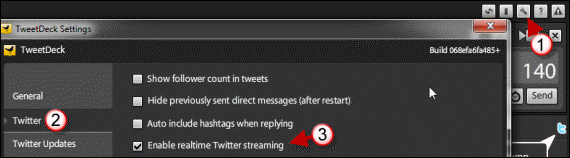
1. When you open TweetDeck, click on the Settings button.
2. The TweetDeck Settings window will open. Click on Twitter from the left pane.
3. Uncheck Enable realtime Twitter streaming and click Save Settings.
If you wish to undo this change, repeat the steps above and check Enable realtime Twitter streaming.
How productive are you with constant Twitter notifications?



