

If you’ve used Quicken software for as long as I have (since version 2003) then you too must be annoyed at the "cha-ching" sound each time a transaction is added or modified. As far as I’m concerned there is no option box within Quicken to change this rather annoying sound. I dug a little and found that the setting for that specific sound and all other software sounds are managed under the Control Panels’ Sound panel. Below I will demonstrate how to disable this sometimes annoying sound. If you have any questions or comments, feel free to post them below.
Note: The screen shots below were generated using Quicken 2008 and Windows XP, options and menu locations should be very similar for Windows Vista.
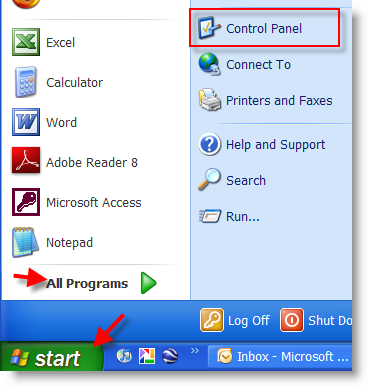
1. You don’t need Quicken open to change these settings, click on Start > Control Panel
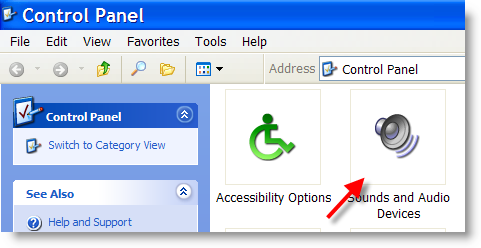
2. The Control Panel window will open, look for the Sounds and Audio Devices icon (Windows Vista users Sounds icon), double click it.
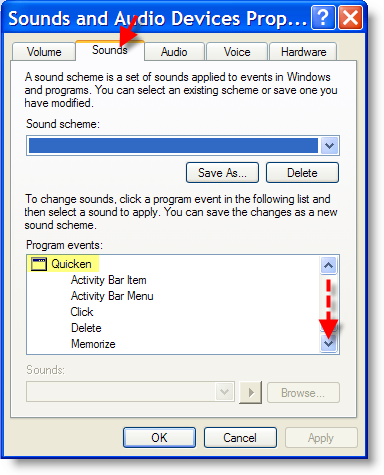
3. When the Sounds and Audio Devices Properties dialog box opens, click on the Sounds tab. Under Program events: there is a list of all the programs that have sound options available, scroll down to the Quicken section.
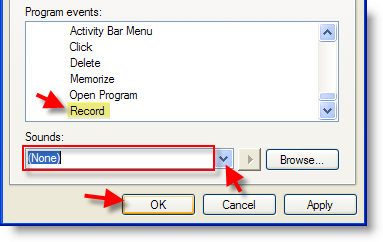
4. Scroll down until you find Record. Select Record and in the Sounds: drop-down select (None), Click OK to close out the dialog box.
5. If Quicken was open while you made these changes, restart the program. You should no longer hear the somewhat annoying "cha-ching" when you enter or update transactions in the register.


