

How to Download Videos from YouTube and View Them On Your iPod


YouTube

There are so many ways you can download videos from YouTube, I will be using iDesktop.tv, my preferred method of downloading and browsing videos from YouTube. With this tutorial I will show you how to download the YouTube video, save it as .MOV file, and then convert it using iTunes so that your iPod can play it. If you have any questions or suggestions please let me know.

1. Go to iDesktop.tv [this site will let you browse all of the videos available on YouTube but in a simplified manner.]

YouTube

2. Find the video you would like to download, and click the download link.
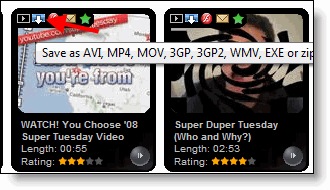
YouTube


3. The video will then be placed on the bottom of the page on a queue. You have option of selecting various file types depending on what you would like to save the file as.
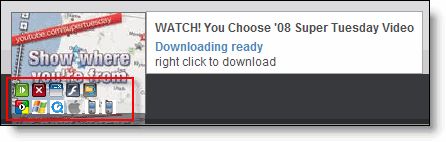
YouTube

4. Since I would like to put this video in my iPod I will save it as a .MOV file [click on the Quicktime icon], it will then start the conversion process …please wait.
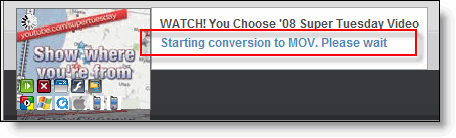
YouTube

5. Once the file has been converted you will be prompted for to Open or Save the download, Save to Disk, click OK
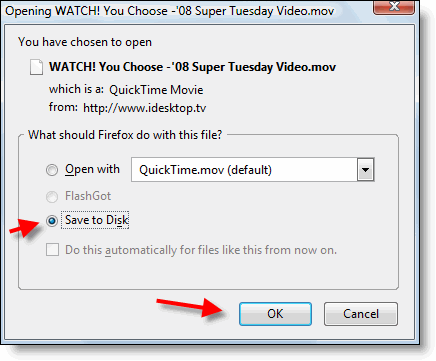
YouTube

6. Open iTunes and drag the video over to your Library - you can also put it in your iTunes folder if you’d like.

YouTube

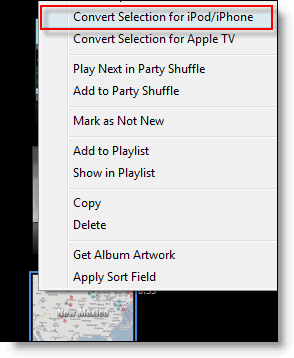
7. Right-click on the video you just added to the library and select Convert the video for the iPod/iPhone
YouTube

Wait for conversion to finish

YouTube

8. Now sync your iPod and enjoy your YouTube videos on your iPod!
YouTube


Article posted on 02 6th, 2008

Related & Suggested Posts

  1. Why Use YouTube When There Are Better Ways to Watch & Download Videos Online?
  2. How to Download Videos from Websites Like Google Video, YouTube, MySpace, and Others
  3. Convert Videos for Your iPod, iPhone, Pre, and Other Mobile Devices
  4. Another Way to Download Youtube, Gooogle, and other Videos
  5. How to Download Videos Using DownloadHelper


One Response to “How to Download Videos from YouTube and View Them On Your iPod”

  1. Thank you so much! This is great. By the way I found a website to Download YouTube Videos

Leave a Comment

Note: I discourage users from using keywords in their names when posting comments, most of those are caught as spam and end up being deleted. It would be more productive and interactive if commentators use the name they go by rather than using an unrelated name. In the future I reserve the right to delete comments from users using a name other than their own.

Connect with Gil via
Connect with Gil
Facebook | Twitter | Digg | SU | LinkedIn
Who's behind Gil's Method?
My Name is Gilberto J Perera and I'm the editor behind Gil's Method. I started this blog to help relatives with computer questions. Since then the blog has grown to the collection of articles you see today, I hope that you find this blog useful and that you come back again.
Read more at my about page
Other Resources

Books (Coming Soon)

Forum (Coming Soon)

Store (Coming Soon)


