
See More About: , , ,

How to Check the PHP Version in 1and1 Hosting

by

php logo How to Check the PHP Version in 1and1 Hosting

One of my readers pointed out the importance of PHP version numbers when running several modules in Drupal and enabling certain workarounds. I hope I clarified his concern, as a result of this exchange I realized that those of you who run a website on a hosted server with PHP might not know how to determine the PHP version used on your server. This information is very important because it will determine the functionality and compatibility of software that is run on your server. The guide below will show you to determine the PHP version used on your server. If you have any comments or questions, please post them below.

Note: I used Dreamweaver to create the PHP file, CuteFTP to upload it, and 1&1 as my host.
php info 1and1 How to Check the PHP Version in 1and1 Hosting

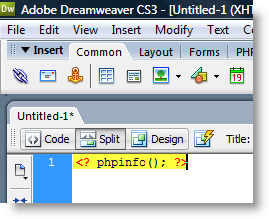
1. Open Dreamweaver or another HTML editor and type the following into an empty document

<? phpinfo(); ?>

You can copy and paste the above statement in its entirety.
php info 1and12 How to Check the PHP Version in 1and1 Hosting

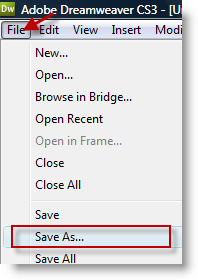
2. Save the file by clicking on File > Save As…
php info 1and13 How to Check the PHP Version in 1and1 Hosting

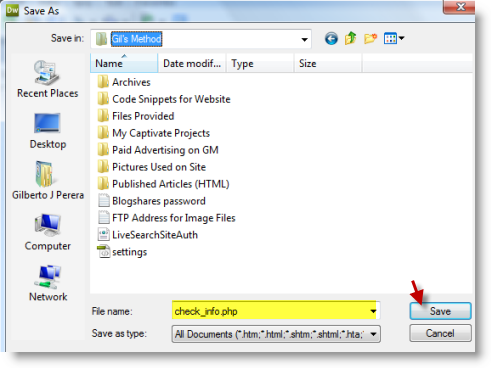
3. Navigate to the directory that you would like to save your file to, name the file check_info.php make sure that All Documents is selected as the Save as type: Click on the Save button

Note: You can name the file whatever you would like, but I recommend the above so that you can identify it.

php info 1and14 How to Check the PHP Version in 1and1 Hosting

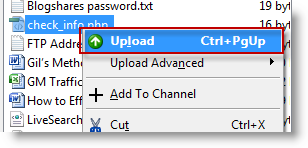
4. Open your favorite FTP program, log on to your server, find the check_info.php file you just created, make sure to also browse to the root directory of your website. To upload using CuteFTP, right click the file and select Upload from the menu.
php info 1and15 How to Check the PHP Version in 1and1 Hosting

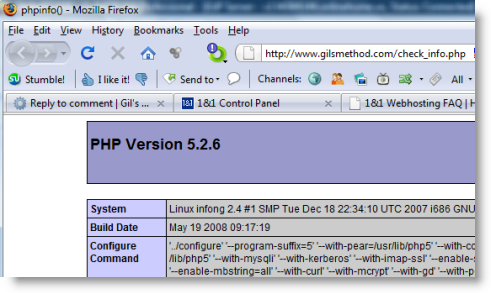
5. Open your browser and head on over to your website, type the following; http://www.yourwebaddresshere.com/check_info.php into the address bar. You should see a page similar to this that details the PHP version used on your server as well as other parameters.

1&1 Uses the above version of PHP – 5.2.6 as of 11/11/2008

See More About: , , ,
Originally posted Nov 11, 2008

We close comments after 30 days on GilsMethod.com and ask that you post questions and issues on our Answers website.

This helps us better serve you by allowing us to keep track of unanswered questions that are usually hidden in long comment threads.

Answers.GilsMethod.com is a community-powered support website where you will be able to post questions, and other users including us will respond with expert advice.

So if you are having trouble with your PC, Mac, iPad, iPhone, or other piece of technology, head over to Answers.GilsMethod.com and ask away.

  • Keddy

    There is an easier way of finding your PHP version. Just open a browser and type in this:

    http://www.example.com/info.php

    Where example.com is your domain.

  • Keddy

    There is an easier way of finding your PHP version. Just open a browser and type in this:

    http://www.example.com/info.php

    Where example.com is your domain.

  • http://www.gilsmethod.com Gil

    @Keddy: Appreciate the feedback, however I have attempted this with my website and it does not work. Does it have to the root directory? Do you need to create the info.php file? Any feedback would be great. Thanks.

  • http://www.gilsmethod.com Gil

    @Keddy: Appreciate the feedback, however I have attempted this with my website and it does not work. Does it have to the root directory? Do you need to create the info.php file? Any feedback would be great. Thanks.

  • Terry

    I use 1&1 hosting in the UK where the version is PHP Version 4.4.9. I have installed XAMPP as a local host and need .php4 extention for sub-domains whilst XAMPP needs just php.
    Can you suggest a solution or a freebie package to replace the excellent XAMPP?
    Thanks in advance
