See More About: , , ,

How to Customize What the Home Button on Your iPad Does

by

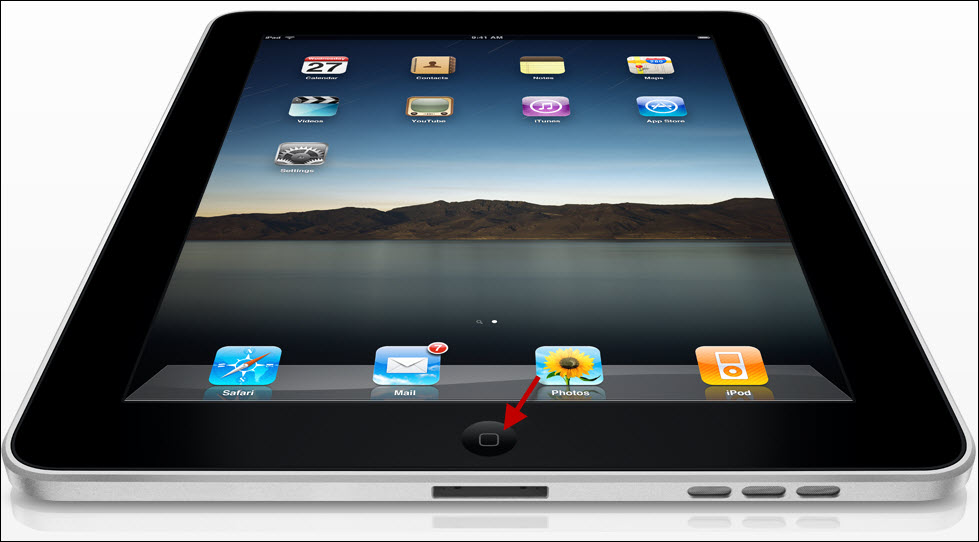
By default, the Home button on the iPad will take you back to the Home Screen if pressed/clicked once, if pressed/clicked twice it will do the same thing. For those of you that are wondering where the Home button is, it is the button located directly below the screen. If either action, single or double press/click, perform the same action, why not customize the pressing/clicking twice action to do something else? You can change the default action to automatically open the iPod App or open Search. Whichever you choose, follow the guide below to learn how to change this useful setting.

Do you own an iPad? You might want to look into protecting your investment with invisibleSHIELD How to Customize What the Home Button on Your iPad Does screen protectors. If you need any help or have questions please post them below.

Are you looking for more iPad how-to’s, tips, and help? Visit our iPad page.
how to customize the ipads home button 0 300x166 How to Customize What the Home Button on Your iPad Does

The iPad Home button pictured above.

how to customize the ipads home button 00 225x300 How to Customize What the Home Button on Your iPad Does

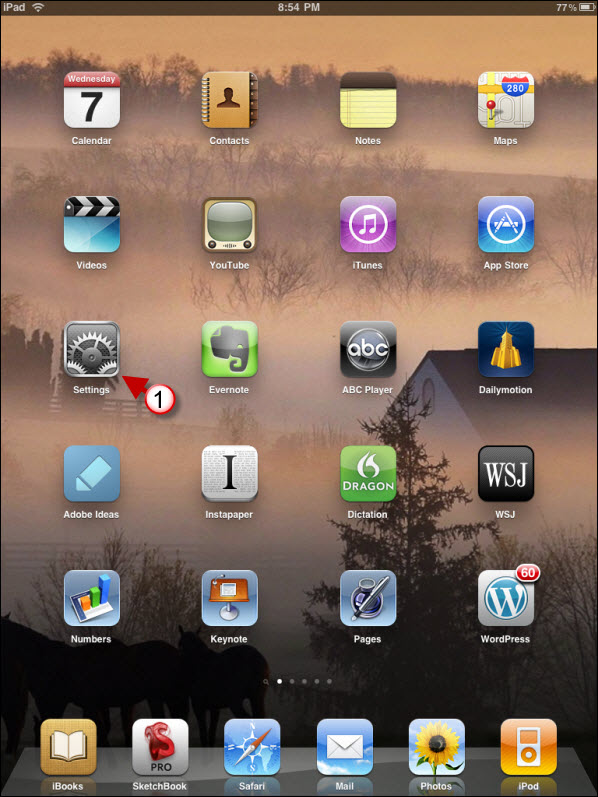
1. Tap on Settings in the Home Screen

how to customize the ipads home button 01 225x300 How to Customize What the Home Button on Your iPad Does

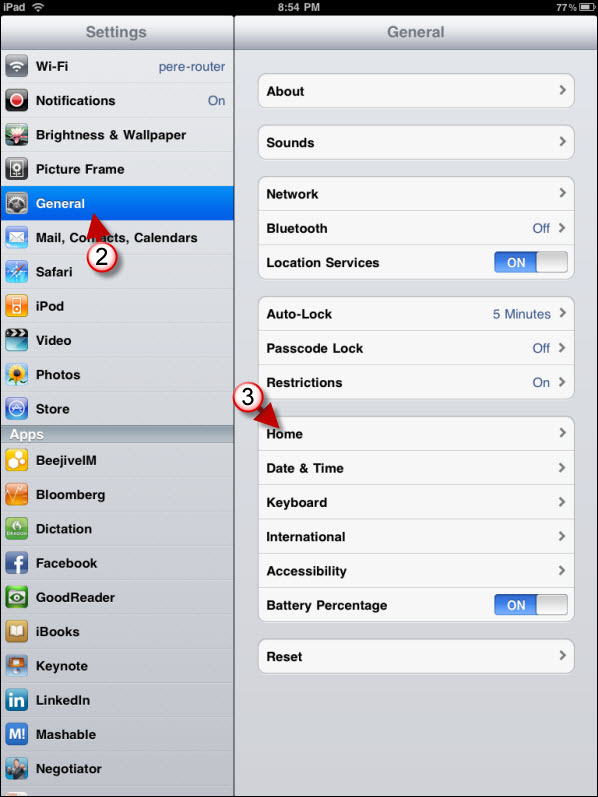
2. Tap on General in the Settings pane.

3. Tap on Home.
how to customize the ipads home button 02 225x300 How to Customize What the Home Button on Your iPad Does

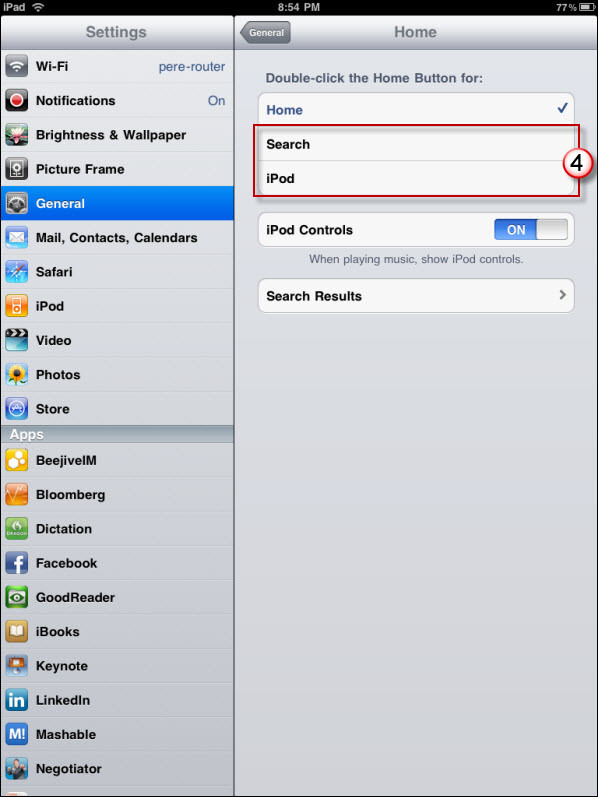
4. Choose either Search or iPod as your default action for the double-click on the Home button.
See More About: , , ,
Originally posted Apr 08, 2010

We close comments after 30 days on GilsMethod.com and ask that you post questions and issues on our Answers website.

This helps us better serve you by allowing us to keep track of unanswered questions that are usually hidden in long comment threads.

Answers.GilsMethod.com is a community-powered support website where you will be able to post questions, and other users including us will respond with expert advice.

So if you are having trouble with your PC, Mac, iPad, iPhone, or other piece of technology, head over to Answers.GilsMethod.com and ask away.

  • Rosemary

    For people with a significant physical disability and unable to press the home button is there another way to access the IPAD home function? If you use the keyboard will it operate the iPAD? On/off? Home?

  • http://www.gilsmethod.com Gil

    The Bluetooth keyboard will work on the iPad (see article – ) Regarding the use of another Home Screen like button, I’m not aware of such a button. I do know that there are some Accessibility options in the Settings menu, but none of them address what you seem to be looking for. If I find anything related to your question I will post it here. Please let me know if you need help with anything else.

  • http://www.gilsmethod.com Gil

    The Bluetooth keyboard will work on the iPad (see article – ) Regarding the use of another Home Screen like button, I’m not aware of such a button. I do know that there are some Accessibility options in the Settings menu, but none of them address what you seem to be looking for. If I find anything related to your question I will post it here. Please let me know if you need help with anything else.

  • http://www.gilsmethod.com Gil

    The Bluetooth keyboard will work on the iPad (see article – ) Regarding the use of another Home Screen like button, I’m not aware of such a button. I do know that there are some Accessibility options in the Settings menu, but none of them address what you seem to be looking for. If I find anything related to your question I will post it here. Please let me know if you need help with anything else.

  • http://www.gilsmethod.com Gil

    The Bluetooth keyboard will work on the iPad (see article – ) Regarding the use of another Home Screen like button, I’m not aware of such a button. I do know that there are some Accessibility options in the Settings menu, but none of them address what you seem to be looking for. If I find anything related to your question I will post it here. Please let me know if you need help with anything else.

  • IceChocolate

    Just update mine with 4.2.1 but not like on your step 2, there is no home button inside of the general setting. should i missed something?

  • Queenofcoins66

    Hi How do I add web clips as my + icon is gone ,I only have the little box with an arrow so how do I save a safari web clip ? I’m real confused & I don’t have that option to ADD TO HOMESCREEN in the DROPDOWN BOX of that little arrowed box next to the address bar.

    I’m real upset I can’t do this as easy as I could. I do not no how to do it at all now

    I want to save some safari webpages to read later can u help me workout how I can still do this I will be extremely grateful THANKYOU & for all the info.