
See More About: , ,

How to Export and Import Keywords in Lightroom

by
lightroom export keywords header How to Export and Import Keywords in Lightroom

So you’ve spent countless hours adding keywords to all of your pictures in Lightroom and now you want to be able to share these keywords with friends or would like to transfer them to another catalog in your computer or would like to back them up. The guide below will walk you through the process of exporting and importing Lightroom keywords. If you have any comments or questions please post them below.

Note: I used Lightroom 2 for this tutorial.

Exporting Keywords
export keywords in lightroom How to Export and Import Keywords in Lightroom

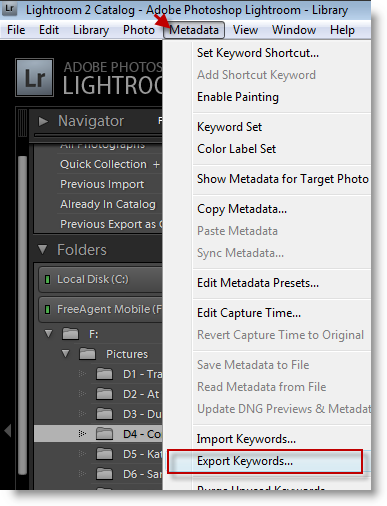
1. With Lightroom open, click on Metadata > Export Keywords… [The Export Keywords window will open]
export keywords in lightroom1 How to Export and Import Keywords in Lightroom

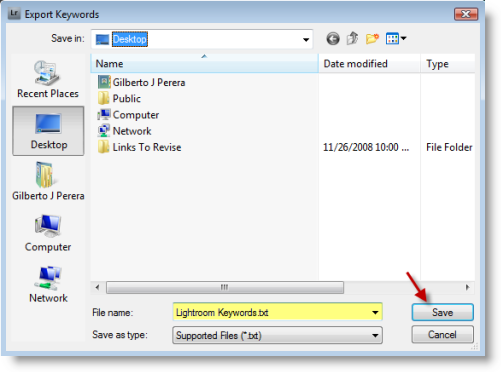
2. Browse to the directory that you would like to save the keywords to, name the file, and click Save.

Note: The file is saved as text file, .txt


Importing Keywords

Now that you’ve obtained a keyword file from a friend or from another catalog, follow the steps below to import the keywords to your catalog.
export keywords in lightroom2 How to Export and Import Keywords in Lightroom

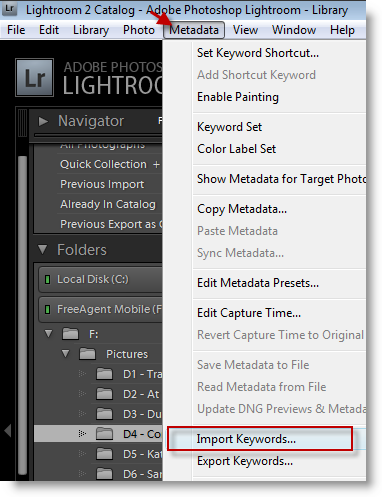
1. With Lightroom open, click on Metadata > Import Keywords… [This will open the Import Keywords window]
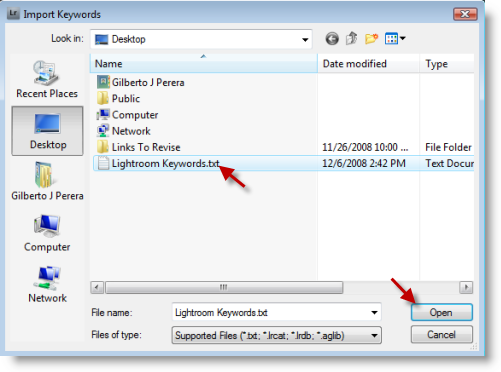
export keywords in lightroom3 How to Export and Import Keywords in Lightroom

2. Locate and select the keyword file you wish to import, click on the Open button to import
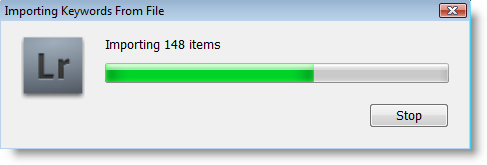
export keywords in lightroom4 How to Export and Import Keywords in Lightroom

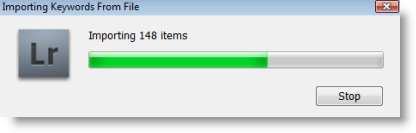
Your Keywords should now be imported.

 

See More About: , ,
Originally posted Dec 07, 2008

We close comments after 30 days on GilsMethod.com and ask that you post questions and issues on our Answers website.

This helps us better serve you by allowing us to keep track of unanswered questions that are usually hidden in long comment threads.

Answers.GilsMethod.com is a community-powered support website where you will be able to post questions, and other users including us will respond with expert advice.

So if you are having trouble with your PC, Mac, iPad, iPhone, or other piece of technology, head over to Answers.GilsMethod.com and ask away.

  • muffler shop

    I am deeply in love with every single piece of information you post here. Will be back often to read more updates!

  • muffler shop

    I am deeply in love with every single piece of information you post here. Will be back often to read more updates!

  • http://forum.belgiumdigital.com/f7/lightroom-and-keywords-277499.html#post2421232 lightroom & keywords – Belgiumdigital forum – Digitale fotografie

    [...] geplaatst door Macroshopper Niemand die een antwoord heeft ? Dit en dat???? Heb lightroom niet maar denk wel dat je antwoord is __________________ My favo; David [...]

  • Kaitlin Teesdale

    Thanks for the cool blog, it’s nice to browse things that produces sense or have a purpose in contrast to a heap of geberish blogs. I do read a ton of these too Smile sometimes it’s just fun. Keep it coming.

  • Kaitlin Teesdale

    Thanks for the cool blog, it’s nice to browse things that produces sense or have a purpose in contrast to a heap of geberish blogs. I do read a ton of these too Smile sometimes it’s just fun. Keep it coming.
