See More About: , , ,

How to Find Your iPad’s MAC Address and Other Useful Information

by

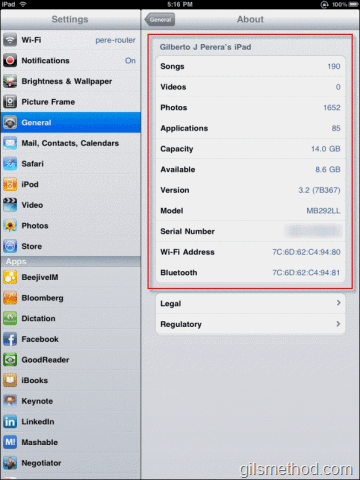
If you are ever find yourself looking for the iPad’s MAC address or other important information like the amount of space remaining, number of songs stored, the current version, or other details about the iPad. You can find all of this information in the About page. The how-to below will show how to locate the iPad’s About page and list the information available.

Don’t know what a MAC address is?

In computer networking, a Media Access Control address (MAC address) is a unique identifier assigned to most network adapters or network interface cards (NICs) by the manufacturer for identification, and used in the Media Access Control protocol sub-layer. If assigned by the manufacturer, a MAC address usually encodes the manufacturer’s registered identification number. It may also be known as an Ethernet Hardware Address (EHA), hardware address, adapter address, or physical address. - Via Wikipedia

Do you own an iPad? You might want to look into protecting your investment with invisibleSHIELD How to Find Your iPads MAC Address and Other Useful Information screen protectors. If you need any help or have questions please post them below.

If you are looking for more iPad how-to’s, tips, and help visit our iPad page.

List of information you will find on the iPad’s About page.

  • Number of Songs stored on iPad
  • Number of Videos stored on iPad
  • Number of Photos stored on iPad
  • Number of installed Applications
  • Capacity
  • Available Capacity
  • Current Version
  • Model
  • Your iPad’s Serial Number
  • The Wi-Fi Address – MAC address
  • The Bluetooth MAC address

findyouripadmacaddress00 thumb How to Find Your iPads MAC Address and Other Useful Information

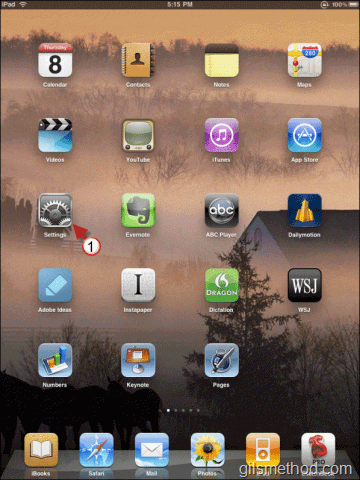
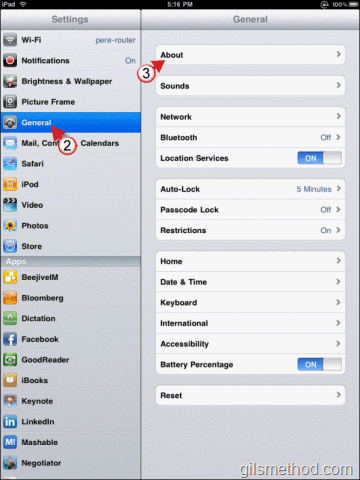
1. Tap on Settings in the Home Screen.
findyouripadmacaddress01 thumb How to Find Your iPads MAC Address and Other Useful Information

2. Tap on General in Settings pane.

3. Tap on About.
findyouripadmacaddress02 thumb How to Find Your iPads MAC Address and Other Useful Information

All of your iPad’s important information will be displayed.
See More About: , , ,
Originally posted Apr 08, 2010

We close comments after 30 days on GilsMethod.com and ask that you post questions and issues on our Answers website.

This helps us better serve you by allowing us to keep track of unanswered questions that are usually hidden in long comment threads.

Answers.GilsMethod.com is a community-powered support website where you will be able to post questions, and other users including us will respond with expert advice.

So if you are having trouble with your PC, Mac, iPad, iPhone, or other piece of technology, head over to Answers.GilsMethod.com and ask away.

  • http://yourdreamhotels.com Alina

    Thanks for the usefull information. Nice website:)

  • http://yourdreamhotels.com Alina

    Thanks for the usefull information. Nice website:)

  • http://yourdreamhotels.com Alina

    Thanks for the usefull information. Nice website:)

  • http://yourdreamhotels.com Alina

    Thanks for the usefull information. Nice website:)

  • http://www.seoroot.com/blog Nherric

    It took me few minutes before I found the MAC address actually. Thanks for the very useful information.

  • http://www.seoroot.com/blog Nherric

    It took me few minutes before I found the MAC address actually. Thanks for the very useful information.

  • http://www.seoroot.com/blog Nherric

    It took me few minutes before I found the MAC address actually. Thanks for the very useful information.

  • http://www.seoroot.com/blog Nherric

    It took me few minutes before I found the MAC address actually. Thanks for the very useful information.

  • http://intensedebate.com/people/gjperera gjperera

    Joe,

    Glad you found it useful….nice blog by the way…wish I would have found it before today!

  • http://intensedebate.com/people/gjperera gjperera

    Joe,

    Glad you found it useful….nice blog by the way…wish I would have found it before today!

  • http://intensedebate.com/people/gjperera gjperera

    Joe,

    Glad you found it useful….nice blog by the way…wish I would have found it before today!

  • http://intensedebate.com/people/gjperera gjperera

    Joe,

    Glad you found it useful….nice blog by the way…wish I would have found it before today!

  • http://www.joetaxpayer.com joetaxpayer

    Gil – I googled to help me find my new iPad's MAC address. Nice, quick explanation here. Thanks. You helped me get it up and running on my secure network.
    /Joe

  • http://www.joetaxpayer.com joetaxpayer

    Gil – I googled to help me find my new iPad's MAC address. Nice, quick explanation here. Thanks. You helped me get it up and running on my secure network.
    /Joe

  • http://www.joetaxpayer.com joetaxpayer

    Gil – I googled to help me find my new iPad's MAC address. Nice, quick explanation here. Thanks. You helped me get it up and running on my secure network.
    /Joe

  • http://www.joetaxpayer.com joetaxpayer

    Gil – I googled to help me find my new iPad's MAC address. Nice, quick explanation here. Thanks. You helped me get it up and running on my secure network.
    /Joe

  • http://www.gilsmethod.com Gil

    Not a problem, glad you found the article useful.

  • http://www.gilsmethod.com Gil

    Not a problem, glad you found the article useful.

  • http://www.gilsmethod.com Gil

    Not a problem, glad you found the article useful.

  • http://www.gilsmethod.com Gil

    Not a problem, glad you found the article useful.

  • Rage

    Hi,
    Thanks for the tip. But I wanted to find the IP address of my iPad. Could you tell how I could find that. Or is the Mac address and IP address same?
    Please reply to this. I will check your comment the next day.

  • http://www.gilsmethod.com Gil

    The MAC address and the IP address are two different things. The IP address can be found by going to Settings > Wi-Fi and then tapping on the network (small blue arrow) you are currently connected to. Once you do that, then you will find the iPad’s IP address listed. Please let me know if you need help with this. Good luck.

    If you’re looking for more iPad how-to’s visit http://www.gilsmethod.com/ipad

  • http://www.gilsmethod.com Gil

    The MAC address and the IP address are two different things. The IP address can be found by going to Settings > Wi-Fi and then tapping on the network (small blue arrow) you are currently connected to. Once you do that, then you will find the iPad’s IP address listed. Please let me know if you need help with this. Good luck.

    If you’re looking for more iPad how-to’s visit http://www.gilsmethod.com/ipad

  • http://www.gilsmethod.com Gil

    The MAC address and the IP address are two different things. The IP address can be found by going to Settings > Wi-Fi and then tapping on the network (small blue arrow) you are currently connected to. Once you do that, then you will find the iPad’s IP address listed. Please let me know if you need help with this. Good luck.

    If you’re looking for more iPad how-to’s visit http://www.gilsmethod.com/ipad

  • http://www.gilsmethod.com Gil

    The MAC address and the IP address are two different things. The IP address can be found by going to Settings > Wi-Fi and then tapping on the network (small blue arrow) you are currently connected to. Once you do that, then you will find the iPad’s IP address listed. Please let me know if you need help with this. Good luck.

    If you’re looking for more iPad how-to’s visit http://www.gilsmethod.com/ipad

  • Ryan

    Found it, but my router keeps insisting it is an invalid MAC address and it doesn’t match the 00 start of all my other devices. Any ideas?

    GREAT tip by the way!

  • Ryan

    OK, the ‘invalid Mac address’ error message is due to my router’s firmware being outdated — i.e. not ready for the brave new iPad world! Firmware fix solved the prob.

  • http://www.gilsmethod.com Gilberto J Perera

    I see that it was a firmware issue. Thanks for reporting back and posting such useful information here, maybe you’ll save someone from a headache with this same issue. Thanks again.

  • http://www.gilsmethod.com Gilberto J Perera

    I see that it was a firmware issue. Thanks for reporting back and posting such useful information here, maybe you’ll save someone from a headache with this same issue. Thanks again.

  • http://www.gilsmethod.com Gilberto J Perera

    I see that it was a firmware issue. Thanks for reporting back and posting such useful information here, maybe you’ll save someone from a headache with this same issue. Thanks again.

  • http://www.gilsmethod.com Gilberto J Perera

    I see that it was a firmware issue. Thanks for reporting back and posting such useful information here, maybe you’ll save someone from a headache with this same issue. Thanks again.

  • http://www.gilsmethod.com Gilberto J Perera

    Ryan,

    Would you be so kind as to include the router information so that others may be able to use this information should they run into this same issue. I would really appreciate it. Thanks.

  • http://www.gilsmethod.com Gilberto J Perera

    Ryan,

    Would you be so kind as to include the router information so that others may be able to use this information should they run into this same issue. I would really appreciate it. Thanks.

  • http://www.gilsmethod.com Gilberto J Perera

    Ryan,

    Would you be so kind as to include the router information so that others may be able to use this information should they run into this same issue. I would really appreciate it. Thanks.

  • http://www.gilsmethod.com Gilberto J Perera

    Ryan,

    Would you be so kind as to include the router information so that others may be able to use this information should they run into this same issue. I would really appreciate it. Thanks.