See More About: , , , , , ,

How to Manually Transfer iWork Files from the iPad to Your Computer

by

You just created a document in one of the iWork Apps (Pages, Keynote, or Numbers) and don’t know how to get those files from the iPad to your computer. Don’t worry, you have several options, you can copy the files over to your computer using the instructions below or you can always email the file to yourself.

Do you own an iPad? You might want to look into protecting your investment with invisibleSHIELD How to Manually Transfer iWork Files from the iPad to Your Computer screen protectors. If you need any help or have questions please post them below.

Are you looking for more iPad how-to’s, tips, and help? Visit our iPad page.

Note: Make sure your iPad is connected to your computer and iTunes is open before proceeding.
manually transfer iwork files from ipad to your computer 300x223 How to Manually Transfer iWork Files from the iPad to Your Computer

(Click on image to enlarge)

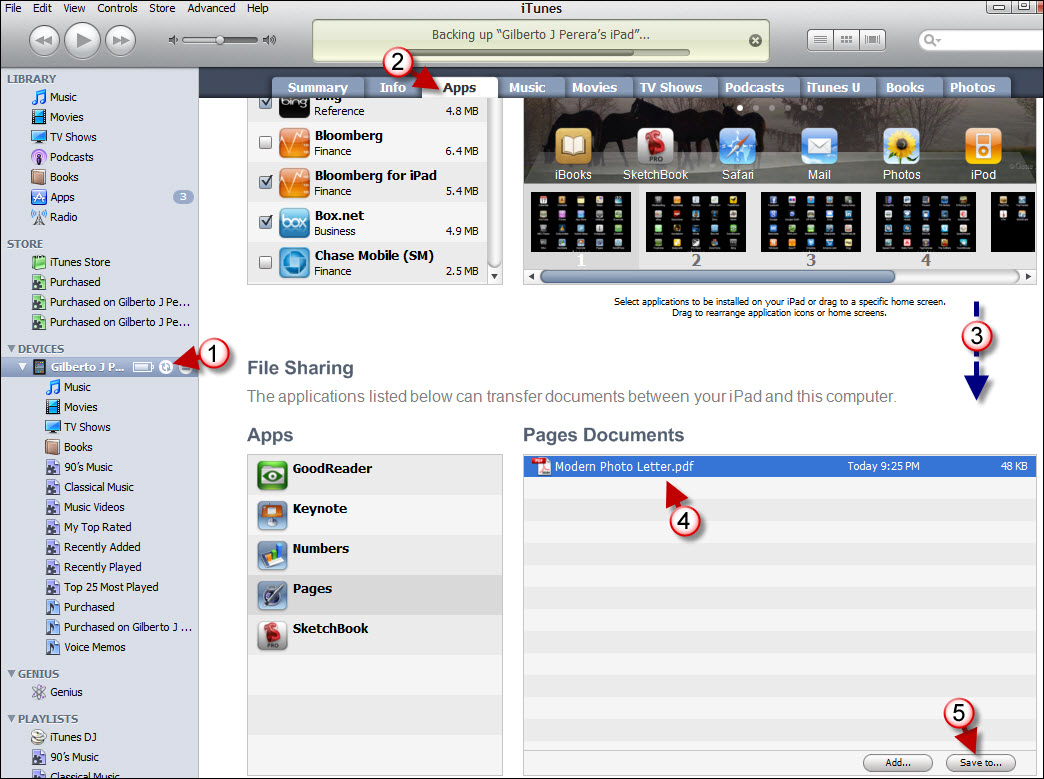
1. Click on the iPad.

2. Click on the Apps tab in the iTunes main pane.

3. Scroll to the bottom of the page until you reach the File Sharing section.

4. Click on the App you wish to transfer the file from (Apps) and click on the file(s) in the list to the right.

5. Click on the Save to… button.


manually transfer iwork files from ipad to your computer a 300x252 How to Manually Transfer iWork Files from the iPad to Your Computer

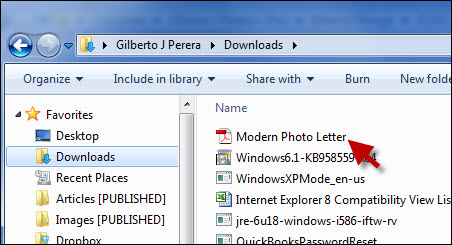
6. Locate the folder you wish to save the file to and click on Select Folder.
manually transfer iwork files from ipad to your computer b 300x162 How to Manually Transfer iWork Files from the iPad to Your Computer

Your file(s) should appear in the destination you selected.
See More About: , , , , , ,
Originally posted Apr 05, 2010

We close comments after 30 days on GilsMethod.com and ask that you post questions and issues on our Answers website.

This helps us better serve you by allowing us to keep track of unanswered questions that are usually hidden in long comment threads.

Answers.GilsMethod.com is a community-powered support website where you will be able to post questions, and other users including us will respond with expert advice.

So if you are having trouble with your PC, Mac, iPad, iPhone, or other piece of technology, head over to Answers.GilsMethod.com and ask away.

  • Johannah

    Thank you! That really just made my life a lot happier!

  • Johannah

    Thank you! That really just made my life a lot happier!

  • Johannah

    Thank you! That really just made my life a lot happier!

  • Johannah

    Thank you! That really just made my life a lot happier!

  • http://topsy.com/trackback?utm_source=pingback&utm_campaign=L1&url=http://www.gilsmethod.com/how-to-manually-transfer-iwork-files-from-the-ipad-to-your-computer Tweets that mention How to Manually Transfer iWork Files from the iPad to Your Computer | GilsMethod.com — Topsy.com

    [...] This post was mentioned on Twitter by iPad Summary. iPad Summary said: How to Manually Transfer iWork Files from the iPad to Your Computer | GilsMethod.com http://bit.ly/d1fj1U #ipad #apple [...]