
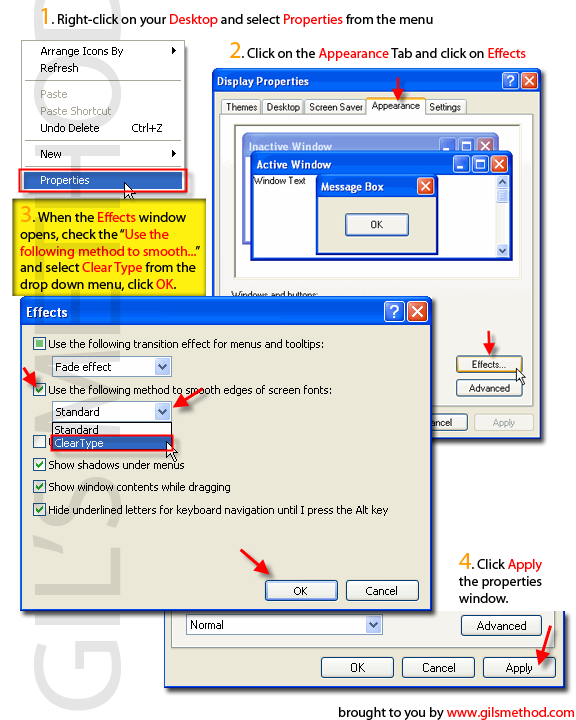
 I really recommend enabling Clear Type on your Windows XP machine, it will make it a lot easier to read on your screen due to the fact that the quality of the text displayed increases. If you have no idea what clear type is then read on. "ClearType is a registered trademark for a technology developed by Microsoft Corporation to improve the appearance of text on certain types of computer display screens, especially flat-panel displays." ( Via Wikipedia) In other words it improves how text/fonts appear on your screen, specially on flat panels. If you don’t know whether or not Clear Type is enabled on your computer, then follow the steps below to confirm/enable Clear Type on your machine. Below you will find instructions on how to enable Clear Type. You can also view the one pager by clicking on the pic tutorial icon. As always comments/suggestions are always welcome.
1. Right-click your Dekstop and select Properties from the drop down menu
2. Click on the Appearance Tab and select Effects.
3. Make sure that the "Use the following method to smooth edges of screen fonts:" is selected.
4. From the drop down list select Clear Type, click OK
5. Click Apply in the Display Properties window


