

 If you own and a website and use Google Adsense to monetize it, I’m sure that you have found yourself constantly logging on to Adsense to view your latest earnings. This can be time consuming and really a waste of time. I found a Firefox extension that installed display all relevant adsense information in the Firefox status bar to the right. if you look at the picture above you will see an example of what it looks like when installed. You have the option of configuring it to update on a specific time interval and if you right-click on it, you will automatically find yourself logged on to your adsense account. I must say that this is a very useful tool and would recommend it to anyone who uses Adsense. Below you will find some basic configuration instructions that will save you time. If you have any questions/comments please let me know.
Note: The Adsense statistic in the screenshot above are not mine.
1. Download and install Adsense Notifier.
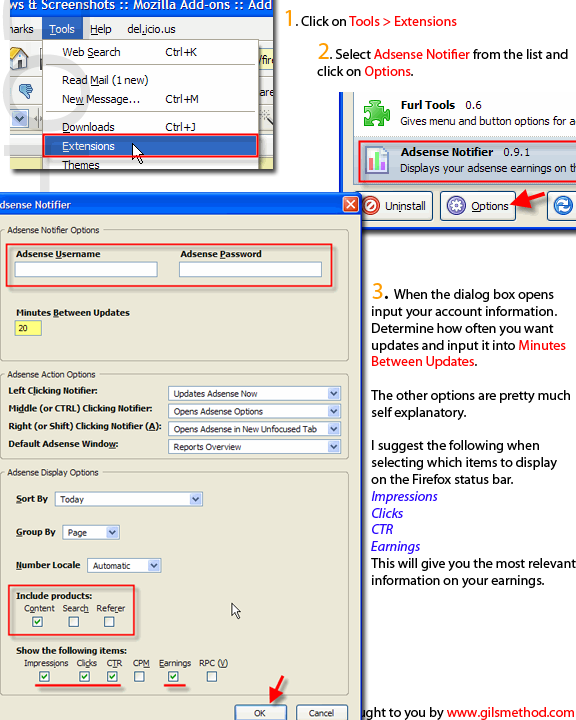
2. Click on Tools > Extensions
3. Select Adsense Notifier from the list and click on Options.
4. When the dialog box opens input your account information. Determine how often you want updates and input it into Minutes Between Updates. The other options are pretty much self explanatory.
I suggest the following when selecting which items to display on the Firefox status bar.
- Impressions
- Clicks
- CTR
- Earnings
This will give you the most relevant information on your earnings.


