
Most computer users are not aware that files created from the Microsoft Office Suite (Word/Excel/PowerPoint) may contain hidden information that you may want to keep private. If you’re wondering what kind of information can be obtained, here’s the list;
- Author information
- Collaboration information
- Editing Time
- Date Created
- Date Copied
- and more…
To battle this issue Microsoft released Remove Hidded Data, a Microsoft Office add-on that allows the user to remove any hidden information that an Office file may contain. After installing the add-on you will notice that a new option appears in the ‘File‘ menu.
Click here to download the utility from Microsoft.
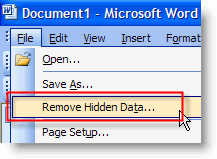
Once the utility is installed, simply open a Word document and click on the File menu. When the menu opens, click on Remove Hidden Data…
If you are not seeing the menu option to Remove Hidden Data, you may have not installed the utility correctly. Re-install the application and try again.


