Get the Vista Sidebar on Your Windows XP Machine
Submitted by Gil on Wed, 03/08/2006 - 7:51pm

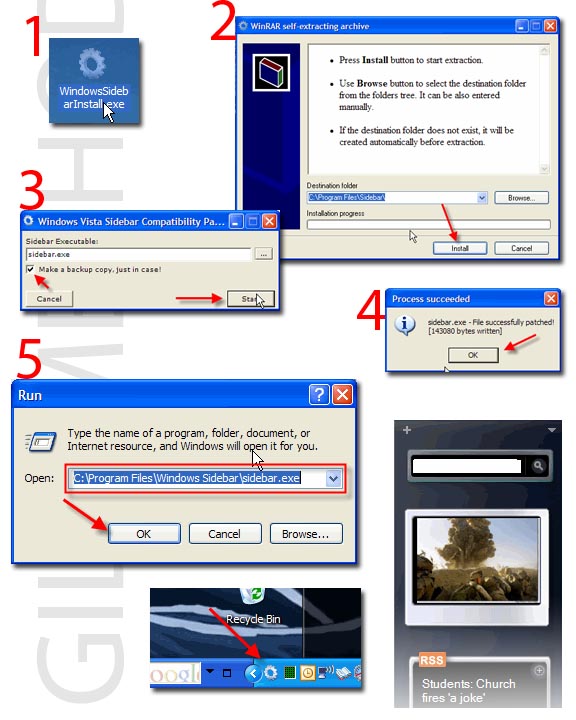
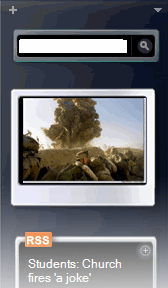
So I found this article on Tech-Recipes demonstrating how to get the Windows Vista Sidebar on Windows XP and thought this would be nice addition to my desktop. After following the steps on the installation I found myself going from one site to the other to gather the files so that I can get the install to work correctly. After about 20 Minutes of copying/pasting going to one website then the other I finally got my sidebar working. I thought to myself, "I need to make this easy for the average Joe that wants to install this," so I decided to package all the files into one file, that automatically extracts all the necessary files to your computer and executes the patch for you all you have to do is click on patch and run the sidebar application. Thanks to all those who posted these files online for everyone to download. Follow the link to the guide, it's a 1 pager....enjoy!
Link to Guide
Link to Installer
Link to Installer in French

Looking for wireless internet that will meet all of your needs?S Work from home with dedicated servers. Find out what the experts use with this list of web hosting used by government offices. If you are just starting out, read industry reviews on windows hosting that will maximize your dollar.
Link to Installer
Link to Installer in French

- 45707 reads


Does this still work?
I really hate Vista and the only thing I love about it is the windows sidebar. I tried getting some freeware for a sidebar on the XP but it's not as good as the one on Vista. I'd like to try this one but it seems that a lot of people are having problems so I was wondering if it really does work?
new sidebar and other
i m updating vista apps my work is finished by 95%
i will release screensavers,apps and other thing of vista soon..
i'd leave it alone try
i'd leave it alone try downloading thoosje sidebar much better
This doesn't work all that
This doesn't work all that well
tried previous posters tips, doesn't work for me ...
The side bar appeared, and the default gadgets are in it, but I am unable to add any -- I only installed it for the Live Writer gadget that lets you drag and drop into the program.
If anybody has any ideas how to make this work (I'm running xpsp2, not missing any files according to these instructions) please let me know.
fyi, the .gadget file I downloaded wasn't registered to a program. I tried registering it to sidebar.exe but it didn't help.
Step 5 is wrong
Step 5 is wrong it is suppose to be
C:\Program Files\Sidebar\sidebar.exe
having problem
hey man when i do the 5th step i got an error message " This application has to failed to start because MSVCR71.DLL was now found.Reinstalling the application may fix this problem.
But i've tried by installing it again but i'm still with this error.
The MSVCR71.DLL-file can be
The MSVCR71.DLL-file can be downloaded from internet. Just google 'MSVCR71.DLL' and put it in the directory where you installed the sidebar. As easy as that. If you get more 'cannot find dll file' messages, just keep on googling those files until it stops crying about that.
I had the same problem, but
I had the same problem, but I got the file from dll-files.com. When I got that file, I was able to run the program, but then the gadgets didn't work. :S
LINK: http://www.dll-files.com/dllindex/download.php?msvcr71download0VMdSDZDkU
RE:have Problem
You could get VAIO XP
For step 5 try typing in:
add more gadgets?
Can you add more gadgets than the stock ones?
RE: Having Problem
try manually creating the folders - thats what i did & got it 2 work.
1) extract files from downloaded setup file to Desktop.
2) place them in a folder - name the folder "Windows Sidebar"
3) move the folder into "C: Program Files"
4) Start > Run > "C:\Program Files\Windows Sidebar\sidebar.exe"
this should bring up the sidebar
hope this helps : )
RE: Having Problem
try manually creating the folders - thats what i did & got it 2 work.
1) extract files from downloaded setup file to Desktop.
2) place them in a folder - name the folder "Windows Sidebar"
3) move the folder into "C: Program Files"
4) Start > Run > "C:\Program Files\Windows Sidebar\sidebar.exe"
this should bring up the sidebar
hope this helps : )
Re: Having Problems
Try installing The Visual Basic Runtime.
Post new comment