
Did you know that all of your Google Talk/Chat conversations are saved by Google on your Gmail account? These same conversations are also saved on the individuals account with whom you are chatting with. Although most of what is sent via email or through a chat can be copied and saved, a little extra precaution doesn’t hurt. In the how-to below I will show you how you can go “off the record†with your Google Talk/Chat conversations. In “off the record†mode, chats are not stored on your account or the other persons account, however if that person is using another chat application that is not Google Talk/Chat the software may automatically save the conversations.
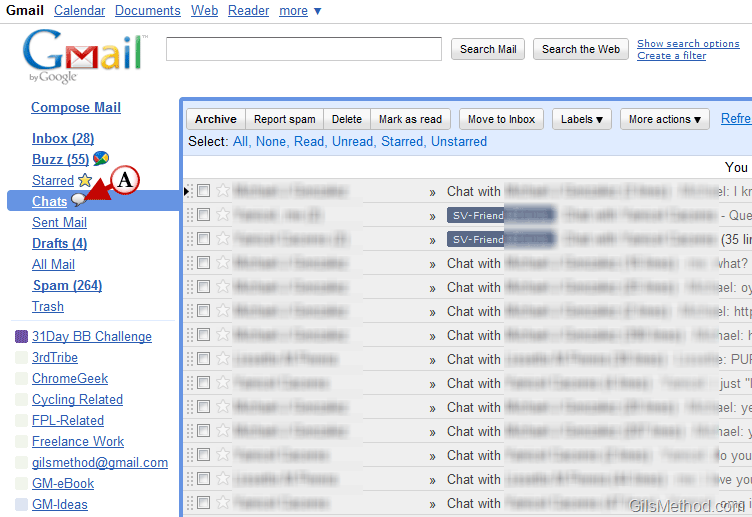
A. In the screenshot above you can see the chat history for my account. You can access your chat history by clicking on the Chats label located on the Navigation pane.
Note: I used Google Chat within the Gmail window in the browser for this tutorial.
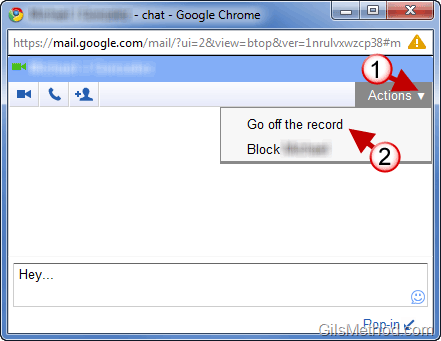
1. Click on Actions and click on 2. Go off the record from the menu.
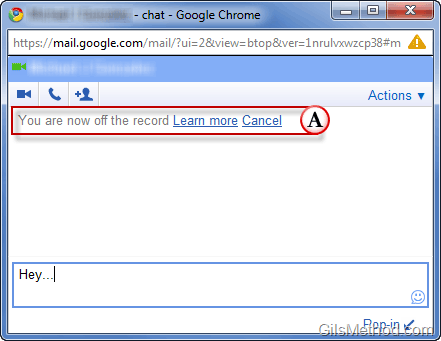
A. You will see a message within the chat window stating that the conversation is now off the record. The person you are chatting with will see the same message.
You are now off the record.
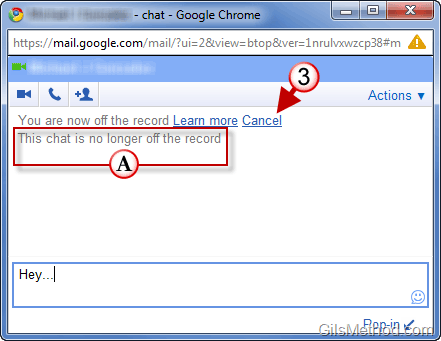
3. You or the other person can cancel the Off the Record mode by clicking on Cancel or using the Action menu.
A. You will see the following message when Off the Record is cancelled – This chat is no longer off the record.



