See More About: , ,

How to Send Text Messages with Outlook 2010

by

Wouldn’t it be nice to your next text message without having to leave your computer? In Outlook 2010 and 2007, users have the ability to setup an SMS account that allows you to send and receive text messages using Outlook’s familiar email interface. Before you can send a text message you have to create an account with one of these SMS providers. You then use the account information and add it to Outlook so that it can send/receive SMS messages via the service.

The tutorial below will show you how to add an SMS account to Outlook and how to send the first text message.

Do you know of free SMS providers for Outlook? Please post the URL below.

Note: I used Outlook 2010  and a free trial messaging account at RedOxygen.com for this tutorial.

Add an SMS Account to Outlook
sendmmsmessageswithoutlook2010 thumb How to Send Text Messages with Outlook 2010

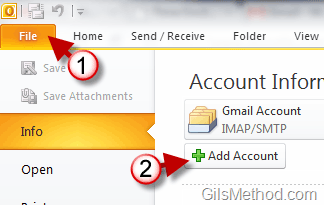
1. Click on File to open the menu.

2. Click on the Add Account button.


sendmmsmessageswithoutlook2010a thumb How to Send Text Messages with Outlook 2010

3. When the Add New Account window opens, choose Text Messaging (SMS).

4. Click Next to proceed.
sendmmsmessageswithoutlook2010b thumb How to Send Text Messages with Outlook 2010

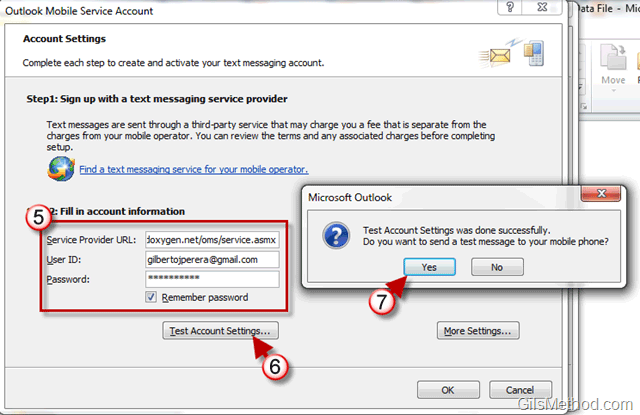
5. Enter the Account information for the provider you use.

6. To make sure everything is running as it should, click on the Test Account Settings button.

7. If the test is successful you will be asked if you would like to test sending a text message. Click Yes to test the service.

If everything went well, you should have received a text message on the mobile phone that was set up with the provider.
sendmmsmessageswithoutlook2010c thumb How to Send Text Messages with Outlook 2010

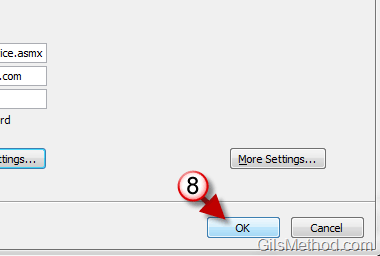
8. Click OK to close the window.

sendmmsmessageswithoutlook2010d thumb How to Send Text Messages with Outlook 2010

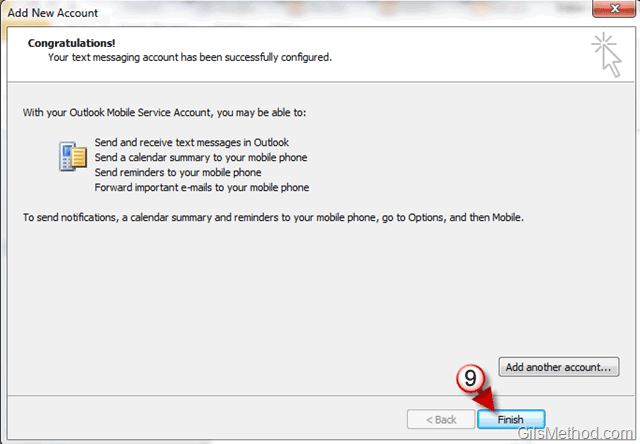
9. Click Finish to exit the Add New Account window.

Sent a Text Message with Outlook

Now that we have the SMS account set up, let’s send the first text message using Outlook 2010.
sendmmsmessageswithoutlook2010e thumb How to Send Text Messages with Outlook 2010

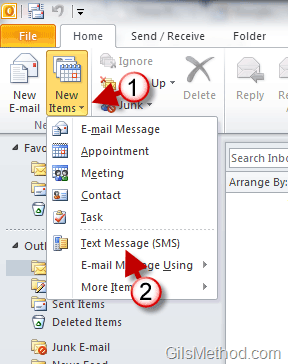
1. Click on the New Items button.

2. Click on Text Message (SMS) from the list.
sendmmsmessageswithoutlook2010f thumb How to Send Text Messages with Outlook 2010

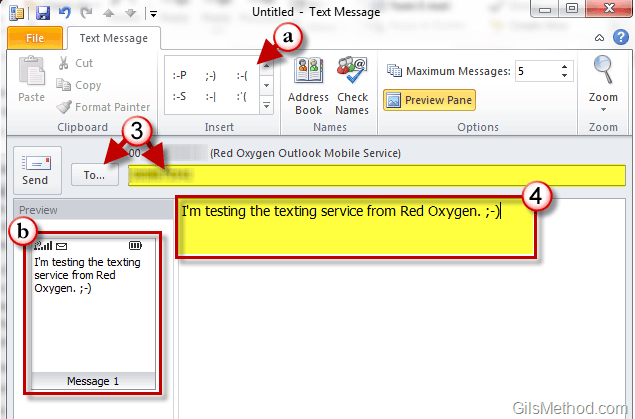
3. Enter the mobile number you would like to send the message to or choose a contact by clicking on the To… button.

Note: When you click on the To… button your contact list will appear.

4. Compose the message you would like to send and click the Send button.

a. You can insert smilies by clicking on them from the list.

b. Notice that a preview of the message you are composing will appear in the Preview pane to the left of the screen.

Check Sent Messages in Outlook

So you’ve sent a couple of text messages, but don’t know where they are.
sendmmsmessageswithoutlook2010g thumb How to Send Text Messages with Outlook 2010

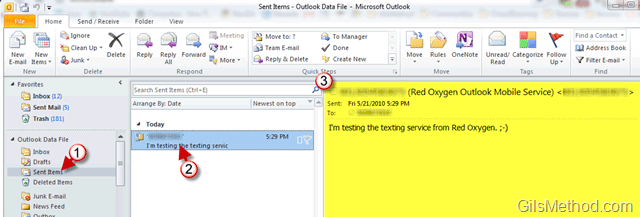
1. Click on the Send Items folder in Outlook’s Navigation Pane.

2. A list of sent messages will appear. You will notice that text messages will have a small mobile phone icon instead of the usual email icon.

3. When you click on the message you will be able to view the contents of the message in the preview pane.


See More About: , ,
Originally posted May 26, 2010

We close comments after 30 days on GilsMethod.com and ask that you post questions and issues on our Answers website.

This helps us better serve you by allowing us to keep track of unanswered questions that are usually hidden in long comment threads.

Answers.GilsMethod.com is a community-powered support website where you will be able to post questions, and other users including us will respond with expert advice.

So if you are having trouble with your PC, Mac, iPad, iPhone, or other piece of technology, head over to Answers.GilsMethod.com and ask away.

  • http://www.dlwlawcorp.com/ granite bay lawyer

    Wow.. that’s cool. Following the Google way I see..

  • http://www.dlwlawcorp.com/ granite bay lawyer

    Wow.. that’s cool. Following the Google way I see..

  • http://www.dlwlawcorp.com/ granite bay lawyer

    Wow.. that’s cool. Following the Google way I see..

  • http://www.dlwlawcorp.com/ granite bay lawyer

    Wow.. that’s cool. Following the Google way I see..

  • http://topsy.com/trackback?utm_source=pingback&utm_campaign=L2&url=http://www.gilsmethod.com/send-text-messages-outlook-2010 Tweets that mention How to Send Text Messages with Outlook 2010 | GilsMethod.com — Topsy.com

    [...] This post was mentioned on Twitter by Richard Hay, SRivera. SRivera said: RT @WinObs: How to Send Text Messages with Outlook 2010 – http://clkon.us/9tnEjH [...]

  • http://www.foolsblogstrategy.com/?p=2179 New Trends Require Innovative Solutions – Cell Phone Monitoring Software | FOOL’S BLOG FOR INTERNET MARKETERS

    [...] How to Send Text Messages with Outlook 2010 | GilsMethod.com [...]

  • http://www.gilsmethod.com Gilberto J Perera

    Thanks for the tip, we’ll have to check it out.