
See More About: , ,

Tip: Loop Slideshows in Picasa and Keep the Party Going

by

I recently received an email from a reader asking me if there was a way to loop slideshows in Picasa so that she could keep a slideshow going during a wedding. I quickly ran through the options panels in Picasa and found the option tucked away in the Tools menu. Follow the instructions below to enable the looping of slideshows in Picasa.

Note: I used Picasa 3.6 for this tutorial.
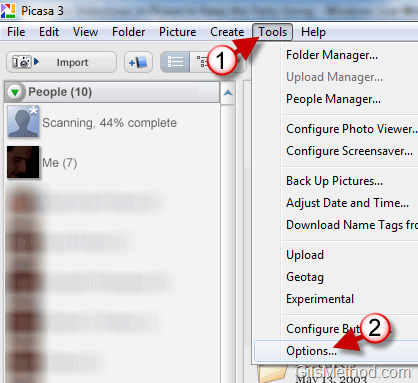
loopslideshowsinpicasa thumb Tip: Loop Slideshows in Picasa and Keep the Party Going

1. Click on Tools to open the menu.

2. Click on Options.

loopslideshowsinpicasaa thumb Tip: Loop Slideshows in Picasa and Keep the Party Going

3. When the options window appears, click on the Slideshow tab.

4. Toggle the Loop Slideshow checkbox.

5. Click OK to save the changes.

Whenever you play a slideshow it should automatically loop. If you wish to disable the feature simply repeat the steps above and uncheck Loop slideshow.


See More About: , ,
Originally posted May 24, 2010

We close comments after 30 days on GilsMethod.com and ask that you post questions and issues on our Answers website.

This helps us better serve you by allowing us to keep track of unanswered questions that are usually hidden in long comment threads.

Answers.GilsMethod.com is a community-powered support website where you will be able to post questions, and other users including us will respond with expert advice.

So if you are having trouble with your PC, Mac, iPad, iPhone, or other piece of technology, head over to Answers.GilsMethod.com and ask away.