
If you’re using Gmail chances are that you’ve come across Google’s online version of Word. One of the newest features added to Google Docs is the ability to translate entire documents in a cinch. Once the document is translated you will have the option of replacing the original document with the translated document or you can copy the translation to a new document. With this tool you will be able to translate documents into 53 languages supported by Google Docs.
If you have any comments or question about this really cool feature, please post it in the comments section below.
Would you like to translate documents in Microsoft Word? Check out this guide: How to Translate Documents in Word 2010
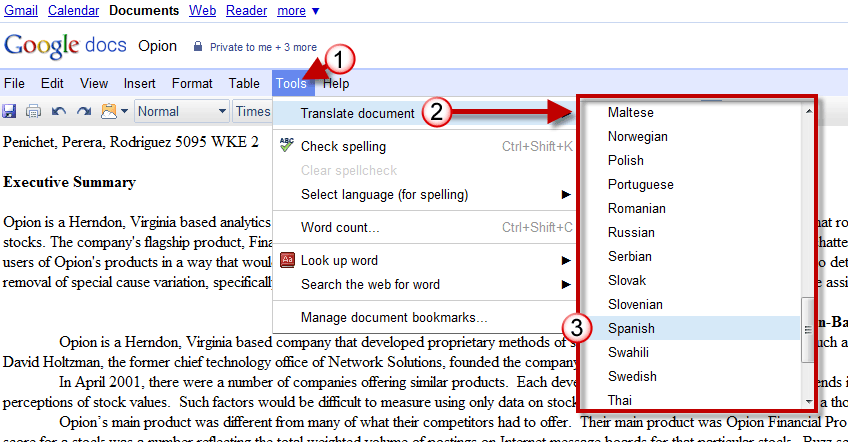
1. Open a Docs document and click on Tools from the toolbar.
2. Click on Translate document to expand the list of available languages.
3. Click on one of the 53 available languages to translate your document.
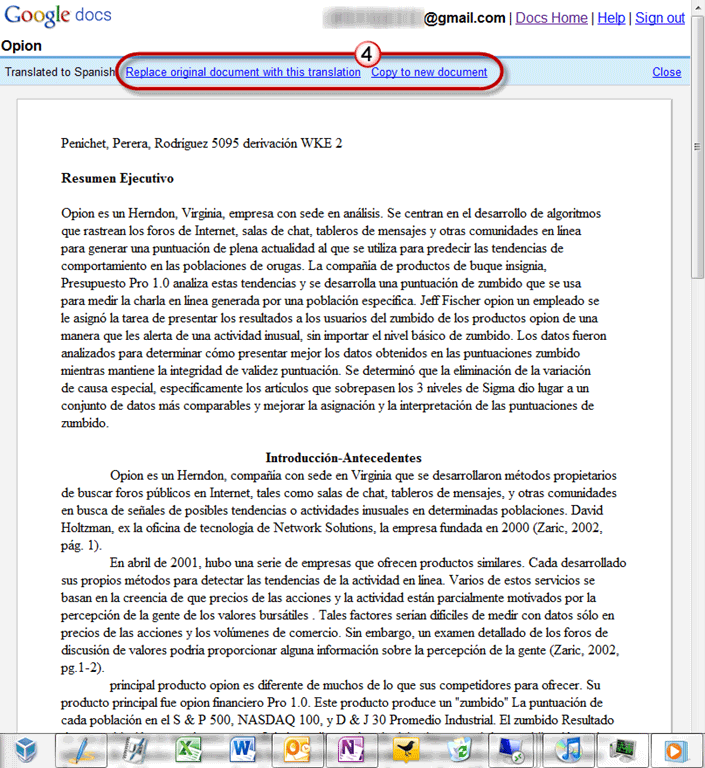
4. A new tab or window will open with the translated document and you will have the following options:
Replace original document with this translation
Copy to new document
Choose the option you wish to use and save the document.



