
How to Turn Off/Hide Google Talk On Your Gmail Screen

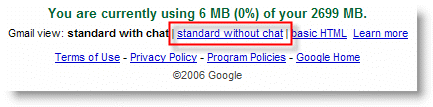
Google Talk and Gmail have been fully integrated into one another; Google Talk notifies you of incoming messages and Gmail allows Google Talk to be displayed within the Gmail interface. This is a very simple thing to do, however Google has made it difficult to find. If you scroll down to the bottom of the browser where Gmail is open (once you log on), you should see the something similar to the image below. Click on standard without chat and you’re done.



Article posted on 02 28th, 2006

Related & Suggested Posts

  1. Google Updates Google Talk With New Features
  2. Enable IMAP Using Gmail
  3. Transfer Your Outlook Emails to Gmail
  4. How to Use Google Your Way
  5. Transfer Your Outlook 2003 Emails to Gmail


Leave a Comment

Note: I discourage users from using keywords in their names when posting comments, most of those are caught as spam and end up being deleted. It would be more productive and interactive if commentators use the name they go by rather than using an unrelated name. In the future I reserve the right to delete comments from users using a name other than their own.

Connect with Gil via
Connect with Gil
Facebook | Twitter | Digg | SU | LinkedIn
Who's behind Gil's Method?
My Name is Gilberto J Perera and I'm the editor behind Gil's Method. I started this blog to help relatives with computer questions. Since then the blog has grown to the collection of articles you see today, I hope that you find this blog useful and that you come back again.
Read more at my about page
Other Resources

Books (Coming Soon)

Forum (Coming Soon)

Store (Coming Soon)