Do you share files between your laptop, desktop at work, and your mobile device? Wouldn’t it be nice if all of the files shared between these devices were always synchronized? Luckily the file syncing and storage space is becoming very crowded and extremely competitive. There are products for every type user at a every price point. In the comparison below I will highlight some of the more popular and established file syncing/storage services along with a listing of some of the more prominent features and the devices supported.
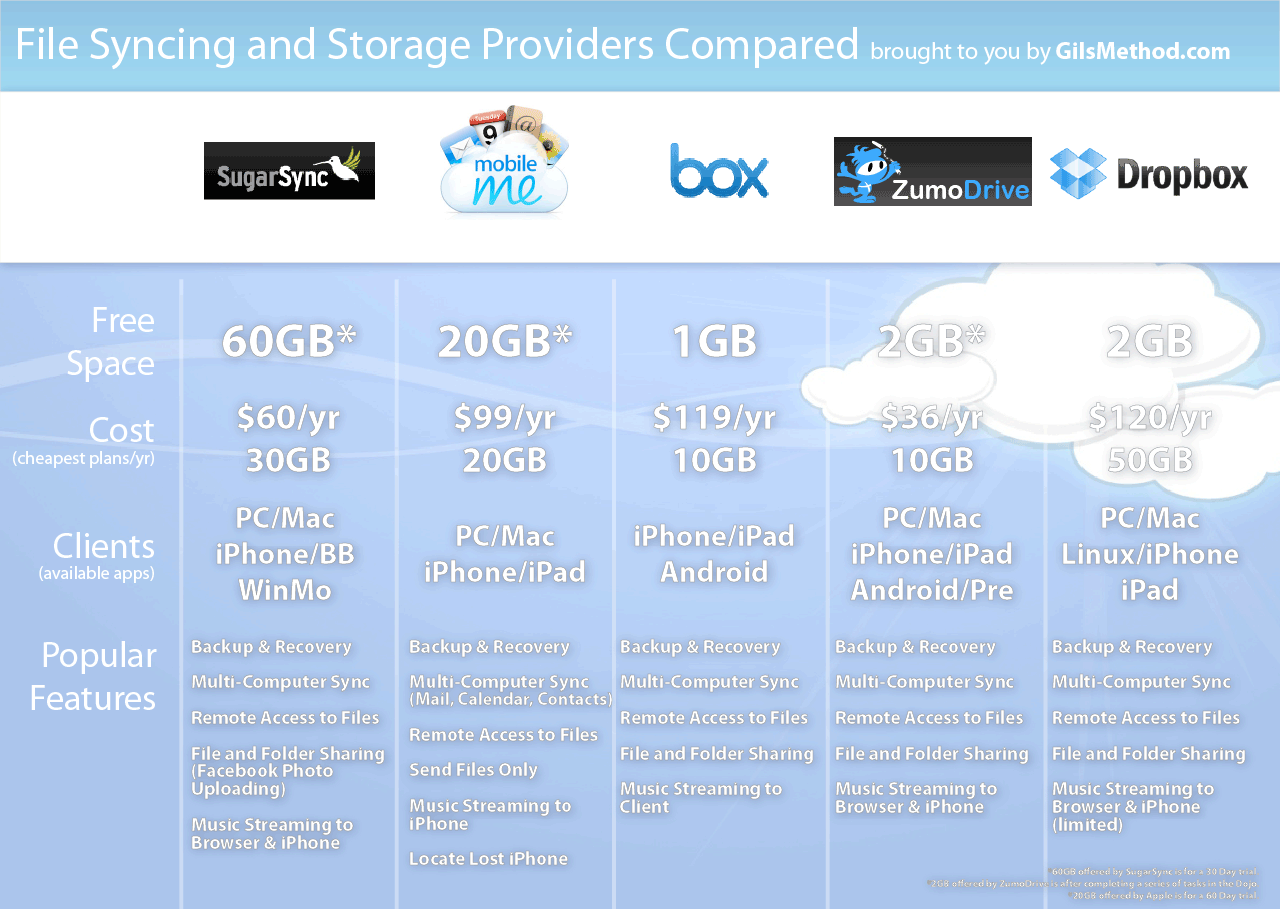
Here’s a graphical summary of the five services compared.
(click image to enlarge)
ZumoDrive (Editor’s Choice)
The ability to work on files stored in ZumoDrive without having to actually store them on my computer makes this the ideal flash drive replacement for anyone with a ton of files and little space. I’ll give you an example, I have a netbook I use when away from home, with ZumoDrive I don’t have to worry about the 40GB hard drive filling up because I can stream my extensive music library using iTunes with ZumoDrive and I can also access gigabytes of data without having to store it on the netbook’s hard drive.
With ZumoDrive you get 1GB of free storage and additional free storage (up to 2GB) when you complete a series of tasks in the dojo. You can buy additional storage for $2.99/month for 10GB of storage space. The storage space can be used for the following:
- Backup and recovery
- Multi-Computer Sync
- Remote Access to Files
- Files and Folder Sharing (Facebook photo uploading)
- Music Streaming to Browser and iPhone
ZumoDrive supports the following clients:
- Windows based PC’s
- Mac OS
- iPhone
- iPad
- Android
- Palm Pre
Get a free ZumoDrive Account.
MobileMe
With a MobileMe you can start with a 60day trial with 20GB of storage space or you can upgrade to a paid plan for $99/year ($8.25/month). Unlike the other services MobileMe synchronizes all of your email, calendars, and contacts. It also has the ability to locate your iPhone should you ever loose it. This storage space can be used for the following:
- Backup and recovery
- Multi-Computer Sync
- Remote Access to Files
- Files and Folder Sharing
- Music Streaming to Browser and iPhone (Limited)
- Email Synchronization (also email provider)
- Contact Synchronization
- Calendar Synchronization
- iPhone Location (if you lose it)
MobileMe supports the following clients:
- Windows based PC’s
- Mac OS
- iPhone
- iPad (in iPhone supported mode)
Get a MobileMe Account.
SugarSync
SugarSync gives you a free 14 day trial of the service after which you can close the account or pay $4.99/month for 30GB of storage space. The storage space can be used for the following:
- Backup and recovery
- Multi-Computer Sync (Limited)
- Remote Access to Files
- Send Files Only
- Music Streaming to iPhone
SugarSync supports the following clients:
- Windows based PC’s
- Mac OS
- iPhone
- BlackBerry
- Windows Mobile
Get a 14 Day trial SugarSync Account.
DropBox
DropBox provides you with 2GB of free storage. You can upgrade to a paid plan that includes 50GB of storage space for $9.99/month. The storage space can be used for the following:
- Backup and recovery
- Multi-Computer Sync
- Remote Access to Files
- Files and Folder Sharing
- Music Streaming to Client
DropBox supports the following clients:
- Windows based PC’s
- Mac OS
- iPhone
- iPad
- Linux
Get a free DropBox Account.
Box.net
Box.net gives you 1GB of free storage and the option to upgrade to 10GB of paid storage for $9.95/month. This storage space can be used for the following:
- Backup and recovery
- Multi-Computer Sync
- Remote Access to Files
- Files and Folder Sharing
- Music Streaming to Browser and iPhone (Limited)
Box.net supports the following clients:
- iPhone
- iPad
- Android
- Client using browser
Get a free Box.net Account.