The other day I installed Picasa 3 and have been fiddling with it since. I found that Google kept the experimental features available, most folks don’t venture that far into Picasa so I decided to post these ‘Obscure’ experimental features that are available to you. Below I summarized 5 of the 7 experimental features and how to use them. If you have any comments or questions, feel free to post them below.
Note: I have created this guide using Picasa 3 Beta, but some of these features can be found in Picasa 2
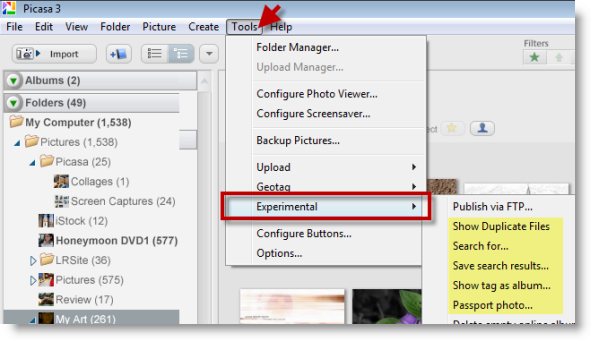
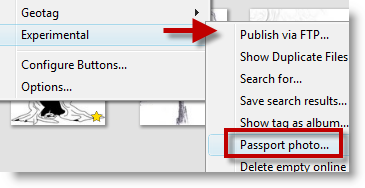
All of these features can be accessed via the Tools > Experimental
Feature 1 – Show Duplicates | Great tool to eliminate duplicates that have accumulated over time and make space.
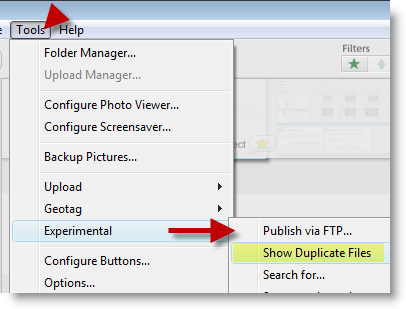
Click on Tools > Experimental > Show Duplicate Files
Feature 2 – Search by color | This is a very neat feature that displays all of the pictures containing the specified color, not sure what you’d use it for other than remembering when you wore a certain colored shirt.
My recommendation to Google would be to allow someone to chose the amount of that color to look for.
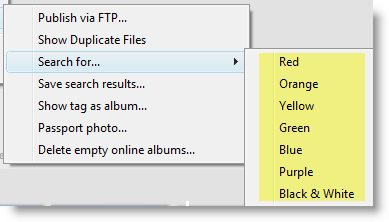
Click on Tools > Experimental > Search for… [pick color]
Feature 3 – Save search | This is one of my favorites, it’s kind of like searches in Vista that can be saved and opened later except you apply it to your pictures in Picasa.
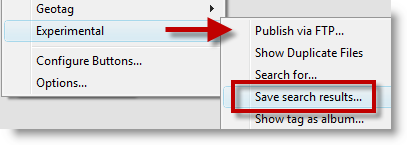
A. Click on Tools > Experimental > Save search results…
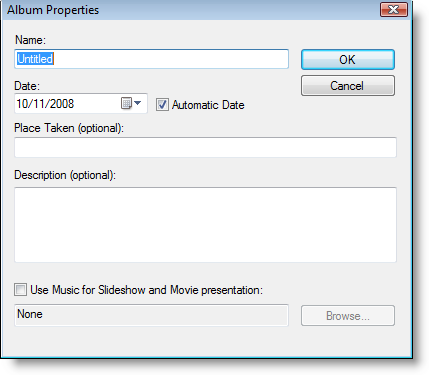
B. Name the search and add the appropriate information, click OK
Feature 4 – Show tag as album | This is a neat feature that creates albums from your tags
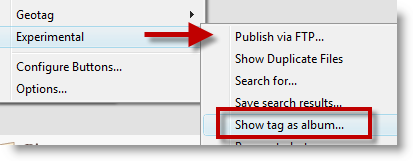
A. Click on Tools > Experimental > Show tag as album…
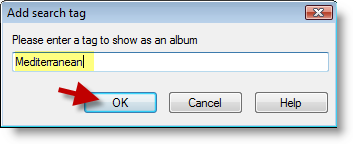
B. Type the Tag and click OK
Feature 5 – Passport | This option requires a picture with one person (one visible face) and preferably one which matches the standards used for passport pictures (see standards) the software automatically isolates (crops the picture to) your face and sets up the print feature.