
 One of my biggest problems at the end of the day is shutting down my laptop…it takes way too long to shut down. I’ve gotten it to where it’s fast booting up, but the shutdown times sometimes exceed a couple of minutes. This of course is very ‘painful’ when I’m trying to run out of the office or just trying to put the laptop away. Below you’ll find some simple steps to speed up your computers shut down time. This is Part I of a couple of tips aimed at speeding up your PC’s shutdown time. As always comments/suggestions are welcome.
1. These tweaks require that you venture into your registry, please backup your registry.
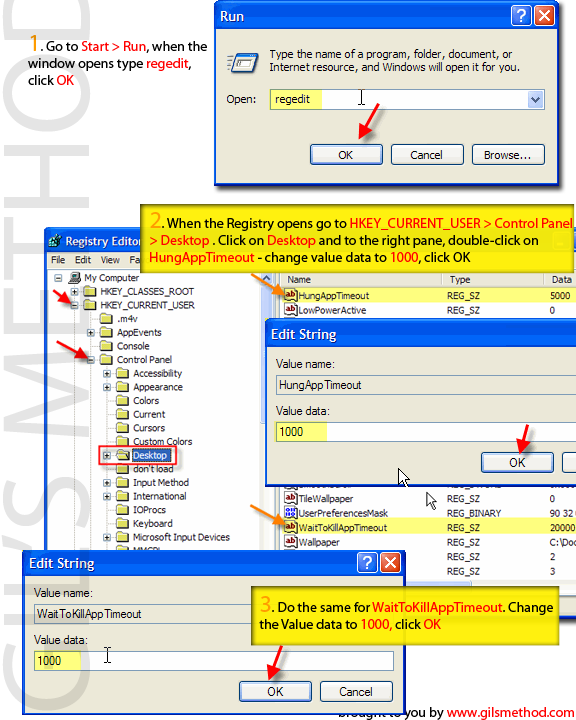
2. Go to Start > Run when the Run box opens type in regedit
3. Your registry should have opened [Just checking…have you backed up your registry?] Navigate to the following keys; HKEY_CURRENT_USER > Control Panel > Desktop
4. When you get to Desktop click on it, the pane to the right should have a listing of several keys, double-click on;
>WaitToKillAppTimeout, change it to ‘1000‘ then double-click (changing this forces your computer during shutdown to end programs that are running much faster)
>HungAppTimeout and change it to ‘1000’ (changing this forces your computer during shutdown to end hung programs much faster)
5. Once you ‘ve changed these settings restart your computer and your settings should have taken effect.


