
Looking for a way to keep track of all the World Cup 2010 matches on your calendar? If you have a Google Calendar account, then you’re in luck. Google Calendar allows its users to subscribe to public calendars that organizations and individuals create to share event information with others. In this case there are a slew of calendars available from FIFA that you can easily subscribe to with your Google Calendar account, specifically the tournament calendar for the World Cup 2010. So follow the instructions below to keep track of your favorite team match dates and scores, all within your own calendar.
Note: These public calendars can be subscribed to with other applications, but the focus of this how-to is using Google Calendar.

1. Open Google Calendar in your browser and click on Add under My Calendars in the left pane.
2. Click on Browse Interesting Calendars.
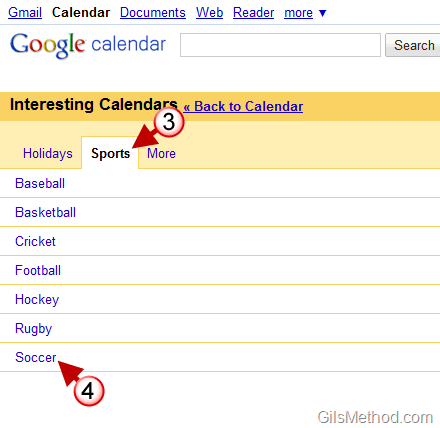
3. When the Interesting Calendars page opens, click on the Sports tab and then click on 4. Soccer.

5. Scroll down the list until you find – FIFA World Cup – FIFA_WCUP and click on it.
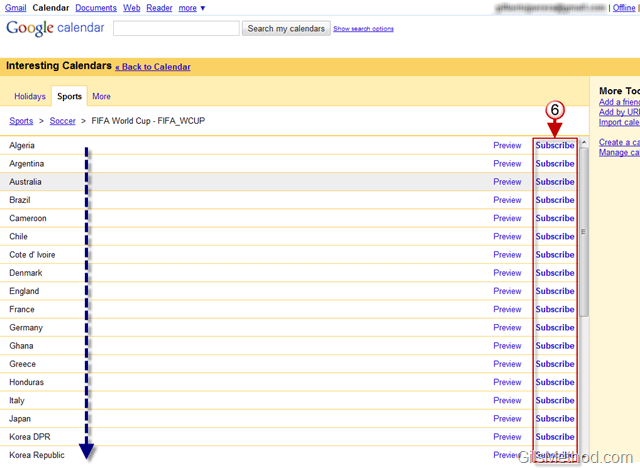
A list of all the countries participating in the Cup will appear.
6. Click Subscribe for the countries whose match schedules you want to add to your calendar. When you are done subscribing to the calendars for each team return to the Calendar page.
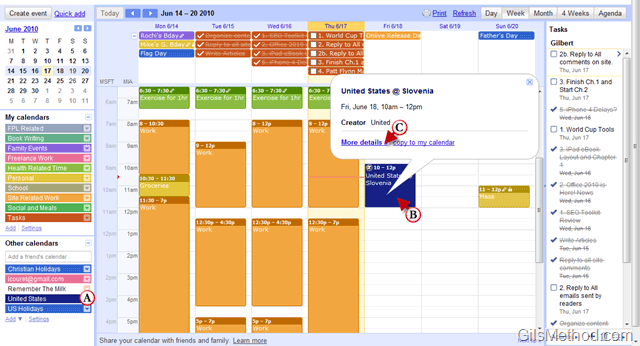
A. When you return to your default calendar view, you will notice that under Other Calendars (in the left pane) the calendars you subscribed to will appear.
B. You will also notice that there is an entry in your calendar for matches that you subscribed to. Click on an event to see match details like date and time.
C. If you click on More details you will be able to see the score for the match (see below).
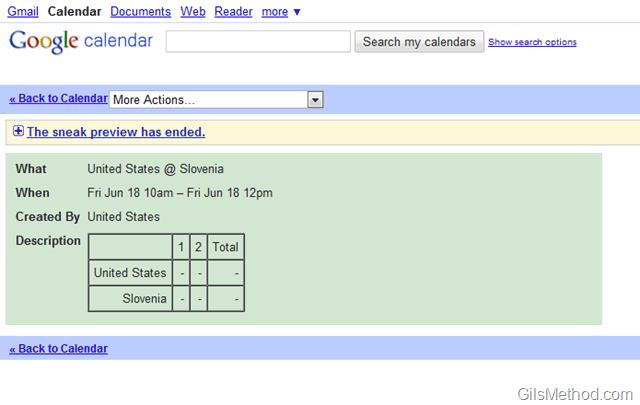
Match details in Google Calendar.
Are you interested in a similar how-to for other Calendar applications? Please post your recommendations below.



