
See More About: , ,

Bring Your Product or Business to Facebook by Creating an Official Facebook Page

by

Do you want the opportunity to reach 500 million customers? With a Facebook page you can. Facebook allows users to create pages for their business, a product, causes, and other communities. These pages can be used to communicate with fans and customers that are already part of the Facebook ecosystem. Customers or fans can Like your page at which time they will be automatically be updated of any announcements made on the official Facebook page you are running. Here’s an example.

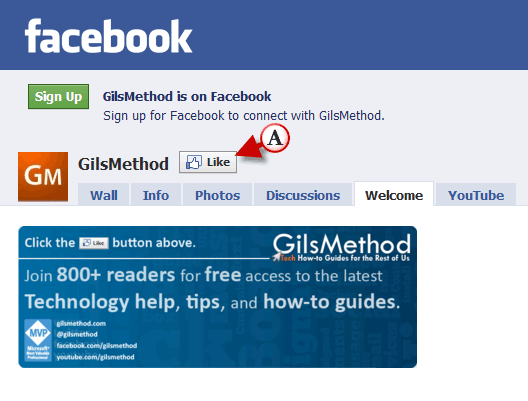
I have a Facebook page for GilsMethod.com that I use as a way to communicate with fans of this How-to blog.

GilsMethod.com Official Facebook Page.
create a facebook page for your business g Bring Your Product or Business to Facebook by Creating an Official Facebook Page

When someone visits the GilsMethod Facebook page they will have the option to Like the page. If they click on the (A) Like button then they will receive updates when announcements are made on the GilsMethod Facebook page.
hreate a facebook page for your business g Bring Your Product or Business to Facebook by Creating an Official Facebook Page

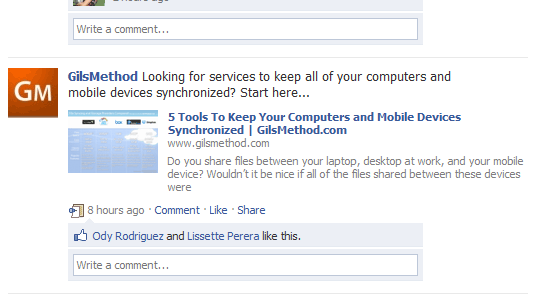
The Facebook Wall (above) with an announcement from the GilsMethod Facebook page.

Create a Facebook Page

To create your own Facebook Page follow the instructions below.

1. Go to http://www.facebook.com/pages/create.php
createafacebookpageforyourbusiness thumb Bring Your Product or Business to Facebook by Creating an Official Facebook Page

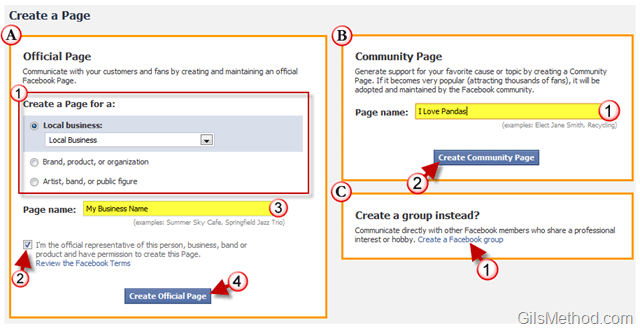
When creating a page in Facebook you have 3 options:

Option A. Official Page – An official Facebook page will help you communicate with customers and fans.

1. Select the type of page you wish to create:

  • Local business
  • Brand, product, or organization
  • Artist, band, or public figure

2. Make sure that you are an official representative for the product, organization, or brand you are trying to promote on Facebook.

3. Name the page

4. Click on the Create Official Page button.
createafacebookpageforyourbusinessa thumb Bring Your Product or Business to Facebook by Creating an Official Facebook Page

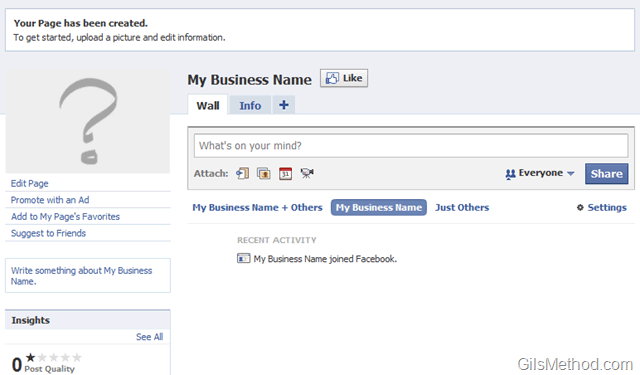
Your official Facebook page is ready.

Option B. Community Page – A community page can be created to generate support for your favorite cause or topic. If this page becomes very popular with thousands of fans it will be adopted and maintained by the Facebook community.

1. Name the page you will be creating.

2. Click on the Create Community Page button.

createafacebookpageforyourbusinessb thumb Bring Your Product or Business to Facebook by Creating an Official Facebook Page

Your official Facebook Community page is ready.

Option C. Create a group instead? A group can be created for Facebook members that share a professional interest or hobby.
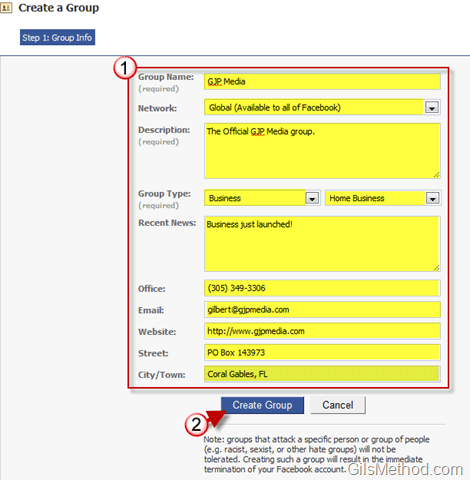
createafacebookpageforyourbusinessc thumb Bring Your Product or Business to Facebook by Creating an Official Facebook Page

1. Fill out the information about the group you are creating.

2. Click on the Create Group button.
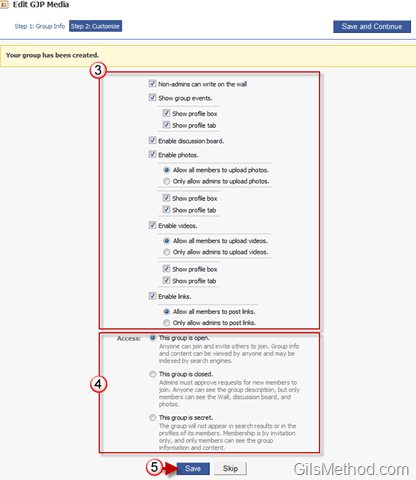
createafacebookpageforyourbusinessd thumb Bring Your Product or Business to Facebook by Creating an Official Facebook Page

3. Customize which items will appear on the page.

4. Choose the visibility status of the page, you will have three options:

  • Open Group: Anyone can join and invite others to join. Group info and content can be viewed by anyone and may be indexed by search engines.
  • Closed Group: Admins must approve requests for new members to join. Anyone can see the group description, but only members can see the Wall, discussion board, and photos.
  • Secret Group: The group will not appear in search results or in the profiles of its members. Membership is by invitation only, and only members can see the group information and content.

5. Click Save to finish saving the group settings.

createafacebookpageforyourbusinesse thumb Bring Your Product or Business to Facebook by Creating an Official Facebook Page

6. You have the option to Publish the creation of your new group to your wall or to Skip the update.
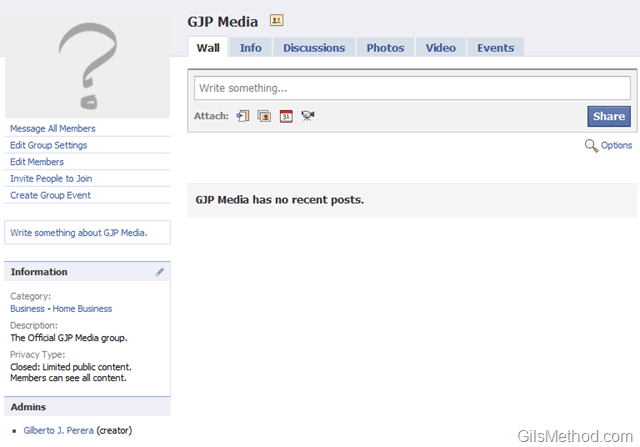
createafacebookpageforyourbusinessf thumb Bring Your Product or Business to Facebook by Creating an Official Facebook Page

The official Facebook group has been created.

Originally posted May 28, 2010

We close comments after 30 days on GilsMethod.com and ask that you post questions and issues on our Answers website.

This helps us better serve you by allowing us to keep track of unanswered questions that are usually hidden in long comment threads.

Answers.GilsMethod.com is a community-powered support website where you will be able to post questions, and other users including us will respond with expert advice.

So if you are having trouble with your PC, Mac, iPad, iPhone, or other piece of technology, head over to Answers.GilsMethod.com and ask away.

  • http://www.1stclasscontracting.net rob

    great post i like this alot im going to create a page for my company thanks

  • http://www.1stclasscontracting.net rob

    great post i like this alot im going to create a page for my company thanks

  • http://www.1stclasscontracting.net rob

    great post i like this alot im going to create a page for my company thanks

  • http://www.1stclasscontracting.net rob

    great post i like this alot im going to create a page for my company thanks

  • YC

    Gilberto, desde Buenos Aires, Argentina.. ¡¨great post¨!

  • http://3in1thermometer.com Steve

    All great tips, WEb 2 and social bookmarking are essential for products nowadays. I’m gonna print this and use it as a template.

    Ste

  • http://3in1thermometer.com Steve

    All great tips, WEb 2 and social bookmarking are essential for products nowadays. I’m gonna print this and use it as a template.

    Ste

  • http://3in1thermometer.com Steve

    All great tips, WEb 2 and social bookmarking are essential for products nowadays. I’m gonna print this and use it as a template.

    Ste

  • http://3in1thermometer.com Steve

    All great tips, WEb 2 and social bookmarking are essential for products nowadays. I’m gonna print this and use it as a template.

    Ste

  • http://www.gilsmethod.com Gilberto J Perera

    You are welcome. Good luck with your Facebook page.

  • http://www.gilsmethod.com Gilberto J Perera

    You are welcome. Good luck with your Facebook page.

  • http://www.gilsmethod.com Gilberto J Perera

    You are welcome. Good luck with your Facebook page.

  • http://www.gilsmethod.com Gilberto J Perera

    Thanks for visiting.

  • http://www.gilsmethod.com Gilberto J Perera

    Thanks for visiting.

  • http://www.gilsmethod.com Gilberto J Perera

    Thanks for visiting.

  • http://www.gilsmethod.com Gilberto J Perera

    You are welcome. Good luck with your Facebook page.

  • http://www.gilsmethod.com Gilberto J Perera

    Thanks for visiting.

  • http://www.gilsmethod.com Gilberto J Perera

    You are welcome. Hope the Facebook page works for your business.

  • http://www.gilsmethod.com Gilberto J Perera

    You are welcome. Hope the Facebook page works for your business.

  • http://www.gilsmethod.com Gilberto J Perera

    You are welcome. Hope the Facebook page works for your business.

  • http://www.gilsmethod.com Gilberto J Perera

    You are welcome. Hope the Facebook page works for your business.

  • http://www.silverbullionworld.com/ Silver Bullion World

    This is an excellent artical, just what I was looking for a how to guide…… :)

  • http://www.silverbullionworld.com/ Silver Bullion World

    This is an excellent artical, just what I was looking for a how to guide…… :)

  • http://www.silverbullionworld.com/ Silver Bullion World

    This is an excellent artical, just what I was looking for a how to guide…… :)
