
If you run multiple sites on a single server chances are that after connecting with your FTP client you have to navigate to the specific site directory you are working on. Rather than navigating to each directory each time you connect you can tell FileZilla which directory to use as default each time you connect. This will save you time and get you where you need to be sooner.
You should also use site manager to create direct connections to all of the folders you frequently access on your computer and remote server. This how-to will walk you through the simple steps necessary to modify the default locations FileZilla connects to.
If you have any comments please post them below or if you need help visit our forums.
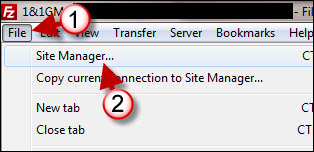
1. Click to open the File menu.
2. Click on Site Manager.
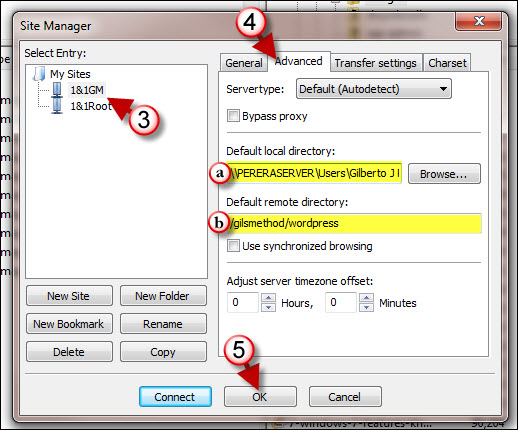
3. Click on the site you wish to customize.
4. Click on the Advanced tab located on the right to change the following settings;
a. Default local directory: Specify the default directory on your computer.
b. Default remote directory: Specify the default directory on the remote server you are connecting to.
5. Click on OK to close the Site Manager window.
Next time you connect to the remote server the default settings you specified will be in effect.



