
The how-to below is a email request from one of the readers of GilsMethod.com. The readers asks;
Gil, when I have several word document windows open my OS/Computer
tends to make them all one tab instead of separating them. how can I
make them separate?
Windows Vista has a setting that allows you to group the same type of window (Word/Excel/etc) into one taskbar button instead of individual buttons. This helps declutter the Taskbar, but can be confusing or an inconvenience to some users. Luckily you have the capability of changing that setting and customizing Windows to your liking. Please follow the instructions below to learn how to group and ungroup similar taskbar buttons. If you have any comments or questions please post them below.
I used Windows Vista Ultimate for this tutorial.
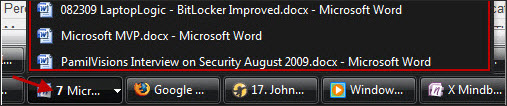
The image below demonstrates how items are grouped, in this case I have 7 Word documents open, notice how Windows automatically grouped them and placed a number (7) to the left of the grouped name. You will also notice that by clicking on the small arrow to the right of the group name a dialog box will appear with the full names of all the grouped Word windows (2nd image below).

Screenshot pointing out the arrow that opens the dialog box
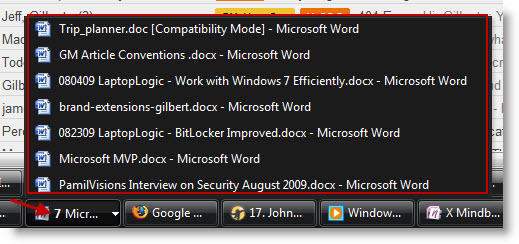
Screenshot pointing out the number 7 and the highlighting the open grouped items details.
Change the Setting to Group and Ungroup Similar Taskbar Buttons

1. To change the setting right-click on a blank area on the Taskbar and choose Properties from the menu.
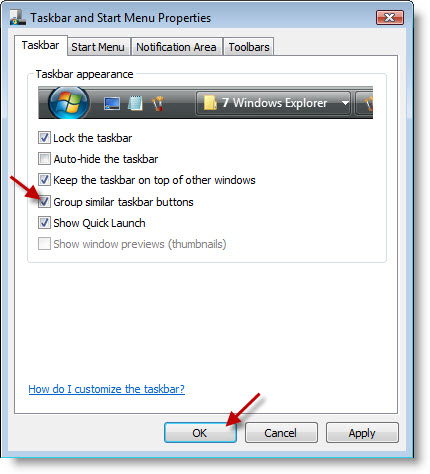
2. Make sure you are in the Taskbar Tab and check or uncheck the Group similar taskbar buttons checkbox. Click OK when you are done.
Once you settings are applied you should be able to see the ungrouped items are grouped or vice versa, depending on which setting you chose.

Screenshot of ungrouped Taskbar buttons.


