See More About: , , , ,

Drag and Drop Images and Attachments Into Gmail Messages

by

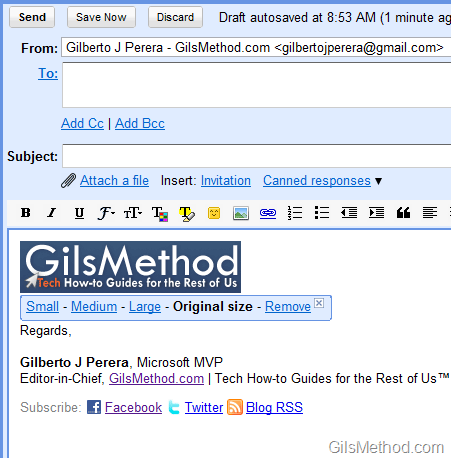
One of the latest features coming from Google Labs is the ability to insert images into email messages by dragging and dropping the image into the body of the email message. This is an enhancement to a recently announced feature that allows you to insert attachments in the same manner. The screenshots below will show you how this feature works and how you can use it to streamline emailing attachments and images with Gmail. You can always use the Insert Image button or the Attach File links if you don’t want to drag and drop these items into messages.

Google, can we get copy and paste for images?
gmailsdraganddroppicturesattachments thumb Drag and Drop Images and Attachments Into Gmail Messages

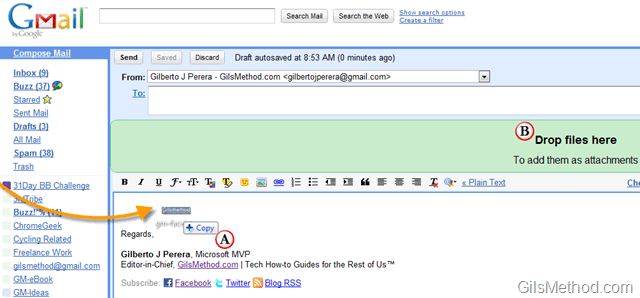
In order to use this feature all you have to do is click on the image you wish to include in the message and drag it to the body of a new email message. When you do this, two things will occur.

A. The image icon will change to include a +copy below the image thumbnail. This indicates that the image will be included in the body of the message.

B. The attachment area directly below the To: field will change to a green color and will display the following message – “Drop files here”

gmailsdraganddroppicturesattachmentsa thumb Drag and Drop Images and Attachments Into Gmail Messages

Image dropped into message body.

gmailsdraganddroppicturesattachmentsb thumb Drag and Drop Images and Attachments Into Gmail Messages

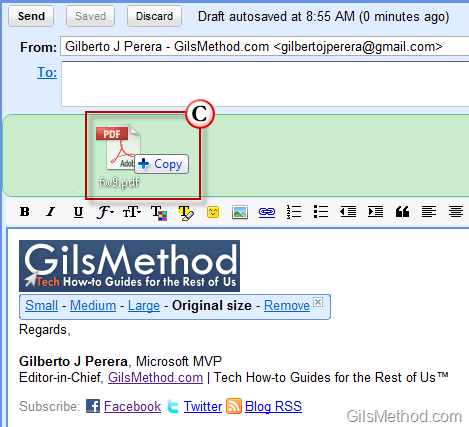
C. When attachment or image is dragged over the attachment area will change to include a +copy below the image/attachment thumbnail.
gmailsdraganddroppicturesattachmentsc thumb Drag and Drop Images and Attachments Into Gmail Messages

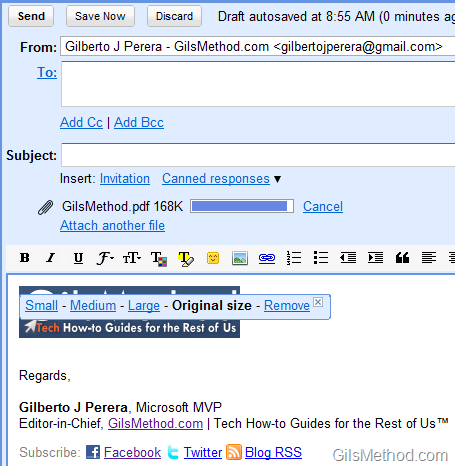
The file will automatically be included as an attachment.

See More About: , , , ,
Originally posted May 12, 2010

We close comments after 30 days on GilsMethod.com and ask that you post questions and issues on our Answers website.

This helps us better serve you by allowing us to keep track of unanswered questions that are usually hidden in long comment threads.

Answers.GilsMethod.com is a community-powered support website where you will be able to post questions, and other users including us will respond with expert advice.

So if you are having trouble with your PC, Mac, iPad, iPhone, or other piece of technology, head over to Answers.GilsMethod.com and ask away.

  • murali

    code for Drag and Drop Images and Attachments Into Gmail Messages

  • murali

    please code for how to play media files in our project?

    and how to upload files more than 10 mb size

  • http://www.gilsmethod.com Gil

    Murali,

    I’m not sure what you mean by playing media files in your product, can you be more specific? With regards to uploading files that are more than 10MB, Gmail allows you to send files that are up to 25MB in size.

    http://mail.google.com/support/bin/answer.py?hl=en&answer=8770

  • http://www.gilsmethod.com Gil

    Murali,

    I’m not sure what you mean by playing media files in your product, can you be more specific? With regards to uploading files that are more than 10MB, Gmail allows you to send files that are up to 25MB in size.

    http://mail.google.com/support/bin/answer.py?hl=en&answer=8770

  • http://www.gilsmethod.com Gil

    Murali,

    I’m not sure what you mean by playing media files in your product, can you be more specific? With regards to uploading files that are more than 10MB, Gmail allows you to send files that are up to 25MB in size.

    http://mail.google.com/support/bin/answer.py?hl=en&answer=8770

  • http://www.gilsmethod.com Gil

    Murali,

    I’m not sure what you mean by playing media files in your product, can you be more specific? With regards to uploading files that are more than 10MB, Gmail allows you to send files that are up to 25MB in size.

    http://mail.google.com/support/bin/answer.py?hl=en&answer=8770

  • http://www.gilsmethod.com Gil

    Murali,

    Again, I’m not sure what you mean by code for drag and drop attachments…can you please be more specific. Look forward to hearing from you.

  • http://www.gilsmethod.com Gil

    Murali,

    Again, I’m not sure what you mean by code for drag and drop attachments…can you please be more specific. Look forward to hearing from you.

  • http://www.gilsmethod.com Gil

    Murali,

    Again, I’m not sure what you mean by code for drag and drop attachments…can you please be more specific. Look forward to hearing from you.

  • http://www.gilsmethod.com Gil

    Murali,

    Again, I’m not sure what you mean by code for drag and drop attachments…can you please be more specific. Look forward to hearing from you.