
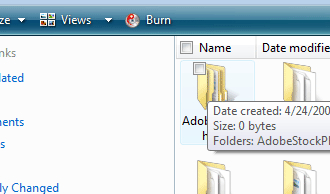
How to Enable Checkboxes in Vista To Simplify Multiple File Selection

Are you tired of holding CTRL down when making multiple selections? Vista has a neat little feature that when enabled allows you to select files within the explorer interface using checkboxes. This method simplifies the process and keeps you from accidently letting go of the CTRL during the selection process and starting all over again. The tutorial below describes the steps necessary to get there, if you need any help let me know.

Instructions below…


As far as I’m concerned this only works with Vista

1. Open Windows Explorer (it could be My Documents, My Computer, etc. not Internet Explorer)

2. Click on the Organize button on the top left..

3. Select Folder and Search Options from the menu and click on the View tab.

4. Click Use check boxes to select items, then click OK.

Once you click OK, small check boxes will appear on the top left corner of all files in explorer.


Related Posts:

  1. How to Select Multiple Files Using Checkboxes in Vista
  2. How to Display File Extensions in Vista
  3. How to Disable and Enable Thumbnails in Vista
  4. How to Enable Remote Desktop Connection with Vista
  5. How to Enable File Sharing in Virtual PC


Leave a Comment

Note: I discourage users from using keywords in their names when posting comments, most of those are caught as spam and end up being deleted. It would be more productive and interactive if commentators use the name they go by rather than using an unrelated name. In the future I reserve the right to delete comments from users using a name other than their own.

Connect with Gil via
EConnect with GIl
Facebook | Twitter | Digg | SU | LinkedIn
Who's behind Gil's Method?
My Name is Gilberto J Perera and I'm the editor behind Gil's Method. I started this blog to help relatives with computer questions. Since then the blog has grown to the collection of articles you see today, I hope that you find this blog useful and that you come back again.
Read more at my about page
Other Resources

Books (Coming Soon)

Forum (Coming Soon)

Store (Coming Soon)