
See More About: , , ,

How to Export Your Contacts from Gmail

by

If you are looking for a way to share contacts across several services to ensure that you will have access to said contacts regardless of being offline or online, you first need to to know how to pull your contact list from a specific service. In this guide along with subsequent guides I will detail the steps necessary to export your contacts from each of the following email providers: Gmail, Hotmail, and Yahoo. In this guide we’ll go over the Export contacts process in Gmail.

If you use an email provider other than the three listed above, feel free to post your request below and I will try my best to get a guide written for your service provider.

Export Gmail Contact List
exportgooglecontacts thumb1 How to Export Your Contacts from Gmail

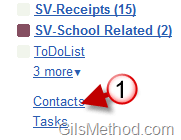
1. Click on the Contacts link located on the left pane below all the email labels.
exportgooglecontactsa thumb1 How to Export Your Contacts from Gmail

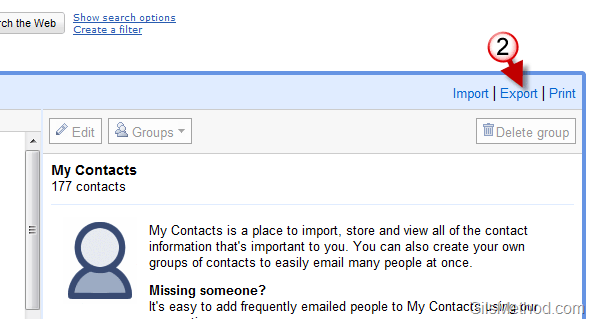
2. When the My Contacts page opens, click on the Export link on the top right corner.
exportgooglecontactsb thumb1 How to Export Your Contacts from Gmail

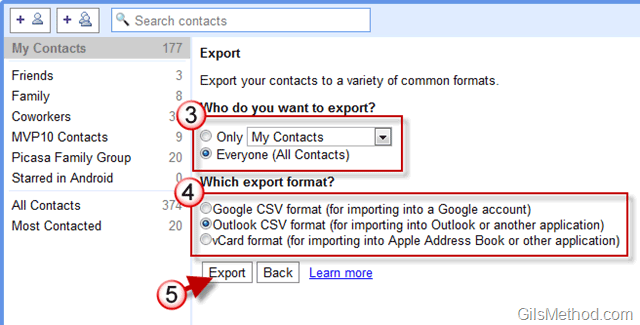
3. You will have the option to Export all of your contacts or a group of contacts (if you use groups).

4. Choose the format you will be using for the file you are exporting. You have the following options:

  • Google CSV format – If importing contacts to another Google account use this format.
  • Outlook CSV format – If your contacts will be used by Outlook or another application, use this format.
  • vCard format – For an Apple Address book or other applications use the vCard format.

5. Once you choose the format, click on the Export button to export the contact list.

exportgooglecontactsc thumb1 How to Export Your Contacts from Gmail

A. A file download should begin. Once completed you will be able to use this file to import the selected contacts to other address book applications.


Originally posted Jun 02, 2010

We close comments after 30 days on GilsMethod.com and ask that you post questions and issues on our Answers website.

This helps us better serve you by allowing us to keep track of unanswered questions that are usually hidden in long comment threads.

Answers.GilsMethod.com is a community-powered support website where you will be able to post questions, and other users including us will respond with expert advice.

So if you are having trouble with your PC, Mac, iPad, iPhone, or other piece of technology, head over to Answers.GilsMethod.com and ask away.

  • http://www.gilsmethod.com/export-contact-list-yahoo How to Export Your Contact List from Yahoo! | GilsMethod.com

    [...] of articles written to instruct others how to export their contacts from email providers like Gmail, Yahoo, and Hotmail. This guide will show you how to export your contact list from Yahoo! to a file [...]

  • http://mydrizzle.com Binoy Anto

    Hi,

    Is there any way I can export All my addresses in Gmail to indivigual .vcf files, which I can import to another stand alone address book app,

    Regards
    Binoy Anto

  • http://mydrizzle.com Binoy Anto

    Hi,

    Is there any way I can export All my addresses in Gmail to indivigual .vcf files, which I can import to another stand alone address book app,

    Regards
    Binoy Anto

  • http://mydrizzle.com Binoy Anto

    Hi,

    Is there any way I can export All my addresses in Gmail to indivigual .vcf files, which I can import to another stand alone address book app,

    Regards
    Binoy Anto

  • http://www.gilsmethod.com Gilberto J Perera

    Binoy,

    Have you tried the vCard format described in Step 4 of the tutorial? You should see that option when exporting. If that doesn’t work you can always import the Gmail contacts from Google to a service like Yahoo that supports the individual vCard files and export it from there. Hope this helps and good luck. Let me know if you need any guidance with that.

  • http://www.gilsmethod.com Gilberto J Perera

    Binoy,

    Have you tried the vCard format described in Step 4 of the tutorial? You should see that option when exporting. If that doesn’t work you can always import the Gmail contacts from Google to a service like Yahoo that supports the individual vCard files and export it from there. Hope this helps and good luck. Let me know if you need any guidance with that.

  • http://www.gilsmethod.com Gilberto J Perera

    Binoy,

    Have you tried the vCard format described in Step 4 of the tutorial? You should see that option when exporting. If that doesn’t work you can always import the Gmail contacts from Google to a service like Yahoo that supports the individual vCard files and export it from there. Hope this helps and good luck. Let me know if you need any guidance with that.

  • http://www.gilsmethod.com Gilberto J Perera

    Binoy,

    Have you tried the vCard format described in Step 4 of the tutorial? You should see that option when exporting. If that doesn’t work you can always import the Gmail contacts from Google to a service like Yahoo that supports the individual vCard files and export it from there. Hope this helps and good luck. Let me know if you need any guidance with that.

  • J R Baker

    How do I import email addresses from Charter.net to gmail?

  • http://www.blackfridayplanet.com/ William Hushburn

    I’ve already exported mine and thank you so much for this post. Gmail is really cool and having all your contacts all along is cooler.