See More About: , , ,

Become Familiar with Gmail’s Latest Refresh and New Contacts Features

by

The Gmail recently surprised us with a new look for Gmail and a completely revamped the way Contacts work in Gmail. They’ve taken a page from Gmail and now your Contacts entries are treated much like emails in Gmail. You will be able to label, undo changes, sort, and a look and feel that matches Mail in Gmail. The nice thing about this change is that those of you who are comfortable with how Gmail works will feel right at home with the changes in Contacts.

Make sure to check out the screenshot tour below to become familiar with the new look and features in the latest refresh to Gmail.

If you have any comments or questions please use the comments form at the end of this entry.

gmailnewfeaturesrefreshcontactstaskslook thumb Become Familiar with Gmails Latest Refresh and New Contacts Features

The “new look for Gmail” message you should have seen after updates were completed giving you access to the new look and features in Gmail.
gmailnewfeaturesrefreshcontactstaskslooka thumb Become Familiar with Gmails Latest Refresh and New Contacts Features

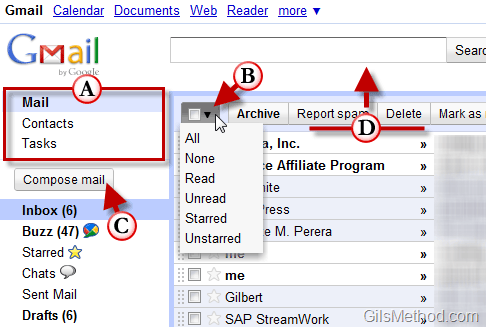
A. Mail, Contacts, and Tasks links have been moved to the top left of Gmail and are now prominently displayed together.

B. The Select All, None, Read, Unread, and Starred links that used to be above your messages are have been combined to options in a drop-down menu, next to the Archive button.

C. The Compose mail link is now a button.

D. The Header area has been shrunk by 16 pixels which puts your messages that much closer to the top of the page.
gmailnewfeaturesrefreshcontactstaskslookB thumb Become Familiar with Gmails Latest Refresh and New Contacts Features

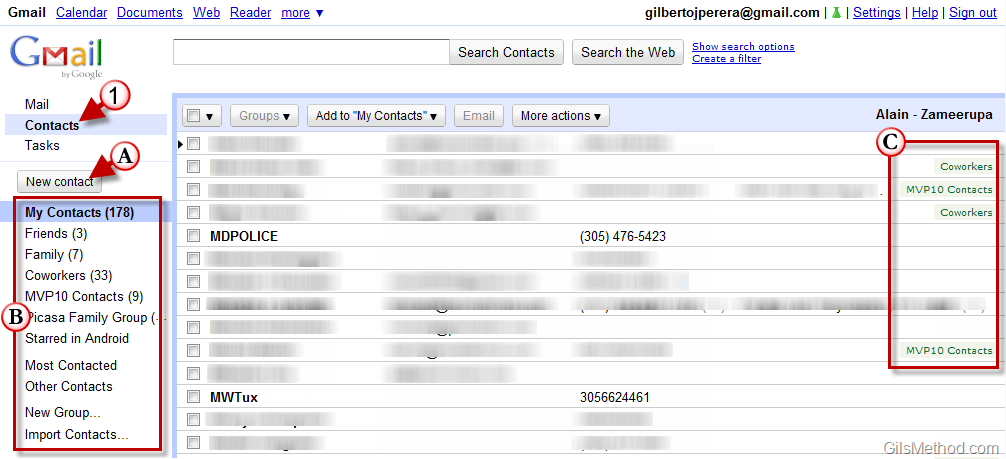
1. When you click on Contacts you will notice that it has completely changed and looks more like the Mail list you have been accustomed to in Gmail.

A. You now have a New Contact button much like the Compose Mail button. Click on this to add a new contact (see screenshot below for example of individual contact page).

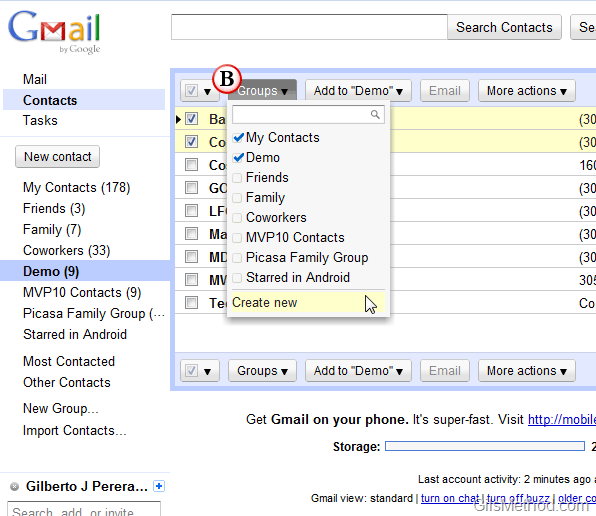
B. Contacts can be grouped much like emails are grouped in Gmail by using labels.

C. Contacts with labels assigned.
gmailnewfeaturesrefreshcontactstaskslookg thumb Become Familiar with Gmails Latest Refresh and New Contacts Features

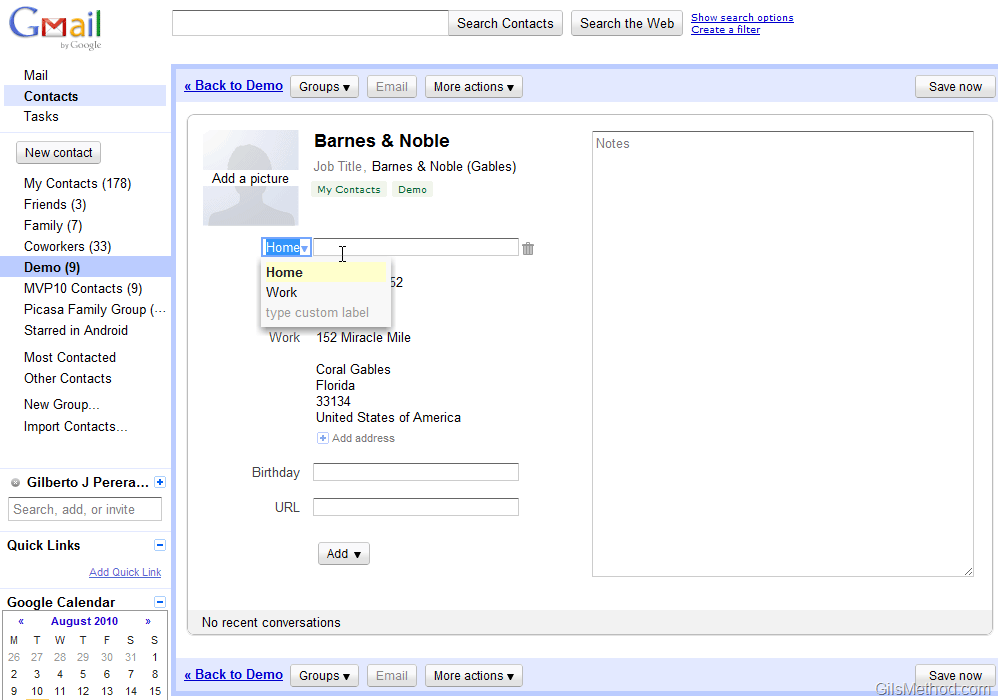
New contact page with customizable fields and automatic saving.
gmailnewfeaturesrefreshcontactstaskslookc thumb Become Familiar with Gmails Latest Refresh and New Contacts Features

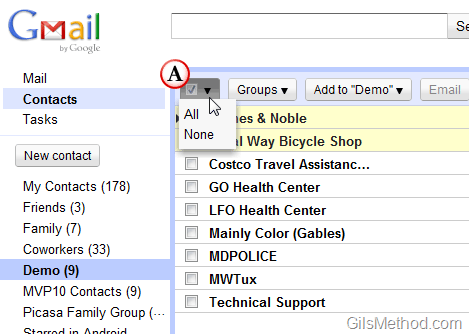
A. Like the change in Gmail, Contacts can be selected using the new Selection drop-down menu.
gmailnewfeaturesrefreshcontactstaskslookd thumb Become Familiar with Gmails Latest Refresh and New Contacts Features

B. Labels or Groups as it is known in Contacts can be assigned much like labels in Mail by clicking on the Groups menu and selecting the groups you wish to assign to a selected contact or group of selected contacts. You can also create groups on-the-fly by clicking on the Create new option.
gmailnewfeaturesrefreshcontactstaskslooke thumb Become Familiar with Gmails Latest Refresh and New Contacts Features

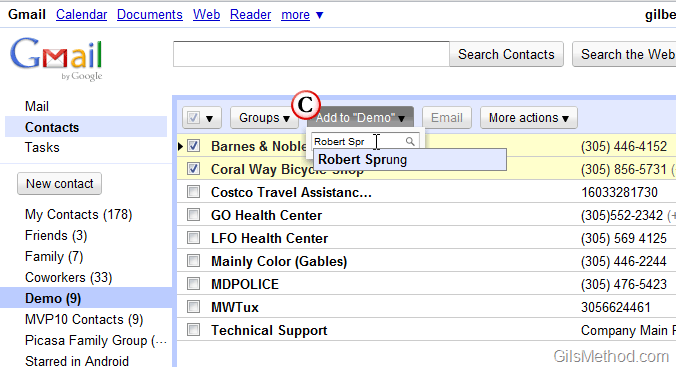
C. If you are currently browsing a specific group and would like to add a contact to the group, simply click on the Add to “group name” button and search for the contact you wish to add to the current group. A list of search result will automatically appear as you type, simply click on the contact from the search results to add them to the group.

gmailnewfeaturesrefreshcontactstaskslookf thumb Become Familiar with Gmails Latest Refresh and New Contacts Features

D. The More Actions menu button allows you to access the following actions with selected contacts.

  • Merge Contacts – Merge two or more contacts into one.
  • Delete Contacts – Deletes the selected contact.
  • Rename Group – Renames the selected group.
  • Delete Group – Deletes the selected group.
  • Import – Imports a list of contacts from supported file formats.
  • Export – Export a list of contacts to Google CSV, Outlook CSV, or vCard formats.
  • Print – The print option will open a new page with the selected contacts in a format that is printer friendly.
  • Find and merge duplicates – This is one of my favorite features, it automatically locates duplicates and merges them for you.
  • Sort by – You now have the option of sorting contacts using the First Name or Last Name. I’m hoping for more options in the near future.
    • First Name
    • Last Name

Other Features

There are a number of features that were not illustrated above but are significant enough to warrant mention.

Custom Labels for Fields – You can use custom labels for contact fields. For example, you can label a phone number as “Vacation Home.” You can do this for other fields as well.

Structured Name Fields – You can now set name components (i.e. Title, First, Middle, Last and Suffix) explicitly or continue to use the name field as a free form area if you prefer a less structured approach.


Originally posted Aug 20, 2010

We close comments after 30 days on GilsMethod.com and ask that you post questions and issues on our Answers website.

This helps us better serve you by allowing us to keep track of unanswered questions that are usually hidden in long comment threads.

Answers.GilsMethod.com is a community-powered support website where you will be able to post questions, and other users including us will respond with expert advice.

So if you are having trouble with your PC, Mac, iPad, iPhone, or other piece of technology, head over to Answers.GilsMethod.com and ask away.

  • Linda

    I wanted to take the tour of Gmail’s new refresh/contact features, but when I click on it, I get Window’s 7 beta – installation tour.

  • http://www.gilsmethod.com Gilberto J Perera

    I saw your email. Thanks for the info.

  • http://www.gilsmethod.com Gilberto J Perera

    I saw your email. Thanks for the info.

  • http://www.gilsmethod.com Gilberto J Perera

    I saw your email. Thanks for the info.

  • http://pedometer-watches.net Alberto

    Hi Gilberto, i just found your blog. Thanks. My wife uses gmail, now I can show her your blog. She told me something had changed with gmail, but i didn’t pay too much attention. Now she’ll think I was deliberately looking for something for her. Thanks.

  • http://pedometer-watches.net Alberto

    Hi Gilberto, i just found your blog. Thanks. My wife uses gmail, now I can show her your blog. She told me something had changed with gmail, but i didn’t pay too much attention. Now she’ll think I was deliberately looking for something for her. Thanks.

  • http://pedometer-watches.net Alberto

    Hi Gilberto, i just found your blog. Thanks. My wife uses gmail, now I can show her your blog. She told me something had changed with gmail, but i didn’t pay too much attention. Now she’ll think I was deliberately looking for something for her. Thanks.

  • http://pedometer-watches.net Alberto

    Hi Gilberto, i just found your blog. Thanks. My wife uses gmail, now I can show her your blog. She told me something had changed with gmail, but i didn’t pay too much attention. Now she’ll think I was deliberately looking for something for her. Thanks.

  • http://www.gilsmethod.com Gilberto J Perera

    Alberto,

    Not a problem. Glad you found the blog useful and I hope your finds it useful as well.

  • Spearce

    This is VERY useful! Thanks. Now, can I also delete the fields that automatically show up in each contact? And can I add a universal field label (one that will show up on each contact)?

  • http://www.gilsmethod.com Gilberto J Perera

    It doesn’t look like you can create a template with Contacts and it sounds like that’s what you are looking for. You could export all of your contacts, add the field you need and then import them back to Contacts so that the field is available to all contacts…just a thought.

  • http://www.gilsmethod.com Gilberto J Perera

    It doesn’t look like you can create a template with Contacts and it sounds like that’s what you are looking for. You could export all of your contacts, add the field you need and then import them back to Contacts so that the field is available to all contacts…just a thought.

  • http://www.gilsmethod.com Gilberto J Perera

    It doesn’t look like you can create a template with Contacts and it sounds like that’s what you are looking for. You could export all of your contacts, add the field you need and then import them back to Contacts so that the field is available to all contacts…just a thought.

  • Dalalfakhry

    My GMail contacts are listed by last name, first name but when I try to send an email the list is reversed to first name in mac

  • http://www.gilsmethod.com Gilberto J Perera

    What are you trying to do? Would you like to change the order? Let me know.