
See More About: , , ,

Force Outlook 2010 to Download All Messages and Attachments with IMAP

by

The other day I decided to give Microsoft another try and ran Outlook 2010 which was already installed with the Office 2010 beta (which you can download for free from Microsoft). One of the things that quickly caught my eye was the default use of conversations for emails something I have always enjoyed while using Gmail. This is where I decided to add my Gmail account to Outlook using the IMAP protocol. Shortly after my emails were transferred I found that the only thing that was downloaded were the message headers and not the content or attachment of the messages. A couple of dialog boxes later I found the option necessary to force Outlook to download all messages including attachments to your computer.

If you have any comments please post them below or if you need help visit our forums.

Note: I used Windows 7 Ultimate and Outlook 2010 Beta for this tutorial. Office 2010 Beta will only be available for a limited time.
force download of all imap messages in outlook 2010 Force Outlook 2010 to Download All Messages and Attachments with IMAP

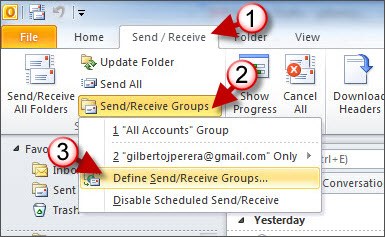
1. With Outlook open, click on the Send/Receive Tab

2. Click on the arrow next to Send/Receive Groups in the Send and Receive Group

3. Click on Define Send/Receive Groups from the menu.


force download of all imap messages in outlook 2010 a Force Outlook 2010 to Download All Messages and Attachments with IMAP

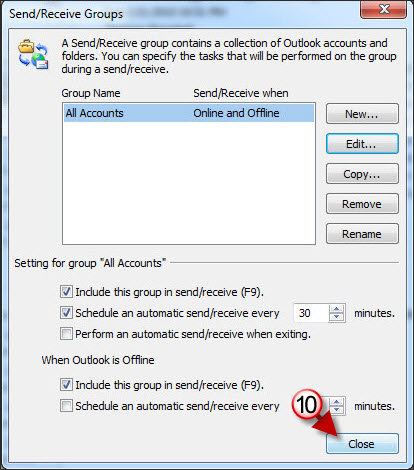
4. When the Send/Receive Groups dialog box appears, click on the Edit button.
force download of all imap messages in outlook 2010 b Force Outlook 2010 to Download All Messages and Attachments with IMAP

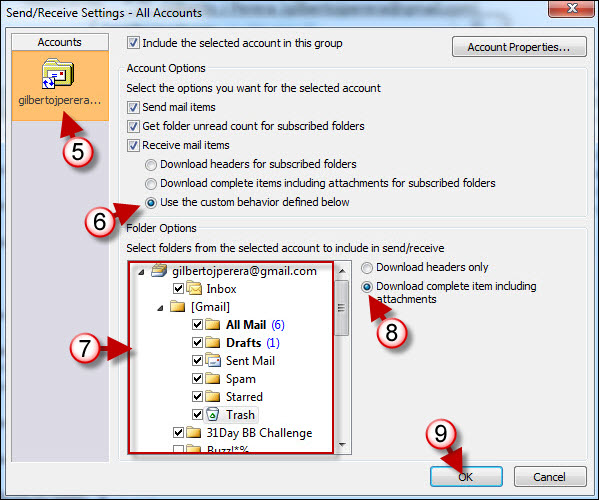
5. Click on the account you wish to edit, in my case I only have one account so only one is listed. If you have multiple accounts you have to modify each individually.

6. Click on Use the custom behavior defined below.

7. Choose the folders you wish to apply this setting to

Note: Each folder needs to be selected individually when choosing the setting in Step #8, if the folder selected is the parent folder, for example All Mail, then the other folders need not be modified.

8. Click on Download complete item including attachments (this will tell Outlook to download all emails with content and attachments).

9. Click OK to proceed.
force download of all imap messages in outlook 2010 c Force Outlook 2010 to Download All Messages and Attachments with IMAP

10. Click Close to close the dialog box.
force download of all imap messages in outlook 2010 d Force Outlook 2010 to Download All Messages and Attachments with IMAP

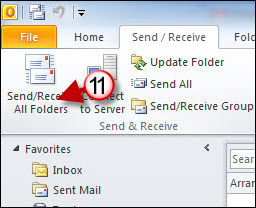
11. When you return to the Outlook window, click on the Send/Receive All Folders button.

Note: Depending on your internet connection and the size of your mailbox this can take anywhere from a couple of minutes to a couple of hours so be patient, also note that Outlook may seem unresponsive while its transferring…just give it some time. The Send/Receive status may indicate that the transfer has failed, when this occurs just close the dialog box and repeat #11.


See More About: , , ,
Originally posted Feb 24, 2010

We close comments after 30 days on GilsMethod.com and ask that you post questions and issues on our Answers website.

This helps us better serve you by allowing us to keep track of unanswered questions that are usually hidden in long comment threads.

Answers.GilsMethod.com is a community-powered support website where you will be able to post questions, and other users including us will respond with expert advice.

So if you are having trouble with your PC, Mac, iPad, iPhone, or other piece of technology, head over to Answers.GilsMethod.com and ask away.

  • Mike

    Do you know how to force Outlook 2010 to open/read all messages in a browser without having to click twice from the editor? I want to print selections and you can no longer do that in Outlook 2007-2010. I was happy with 2003. All I want is to open the message and be able to select text for printing, then click print preview and print selection. I know I can cut and paste from the editor to do it but that is extra steps.

  • http://www.gilsmethod.com Gilberto J Perera

    Mike,

    Thanks for your question…when you say that you want messages to open in the browser you don’t mean an internet browser like Internet Explorer or Firefox correct? I’m assuming that you are referring to separate message window that opens when you double-click on a message…correct? I’ve tried to print a selection in 2010 and within Outlook it doesn’t seem to be an option…as you mentioned copying an pasting to another application will do the trick. Regarding the feature being present in 2003, if I recall correctly that was an option because messages could be edited using Word, with Office 2007 and 2010, Outlook provides editing capabilities similar to Word so it really isn’t an option. Hope this all makes sense and if I run into something I’ll be sure to post it here.

  • http://www.gilsmethod.com Gilberto J Perera

    Mike,

    Thanks for your question…when you say that you want messages to open in the browser you don’t mean an internet browser like Internet Explorer or Firefox correct? I’m assuming that you are referring to separate message window that opens when you double-click on a message…correct? I’ve tried to print a selection in 2010 and within Outlook it doesn’t seem to be an option…as you mentioned copying an pasting to another application will do the trick. Regarding the feature being present in 2003, if I recall correctly that was an option because messages could be edited using Word, with Office 2007 and 2010, Outlook provides editing capabilities similar to Word so it really isn’t an option. Hope this all makes sense and if I run into something I’ll be sure to post it here.

  • Anita PR

    Hi – Any help you can provide would be so gratefully received as I am ready to throw myself off a tall building after spending all day between Microsoft Outlook and my email provider (1and1).

    I have logged on today to find that the sub folders I set up and have been using for about 2 months now (in the imap folder) have dissapeared.

    I have managed to find them but have only the headers. I located the download tool but it was highlighted and i have followed the instructions above but all I have now is the folders, the headers and when I click on the email, rather than getting the download warning which I was getting earlier, I now can open the email but it is completely blank ???

    I would really appreciate your help !!

  • Anita PR

    Sorry I forgot to say it is Outlook 2007

    Thanks

  • Papajack222

    i do not have the beta 2010 i bought the full blown model, installed it and it automatically sent my
    emails as soon as i got done typing it and hit the send button which i did not like. so i went looking for how to delay the sending them until i wanted to send them. now i send them when i want to, but the emails that are downloaded from the server are not to be found in the inbox, i do not know where they are going.
    what can i do to start over? i have tried for two weeks and nothing is working for me.
    i hope you can help me.
    jack

  • http://www.gilsmethod.com Gilberto J Perera

    Jack,

    Thanks for the question. Can you be more specific? How many email accounts do you have in Outlook? What email service are you using and how was the account added? Thanks.

  • John

    I have just installed a new computer for our Office Manager, including Office 10. We have been using OE6 as POP3 for quite some time now, with no problems, but now it is no longer an option in Win7. She monitors mulpiple accounts for the company (5, actually.) The first issue found was that only 2 of the 5 accounts were imported during the transfer. OK. Next, when added, one of the accounts came up as IMAP, the others as POP3. As this account now only comes up in it’s own IMAP folder, this complicates monitoring. Now, the e-mails in the Inbox of the IMAP account are being removed an hour or so after reading. They are not being moved to the Deleted Items folder, and I can find no item in Options that would lead to this. Also, since it is a bleeping IMAP account, it is deleting them off of the server. OE/POP3 did not have this problem, as there was an option “Delete from server only when deleted from “Deleted Items” folder”, but this is not an option, and already some important company e-mails have been lost to bianary space. Does anyone know what settings may be causing this removal? Also, is there a way to combine the Inboxes? Outlook 2010 does not seem to allow the easy moving of files rules based on the account that recieved them.
    Thank you, John

  • William-jacob

    Hi,

    I send emails but they are not being received by the recipients even though they are leaving Microsoft Outlook 2010, but I can receive emails ok. Why is this?

    Thanks
    Simon

  • Andre

    My problem is a variation of those mentioned here. I use Outlook 2010 via Gmail. I have set up a rule in Outlook that tells it to “print it” for emails from a number of senders. When an email arrives from one such sender the email is printed, but only the header. However, once the email “settles in” to my inbox, I can then print the email, and the header and complete text are printed. Any suggestion as to how I can force the printing of the header and complete text on initial arrival in accordance with my OUtlook rule?

  • http://www.gilsmethod.com Gilberto J Perera

    I know there is a delay with sent messages, but I don’t know of any for
    actual printing. The only thing I can think of is that you force Outlook to
    download IMAP messages as they come in, see if that works.

    Like the GilsMethod.com Facebook page for a
    chance to win an iPod Touch and other prizes.

  • Mazzj

    THIS WORKED PERFECTLY!!!!!! THANK YOU…now i can actually use my email Mazzter

  • http://www.gilsmethod.com Gilberto J Perera

    Glad you found it useful. Thanks for the kind words.

  • Tom C

    This is one of the best online solutions I have seen on any topic ever. It is not bait for a software sale, it doesn’t obfuscate, it doesn’t patronize the reader, AND it is accompanied by the screens to follow as part of the solution.

  • http://www.gilsmethod.com Gilberto J Perera

    Thanks for the kind words…all of my guides are written in this manner. Hope you find other solutions on the site. Thanks again.

    Regards,

    Gilberto J Perera
    Editor-in-Chief, GilsMethod.com

  • Ilia

    I have done all you wrote (the tutorial is very good) but the outlook doesn’t save configuration after clicking steps 9 and 10. Next time I open it, the “download headers only” radio button is checked. If you can help I will be thankful to you.

  • http://www.gilsmethod.com Gilberto J Perera

    Is this a corporate computer? Are you hooked up to Exchange? I ask because
    it could be a policy issue with your company and it is set server side. If
    this is the case you would have to ask IT to make the change for your
    account…my two cents. Let me know.

  • Ilia Ingerman

    No, this is my private PC, and not connected to Exchange. It’s GMail.
    Something wierd happens to my PC. I simply reinstalled the Office and my first problem (described above) is solved :-) , now have another one:I have two GMail accounts in Outlook, first one is downloading the whole messages and the second one only headers. The wierd thing is that they both have the same configuration. I defined in your step 6 to “Download complete items …” and in one account it works.Thank you for your help.Ilia.

  • http://www.gilsmethod.com Gilberto J Perera

    That’s pretty strange. Are both gmail accounts configured for IMAP
    access in Gmail. You can check this in settings…

  • Ilia Ingerman

    Yes, they are.