
The following is the first in a series of articles that will mirror an electronic book that I’m set to release in December of this year. The eBook’s main focus will be helping new and old Windows users become familiar with the new version of Windows 7 that will available to the public in December. I hope that you find this series useful and informative and that you enjoy it so much that you will purchase my eBook when it is released.
Before we delve too deep into all of the How-to’s in this series, let’s familiarize ourselves with the basic components that make up the Windows 7 Desktop. The Windows 7 Desktop is the environment where all of the application windows you are working with reside. The desktop provides access to applications and folders via the Start Menu and the shortcuts that are placed on the Desktop and the Task Bar. The Desktop also provides a space where enabled gadgets can be accessed. Please refer to the Figure 1.1 to familiarize yourself with the Windows 7 Desktop.
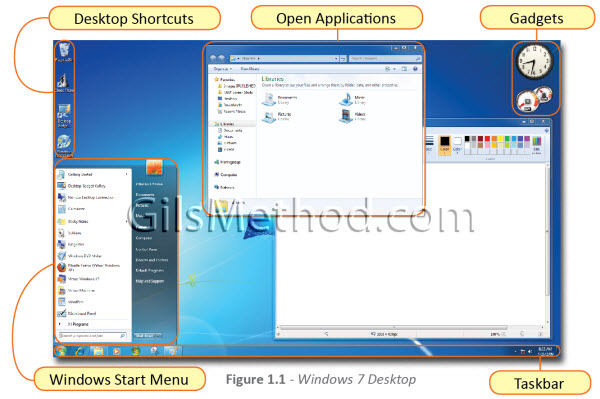
Components Highlighted Above
- Desktop Shortcuts – Shortcuts to your favorite files, folders, and/or applications
- Open Applications – Application or folder windows that are currently open
- Gadgets – Gadgets are small applications that put information like news, pictures, and games easily available at all times.
- Windows Start Menu – Menu used to access applications, settings, and other commands.
- Taskbar – Used to pinup favorite applications and display open application icons. Also contains the notification area and the Start Menu button.


