
See More About: , , , ,

How to Access Field Test Mode on the iPhone

by

If you have ever wondered what the values behind your iPhone’s bars meant then you may want to check out the Field Test mode. This mode allows you to get a numerical figure for your antenna’s strength instead of the five bars we are accustomed to. In this mode you will also have access to a ton of diagnostic information which will probably be foreign to most users. Regardless, if you wish to check it out follow the instructions below.

Software/Hardware used: iPhone 4 running iOS 4.2.
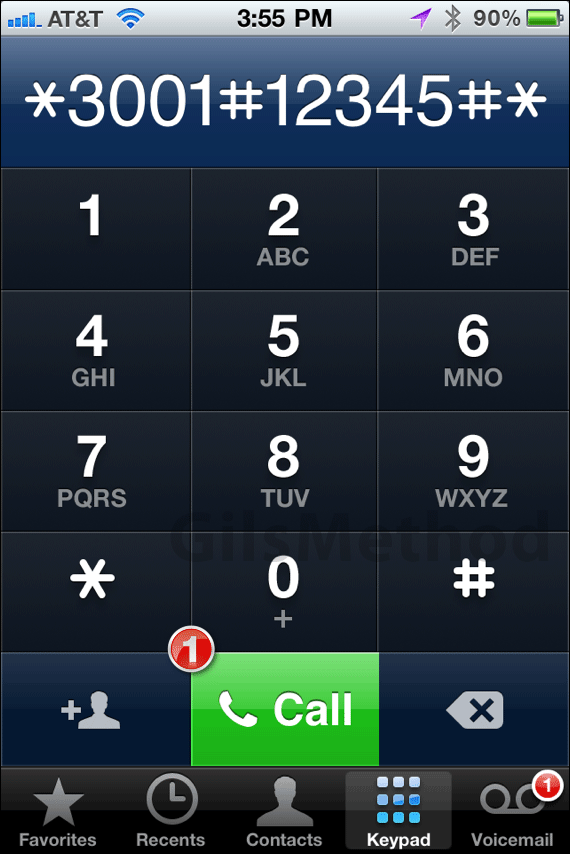
iphone field test mode1 How to Access Field Test Mode on the iPhone

1. Open Phone and dial the following:

*3001#12345#*

and tap Call.
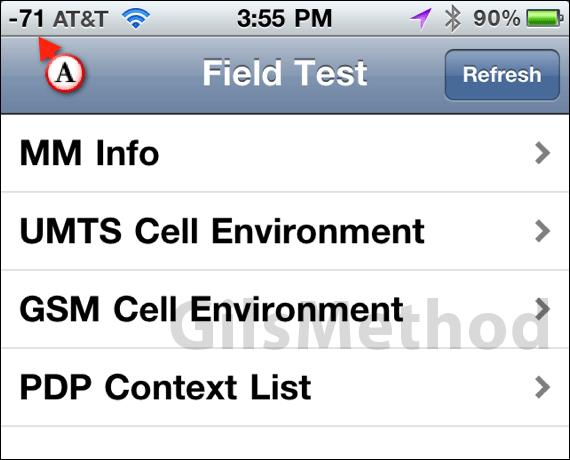
iphone field test mode2 How to Access Field Test Mode on the iPhone

A. The iPhone will automatically open Field Test Mode and switch the bars to their numerical equivalent.

To exit the Field Test Mode simply press the Home button and you are done.

Via MacRumors Forums.

See More About: , , , ,
Originally posted Jan 13, 2011

We close comments after 30 days on GilsMethod.com and ask that you post questions and issues on our Answers website.

This helps us better serve you by allowing us to keep track of unanswered questions that are usually hidden in long comment threads.

Answers.GilsMethod.com is a community-powered support website where you will be able to post questions, and other users including us will respond with expert advice.

So if you are having trouble with your PC, Mac, iPad, iPhone, or other piece of technology, head over to Answers.GilsMethod.com and ask away.
