

See More About: , , ,

How to Automatically Clear Your Browsing History

by
clear history icon How to Automatically Clear Your Browsing History

If you are concerned with your the files left behind whenever you browse the internet at home or at the office, then this is your solution. The how-to below will demonstrate how you can setup Internet Explorer and Firefox to automatically delete all files related your browsing activities. If you have any questions or comments, feel free to post them below.

Note: I used Firefox 3 and Internet Explorer 7 to create this guide. The menu options should be similar in previous versions.

Firefox Instructions
clear browser history1 How to Automatically Clear Your Browsing History

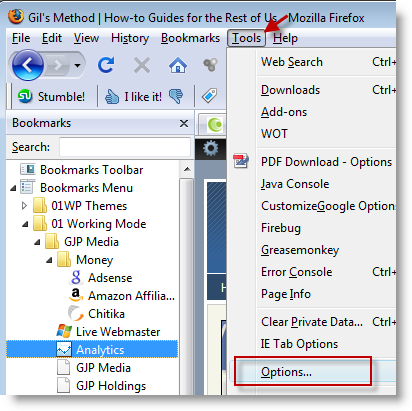
1. With Firefox open, click on Tools > Options…
clear browser history2 How to Automatically Clear Your Browsing History

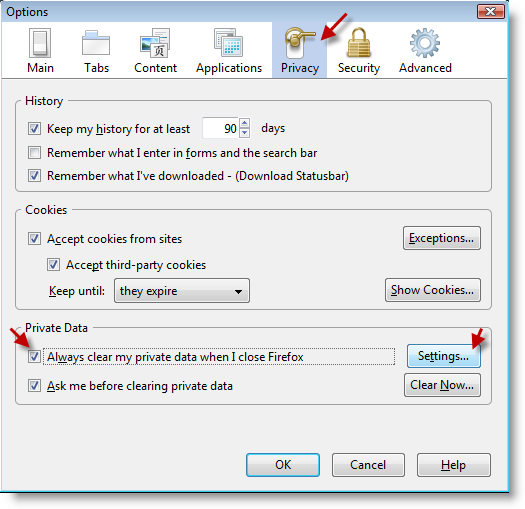
2. Click on the Privacy icon (tab) and check the Always clear my private data when I close Firefox checkbox, click on the Settings button
clear browser history3 How to Automatically Clear Your Browsing History

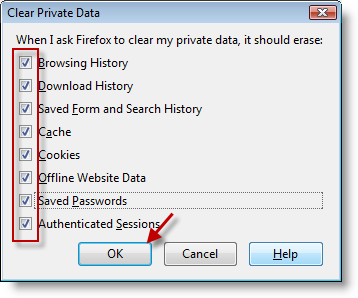
3. Specify the items that you would like to include when Firefox clears all of your data checking them, click OK.

Internet Explorer Instructions

clear browser history4 How to Automatically Clear Your Browsing History

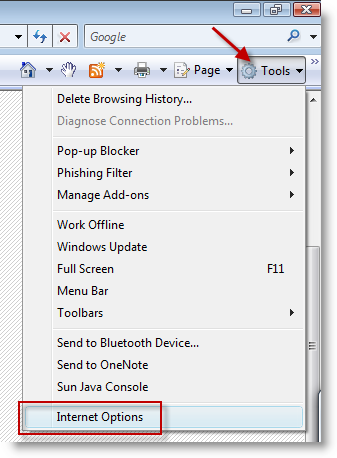
4. With Internet Explorer open, click on the Tools > Internet Options.
clear browser history5 How to Automatically Clear Your Browsing History

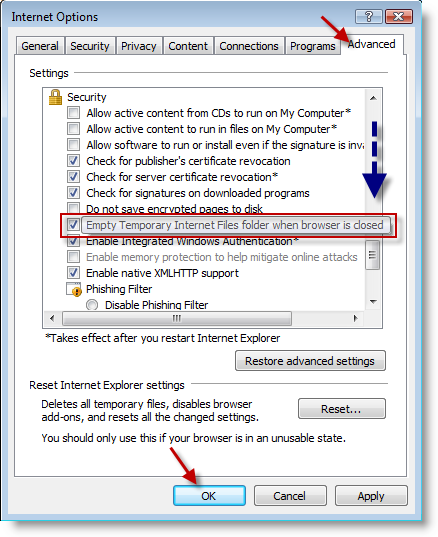
5. Click on the Advanced tab in the Internet Options dialog box and scroll down until you reach the Security section, make sure to check the Empty Temporary Internet Files folder when… Click OK
clear browser history6 How to Automatically Clear Your Browsing History

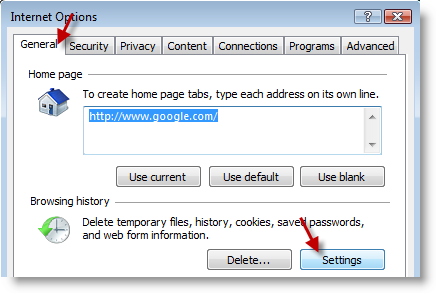
6. Now return to the General tab and click on the Settings button below Browsing history.
clear browser history7 How to Automatically Clear Your Browsing History

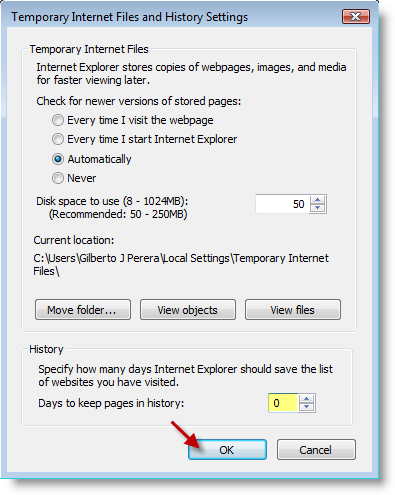
7. Under History, set the number of Days to keep pages in history: to 0, click OK

Originally posted Oct 14, 2008

We close comments after 30 days on GilsMethod.com and ask that you post questions and issues on our Answers website.

This helps us better serve you by allowing us to keep track of unanswered questions that are usually hidden in long comment threads.

Answers.GilsMethod.com is a community-powered support website where you will be able to post questions, and other users including us will respond with expert advice.

So if you are having trouble with your PC, Mac, iPad, iPhone, or other piece of technology, head over to Answers.GilsMethod.com and ask away.

  • http://erase-internet-history.com George

    Have you every used history cleaner software like this site recommends?

    They claim it clears much more than just your browser history

  • http://erase-internet-history.com George

    Have you every used history cleaner software like this site recommends?

    They claim it clears much more than just your browser history

  • http://erase-internet-history.com George

    Have you every used history cleaner software like this site recommends?

    They claim it clears much more than just your browser history

  • http://erase-internet-history.com George

    Have you every used history cleaner software like this site recommends?

    They claim it clears much more than just your browser history

  • http://www.directorysubmissionservices.net Nick

    Thanks for sharing this information. I had used all of these history clearence programs. but any why thanks.

