
If you find that you open several applications like iTunes, FaceTime, or Safari when booting up your Mac you can have Mac OS automatically start those applications on start-up so you don’t have to. To learn how to automatically start the aforementioned apps and more on boot-up, follow the instructions below.
Software/Hardware used: Mac OS 10.6
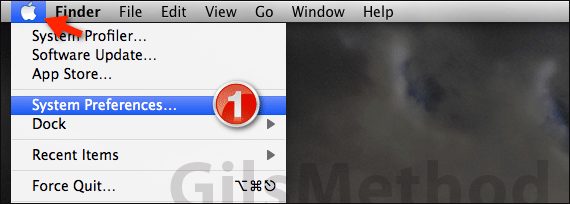
1. Click System Preferences from the Apple menu.

2. When System Preferences opens, click Accounts in the System row.
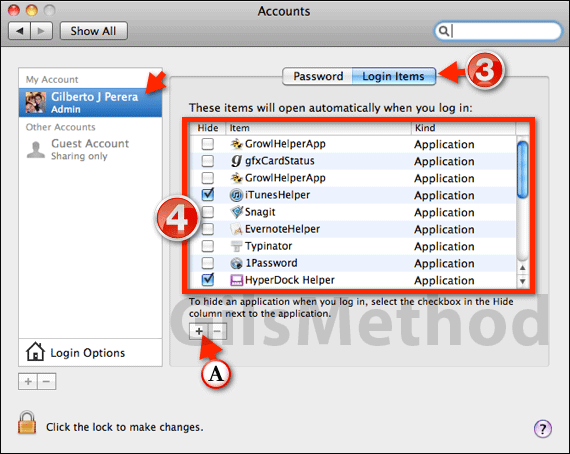
3. Click the Login Items tab.
4. Add a checkmark to the item you wish to open automatically when you log in from the list.
The selected item will open when you login to your Mac the next time. If the item is not listed, follow the instructions below to add it to the list.
A. If the item is not listed, click the Add (+) button.
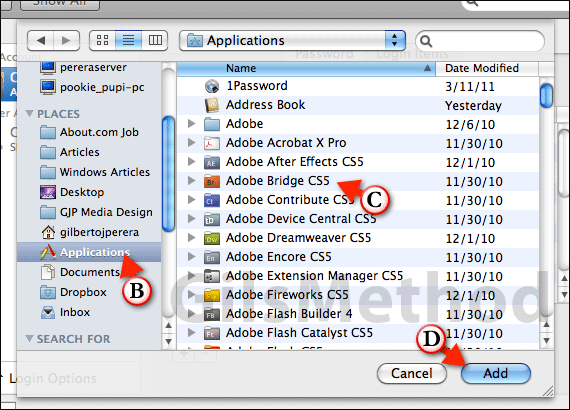
B. Click Applications on the left.
C. Select the application you wish to use from the list.
D. Click the Add button.
Make sure that the checkbox is checked and close the window to save the changes. If asked for the password, make sure to enter it. You can also use this to automatically open frequently used documents, just locate the document using the prompt in the last step and add it to the list. If you have any comments or questions please use the comments form below.



