
Do you find that importing two-year old clips into iMovie results in events created the year the clips were imported and not when they were actually filmed?
Why does this happen?
Unfortunately iMovie’s default behavior is to use the clip’s import date rather than the actual date the clip was created which results in an events directory with clips all over the place.
If you filmed something on March 12, 2007 and import it to iMovie on June 16, 201. iMovie will automatically adjust the clip’s creation date to June 16, 2011, the date the clip was imported…instead of the date it was created.
Here’s how to fix the problem.
Luckily, Apple was kind enough to allow its users to adjust a clip’s date and time to match what you want it to be. In this guide I will show you how to adjust the date and time for clips in your events library in iMovie.
Software/Hardware used: iMovie ’11 on Mac OS 10.6.
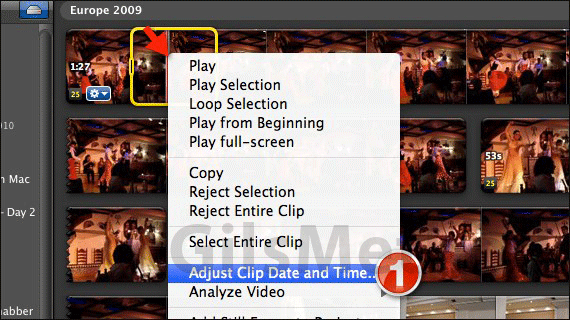
1. Right-click the clip you wish to edit and click Adjust Clip Date and Time from the menu that appears.
Select more than one clip to edit multiple clips: If you wish to select more than one clip click on a clip and to add more to your selection press and hold the Command key on your keyboard while you click on other clips.
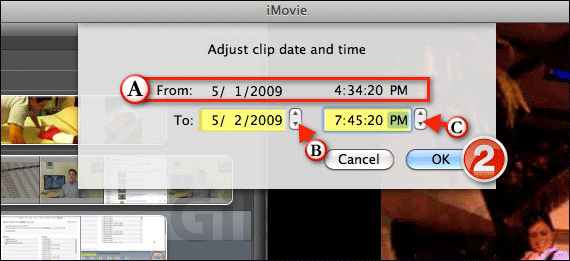
A sheet will appear providing you with the clip’s current date and time. iMovie defaults to the date that the clip was imported rather than the actual date the clip was created.
A. From: Date clip was imported into iMovie will be displayed.
B. To: To adjust the clip’s date use the small arrows to move the date or enter the date manually.
C. You can also adjust the clip’s time by using the small arrows next to the time field to move the time or you can enter the time the time manually.
2. When you are done adjusting the clip’s date and time, click OK.
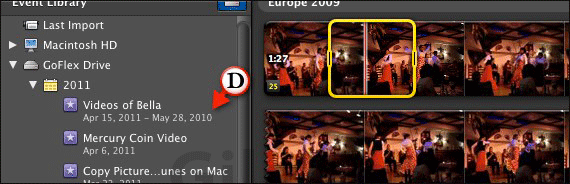
D. Adjusting the clip’s date will adjust its place in the Event Library. For example, if a clip is listed in 2008 and you change the date to 2009, the clip will move from the 2008 list of events to the 2009 list of events.
You will also notice that events spanning long periods of time will show a date range underneath the event name signifying the date interval of the clips in the event.
Now that you know how to take control of your events in iMovie, its time to clean up all of those events listed in the wrong years.
If you have any comments or questions please use the comments form below.



