
Like most users that upgraded from Snow Leopard to Lion, you probably expected your desktop background to change to the new lion wallpaper introduced in Lion.
Unfortunately, unless you did a clean install or bought a new Mac with Lion installed, the default wallpaper will be either the snow leopard or another older Mac OS wallpaper.
One would think that the new wallpapers would be in the Nature folder like all other nature-themed wallpapers, but it seems Apple decided to place them in the Desktop Pictures folder instead.
Check out the guide below that will show you how to change Lion’s Desktop background to the new lion or Andromeda wallpaper.
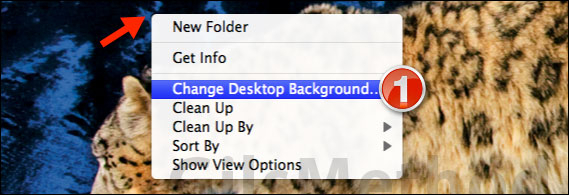
1. Right-click the Desktop and then click Change Desktop Background from the menu.
Note: You can also open Preferences and then click Desktop & Screen Saver to change these settings.

2. Click the Desktop Pictures folder under Apple.
3. Choose one of the new Lion wallpapers to use as your desktop’s background.
If you have any comments or questions please use the comments form below.
Software/Hardware Used: Mac OS X Lion.



