
Bored of the default Aurora background Mac OS ships with? Don’t worry, Mac OS has plenty of options to please your eyes. To learn how to change the desktop background (wallpaper) in Mac OS or add your own photos to the desktop background, follow the instructions below.
Software/Hardware used: Mac OS 10.6.
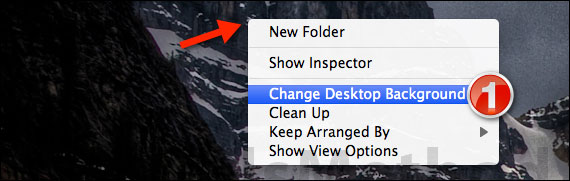
1. Right-click the Desktop and click Change Desktop Background from the menu.
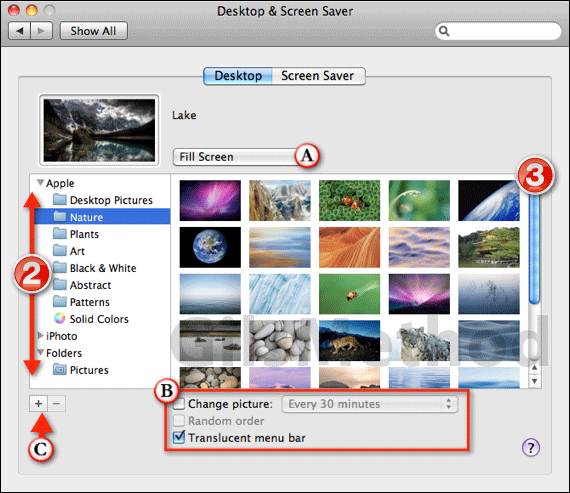
2. Use the folder list to select the location where the images are stored. Here you will have access to built-in wallpapers (Apple folder), iPhoto, and other Folders containing pictures. Select the source.
3. Select the image you wish to use from the list.
A. You have the option of determining how the image appears on your desktop:
- Fit to screen
- Fill Screen
- Stretch to Fit Screen
- Center
- Tile
B. You can also set the pictures to change at a designated time interval. When you choose this option, the folder containing the selected image will be used. You can set the order to random by checking Random order.
C. If the folder containing the images you wish to use as a background is not listed (a server directory or flash drive), click the (+) button to add the directory to the list.
Note: If you have two displays you will need to set a background for each. The options window will also appear on the secondary display.
Once you made your changes, close the Settings window and you are set. If you have any comments or questions please use the comments form below. For great Wallpaper ideas, check out our Weekly Wallpaper feature.



