See More About: , , ,

How to Copy Pictures to Your iPad

by

If you’re new to the iPad, chances are you are wondering how you’re going to get pictures stored on your computer to your new iPad.

The only way that you can copy pictures to your iPad is by using iTunes, emailing the pictures to yourself, or using a MobileMe-like service to keep your pictures synchronized.

The guide below will show you how to configure iTunes and your iPad to keep pictures stored on your computer synced with your iPad.

Software/Hardware used: iTunes 10 running on Mac OS X and an iPad running iOS 4.2. These instructions should apply to the iTunes version for Windows.

Before proceeding, please make sure that your iPad is plugged in to your computer.

sync photos ipad itunes How to Copy Pictures to Your iPad

1. Click on the iPad in iTunes under Devices.

2. Click the Photos tab.


3. Check Sync Photo’s from.
sync photos ipad itunes a How to Copy Pictures to Your iPad

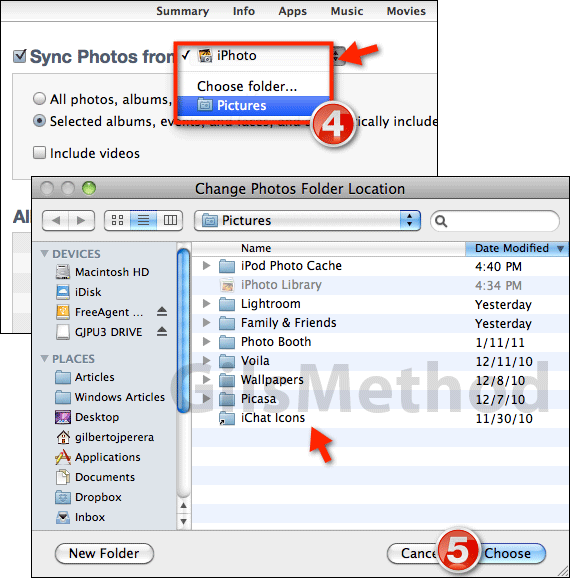
4. If you are running iTunes on a Mac and use iPhoto to manage your pictures, select iPhoto from the Sync Photos from drop-down.

Otherwise click Choose folder… to locate the directory containing the photos you wish to sync with your iPad.

Note: When you select the directory make sure to select the main directory containing all of your photos, this way you can select individual folders by following the steps below.

Using this method you can only sync one directory (that can contain multiple folders) at a time, this is why I recommend you use the directory containing all of your photos.

If your photos are dispersed across a network or several computers, I recommend that you combine the photos in one location to facilitate synchronization of photos to your iPad.

5. When the folder location window opens (same on Mac and Windows), find and select the folder containing the picture you wish to sync. Click Choose to continue.
sync photos ipad itunes b How to Copy Pictures to Your iPad

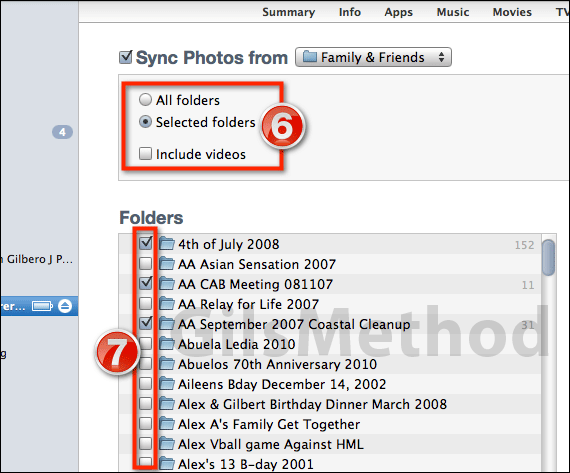
6. When you come back to iTunes you will notice that you have the option of syncing All folders or Selected folders within the directory you selected.

Note: When syncing photos to your iPad you can also opt to include videos that are contained in those folders, but be aware that adding videos will increase the length of the initial sync and will reduce the amount of space on your iPad.

7. If you choose to select individial folders, which I recommend, a separate list will appear with the names of all the folders contained in the selected directory. Check the folders you wish to include for the iPad.

Note: If the directory you selected exceeds the space of the iPad you will receive an error when syncing.

9. Click on Apply to save the settings and sync with your iPad.

If you encounter any issues or have any questions, please use the comments form below.

See More About: , , ,
Originally posted Apr 06, 2010

We close comments after 30 days on GilsMethod.com and ask that you post questions and issues on our Answers website.

This helps us better serve you by allowing us to keep track of unanswered questions that are usually hidden in long comment threads.

Answers.GilsMethod.com is a community-powered support website where you will be able to post questions, and other users including us will respond with expert advice.

So if you are having trouble with your PC, Mac, iPad, iPhone, or other piece of technology, head over to Answers.GilsMethod.com and ask away.

  • http://www.gilsmethod.com/how-to-send-pictures-via-email-using-the-ipad How to Send Pictures Via Email Using the iPad | GilsMethod.com

    [...] How to Copy Pictures to Your iPad [...]

  • http://www.phototransferapp.com Enrique

    A simpler way is to use ‘Photo Transfer App’. An universal app (iPhone/iPad) app that let’s you transfer photos from your computer or iPhone directly to your iPad over wifi. No cables or other software required.

    You can see how it works here:

    http://www.phototransferapp.com

    Cheers!

  • http://www.phototransferapp.com Enrique

    A simpler way is to use ‘Photo Transfer App’. An universal app (iPhone/iPad) app that let’s you transfer photos from your computer or iPhone directly to your iPad over wifi. No cables or other software required.

    You can see how it works here:

    http://www.phototransferapp.com

    Cheers!

  • http://www.phototransferapp.com Enrique

    A simpler way is to use ‘Photo Transfer App’. An universal app (iPhone/iPad) app that let’s you transfer photos from your computer or iPhone directly to your iPad over wifi. No cables or other software required.

    You can see how it works here:

    http://www.phototransferapp.com

    Cheers!

  • http://www.phototransferapp.com Enrique

    A simpler way is to use ‘Photo Transfer App’. An universal app (iPhone/iPad) app that let’s you transfer photos from your computer or iPhone directly to your iPad over wifi. No cables or other software required.

    You can see how it works here:

    http://www.phototransferapp.com

    Cheers!

  • http://www.gilsmethod.com Gil

    Thanks for the suggestion, I’ll have to check it out.

  • http://www.gilsmethod.com Gil

    Thanks for the suggestion, I’ll have to check it out.

  • http://www.gilsmethod.com Gil

    Thanks for the suggestion, I’ll have to check it out.

  • http://www.gilsmethod.com Gil

    Thanks for the suggestion, I’ll have to check it out.

  • MarkD

    #1 I don’t have a photos tab on in my iTunes, which is how I found this.
    #2 For other Googlers, the phototransferapp only supports transfer from other iDevices (iPhone IPod Touch), not PC/iTunes.

  • MarkD

    #1 I don’t have a photos tab on in my iTunes, which is how I found this.
    #2 For other Googlers, the phototransferapp only supports transfer from other iDevices (iPhone IPod Touch), not PC/iTunes.

  • MarkD

    #1 I don’t have a photos tab on in my iTunes, which is how I found this.
    #2 For other Googlers, the phototransferapp only supports transfer from other iDevices (iPhone IPod Touch), not PC/iTunes.

  • MarkD

    #1 I don’t have a photos tab on in my iTunes, which is how I found this.
    #2 For other Googlers, the phototransferapp only supports transfer from other iDevices (iPhone IPod Touch), not PC/iTunes.

  • http://www.gilsmethod.com Gilberto J Perera

    That’s a little strange that you don’t have the Photos tab…do you have the latest version of iTunes installed? Let me know what you find. Thanks for the tip on the PhotoTransfer App.

  • http://www.gilsmethod.com Gilberto J Perera

    That’s a little strange that you don’t have the Photos tab…do you have the latest version of iTunes installed? Let me know what you find. Thanks for the tip on the PhotoTransfer App.

  • http://www.gilsmethod.com Gilberto J Perera

    That’s a little strange that you don’t have the Photos tab…do you have the latest version of iTunes installed? Let me know what you find. Thanks for the tip on the PhotoTransfer App.

  • http://www.gilsmethod.com Gilberto J Perera

    That’s a little strange that you don’t have the Photos tab…do you have the latest version of iTunes installed? Let me know what you find. Thanks for the tip on the PhotoTransfer App.

  • Name

    I just downloaded iTunes to get my iPad going and no photo tab anywhere.

    Cheers,chris

  • http://www.gilsmethod.com Gilberto J Perera

    Name,

    Did you click on the iPad in the Navigation pane? The Photos tab along with the other tabs should be listed there. Let me know if you are still having the issue.

  • http://www.gilsmethod.com Gilberto J Perera

    Name,

    Did you click on the iPad in the Navigation pane? The Photos tab along with the other tabs should be listed there. Let me know if you are still having the issue.

  • http://www.gilsmethod.com Gilberto J Perera

    Name,

    Did you click on the iPad in the Navigation pane? The Photos tab along with the other tabs should be listed there. Let me know if you are still having the issue.

  • http://www.gilsmethod.com Gilberto J Perera

    Name,

    Did you click on the iPad in the Navigation pane? The Photos tab along with the other tabs should be listed there. Let me know if you are still having the issue.

  • Name

    Thanks,
    Sounds like my iPad must first connected to iTunes to see the photo tab, is that true?

    Another item re photos, I heard good and bad re iTunes not managing photos well. I have about 5k photos in my pc all in repective folders most are 5 to 7mg in size, I also have same photo folders in smaller sizes for web 400 to 800kb.
    Are there any settings in iTunes to prevent possible problems? I really don’t want I tunes to screw up/take over all my photos.

    Chris

  • Name

    Ok, nothing! Looked an looked and no photo tab in my iTunes

    Chris

  • Anders

    The trick to find the tabs for photo is to first click on the devices in the left hand navigation panel of iTunes. It should be directly under “Store”. Then your iPad and all the different tabs should appear and you can start syncing the pictures and anything else you would like to put on it.

    Hope this helps.

    Anders

  • mww1110

    How do you add new albums to the ipad without it deleting old albums? The message even comes up saying its going to remove all old pics from the ipad during snycning. very frustrated. spent a lot of time transferring only to find out it was deleting as I was adding.

  • http://www.gilsmethod.com Gilberto J Perera

    Chris,

    Yes, the iPad does need to be connected to iTunes in order to see the photos tab.

    I don’t think that iTunes will mess with your photos…all it does is copy them from your computer to the iPad so that you can view them on the iPad. If you have two sets of photos (original and resized) I would probably sync the resized photos to conserve space on the iPad and to make syncing much faster…not to mention you’re limited in storage space as well, so keep that in mind.

  • http://www.gilsmethod.com Gilberto J Perera

    Chris,

    Yes, the iPad does need to be connected to iTunes in order to see the photos tab.

    I don’t think that iTunes will mess with your photos…all it does is copy them from your computer to the iPad so that you can view them on the iPad. If you have two sets of photos (original and resized) I would probably sync the resized photos to conserve space on the iPad and to make syncing much faster…not to mention you’re limited in storage space as well, so keep that in mind.

  • http://www.gilsmethod.com Gilberto J Perera

    Chris,

    Yes, the iPad does need to be connected to iTunes in order to see the photos tab.

    I don’t think that iTunes will mess with your photos…all it does is copy them from your computer to the iPad so that you can view them on the iPad. If you have two sets of photos (original and resized) I would probably sync the resized photos to conserve space on the iPad and to make syncing much faster…not to mention you’re limited in storage space as well, so keep that in mind.

  • http://www.gilsmethod.com Gilberto J Perera

    Chris,

    Yes, the iPad does need to be connected to iTunes in order to see the photos tab.

    I don’t think that iTunes will mess with your photos…all it does is copy them from your computer to the iPad so that you can view them on the iPad. If you have two sets of photos (original and resized) I would probably sync the resized photos to conserve space on the iPad and to make syncing much faster…not to mention you’re limited in storage space as well, so keep that in mind.

  • http://www.gilsmethod.com Gilberto J Perera

    Chris,

    This is a bit strange…is your iPad being recognized by iTunes at all? It should appear under Devices in the left pane. Please let me know.

  • http://www.gilsmethod.com Gilberto J Perera

    Chris,

    This is a bit strange…is your iPad being recognized by iTunes at all? It should appear under Devices in the left pane. Please let me know.

  • http://www.gilsmethod.com Gilberto J Perera

    Chris,

    This is a bit strange…is your iPad being recognized by iTunes at all? It should appear under Devices in the left pane. Please let me know.

  • http://www.gilsmethod.com Gilberto J Perera

    Chris,

    This is a bit strange…is your iPad being recognized by iTunes at all? It should appear under Devices in the left pane. Please let me know.

  • http://www.gilsmethod.com Gilberto J Perera

    Anders,

    Thanks for pitching in, I appreciate the help.

  • http://www.gilsmethod.com Gilberto J Perera

    Anders,

    Thanks for pitching in, I appreciate the help.

  • http://www.gilsmethod.com Gilberto J Perera

    Anders,

    Thanks for pitching in, I appreciate the help.

  • http://www.gilsmethod.com Gilberto J Perera

    Anders,

    Thanks for pitching in, I appreciate the help.

  • http://www.gilsmethod.com Gilberto J Perera

    mww1110,

    When are you seeing this message? When you are adding folders under Folders or when moving to another directory under Sync Photos From? If you are just adding folders from a directory you’ve selected, that is – you assigned My Pictures as the directory and My Pictures has multiple folders with images. If you select or remove folders from the list, you should not see this message appear, however if you move from directories the photos from the other directory will be removed from the iPad. It looks like iTunes only allows you to sync one directory at a time. Keep in mind that a directory can contain multiple folders.

    The workaround for this would be to make sure that all of your picture folders are under the same directory (My Pictures or similar). This will help and ensure that all of the selected folders are synchronized.

    Please let me know if you need additional clarification. Good luck.

  • http://www.gilsmethod.com Gilberto J Perera

    mww1110,

    When are you seeing this message? When you are adding folders under Folders or when moving to another directory under Sync Photos From? If you are just adding folders from a directory you’ve selected, that is – you assigned My Pictures as the directory and My Pictures has multiple folders with images. If you select or remove folders from the list, you should not see this message appear, however if you move from directories the photos from the other directory will be removed from the iPad. It looks like iTunes only allows you to sync one directory at a time. Keep in mind that a directory can contain multiple folders.

    The workaround for this would be to make sure that all of your picture folders are under the same directory (My Pictures or similar). This will help and ensure that all of the selected folders are synchronized.

    Please let me know if you need additional clarification. Good luck.

  • http://www.gilsmethod.com Gilberto J Perera

    mww1110,

    When are you seeing this message? When you are adding folders under Folders or when moving to another directory under Sync Photos From? If you are just adding folders from a directory you’ve selected, that is – you assigned My Pictures as the directory and My Pictures has multiple folders with images. If you select or remove folders from the list, you should not see this message appear, however if you move from directories the photos from the other directory will be removed from the iPad. It looks like iTunes only allows you to sync one directory at a time. Keep in mind that a directory can contain multiple folders.

    The workaround for this would be to make sure that all of your picture folders are under the same directory (My Pictures or similar). This will help and ensure that all of the selected folders are synchronized.

    Please let me know if you need additional clarification. Good luck.

  • http://www.gilsmethod.com Gilberto J Perera

    mww1110,

    When are you seeing this message? When you are adding folders under Folders or when moving to another directory under Sync Photos From? If you are just adding folders from a directory you’ve selected, that is – you assigned My Pictures as the directory and My Pictures has multiple folders with images. If you select or remove folders from the list, you should not see this message appear, however if you move from directories the photos from the other directory will be removed from the iPad. It looks like iTunes only allows you to sync one directory at a time. Keep in mind that a directory can contain multiple folders.

    The workaround for this would be to make sure that all of your picture folders are under the same directory (My Pictures or similar). This will help and ensure that all of the selected folders are synchronized.

    Please let me know if you need additional clarification. Good luck.

  • Marc

    On one computer I create a folder called ipad photos on the c: drive.
    On a second computer I created a folder by the same name on its c: drive.

    I thoght itunes would then let me sink photos from 2 different computers, but it didn’t. It first deleted all the photos on the ipad and then copied the photos from the second computer’s ipad photos folder to the ipad.

    Is there anyway to add photos to the ipad from more than one computer, without sticking all the new photos in the “Saved Photos” album?

  • http://www.gilsmethod.com Gilberto J Perera

    Marc,

    You would have to add the folder to the folder you have selected to sync with the iPad.

    So if you have My Pictures set to sync with the iPad, you would have to place the folder from the other computer into that directory. Unfortunately it is a limitation that will hopefully be addressed in a future version of iOS for the iPad. If I find a workaround, I’ll make sure to post it here. I hope you find the other iPad articles useful.

  • http://www.gilsmethod.com Gilberto J Perera

    Marc,

    You would have to add the folder to the folder you have selected to sync with the iPad.

    So if you have My Pictures set to sync with the iPad, you would have to place the folder from the other computer into that directory. Unfortunately it is a limitation that will hopefully be addressed in a future version of iOS for the iPad. If I find a workaround, I’ll make sure to post it here. I hope you find the other iPad articles useful.

  • http://www.gilsmethod.com Gilberto J Perera

    Marc,

    You would have to add the folder to the folder you have selected to sync with the iPad.

    So if you have My Pictures set to sync with the iPad, you would have to place the folder from the other computer into that directory. Unfortunately it is a limitation that will hopefully be addressed in a future version of iOS for the iPad. If I find a workaround, I’ll make sure to post it here. I hope you find the other iPad articles useful.

  • http://www.gilsmethod.com Gilberto J Perera

    Marc,

    You would have to add the folder to the folder you have selected to sync with the iPad.

    So if you have My Pictures set to sync with the iPad, you would have to place the folder from the other computer into that directory. Unfortunately it is a limitation that will hopefully be addressed in a future version of iOS for the iPad. If I find a workaround, I’ll make sure to post it here. I hope you find the other iPad articles useful.

  • Jim Falen

    Folwwed you suggestion, but in Photos tab I don’t after selecting My Pictures, I don’t get a “select folders” option, but rather “make a new folder.” Help!

  • http://www.gilsmethod.com Gilberto J Perera

    Jim,

    That’s odd. Are you selecting a picture or a directory?

  • http://www.gilsmethod.com Gilberto J Perera

    Jim,

    That’s odd. Are you selecting a picture or a directory?

  • http://www.gilsmethod.com Gilberto J Perera

    Jim,

    That’s odd. Are you selecting a picture or a directory?

  • http://www.gilsmethod.com Gilberto J Perera

    Jim,

    That’s odd. Are you selecting a picture or a directory?

  • jerry

    i downloaded free apps to my ipad so when i go to add photos from my computer to my photos and i add the folders i want to add when i click apply a box opens and says do i really want to delete all the free apps i downloaded to my ipad what is wrong

  • Jean

    I am having this SAME issue tonight. I hope that someone writes in soon because I can’t find the answer online as yet.

  • Jean

    Meanwhile I figured out the answer to this on my own. Click on apps in Itune after opening the ipad. Make sure Sync is checked in your apps. Then it will sync the apps along with whatever photos you selected. Worked for me!

  • Lauren

    I really need a way to add photos to the iPad without removing the ones already on it! There must be some answer besides to keep it all in one directory, because I’m using different computers!

  • Davids623

    I use a PC and have the most current version of i-tunes. I am unable to locate anyplace or tab titled “photos”. Where should I be looking?

  • http://www.gilsmethod.com Gilberto J Perera

    David,

    Did you make sure that the iPad was plugged-in to your computer? In order for you to be able to view the Photos tab, the iPad must be plugged in to your computer. Hope this helps, please let me know if you need more guidance.

  • Dchase1830

    I have the device that you can add pictures to my ipad by plugging it into the ipad and putting my memory card into the device and when I plug it in it only tells me the attached USB device is not supported. what do I do? It’s suppose to be able to add photos that way

  • http://www.gilsmethod.com Gilberto J Perera

    Dchase,

    What device is this? Can you provide more details? Thanks.

  • Donstouder

    In following the above instructions using Windows 7 PC, two things are radically dfferent. First I in Step 7, Select Folders is grayed out and there is no list below.

    If I press apply anyway, I get a warning that if I proceed I will delete named applications and their data.

    In other words I cannot do Steps 7-9.

  • Donstouder

    I’m selecting a folder containing multiple photos. I know I must being doing something but for the life of me, I do not know what that is.

    And why when I click on Apply in the syncing/bottom section is it warning me that I am going to delete applications? I have not indicated for that to happen. Thanks for the prompt reply.

  • http://www.gilsmethod.com Gilberto J Perera

    It sounds to me like you made changes to Apps in iTunes for the iPad…there’s no reason why you should receive that message if you are just adding pictures to the iPad.

  • http://www.gilsmethod.com Gilberto J Perera

    You must first select the directory and then the folders. I created a video how-to if you prefer that over the instructions above.

    http://www.youtube.com/watch?v=e0Wq3Ik2Fes

    Hope it helps.

  • Enni

    my ipad not appear in my laptop itunes…

  • http://www.gilsmethod.com Gilberto J Perera

    Is it plugged in? Are all the drivers loaded? Does your laptop make a sound (usually the sound you hear when you plug-in USB peripherals? Please provide me with more details to try and help you. Thanks.

  • Brianjdougherty

    When I navigate to the folder I want, I get the message ” no items match your search” The “items” that are actually located in the file are jpeg. Any ideas as to why they are not recognized?

    Brian

  • http://www.gilsmethod.com Gilberto J Perera

    Brian – Are you selecting the folder or are you selecting the image. Remember that you can only select a folder containing the images. Hope this helps.

  • Brianjdougherty

    I can’t believe it was that obvious….thank you! Now….lets talk video…

  • Bianchijoe

    I can actually understand this. It is as easy to use as my I-Pad

  • Jeannebird12

    Thanks mate, so simple when you know how, but I could not figure this out without your great instructions. Cheers.

  • http://www.gilsmethod.com Gilberto J Perera

    Not a problem, glad you found it useful.

  • Debra

    I am new to this and my Itunes doesn’t show devices. i have my Ipad connected to my computer. help!

  • http://joyce-fromthissideofthepond.blogspot.com Joyce

    This was extremely helpful! Thanks so much!

  • Kimberly Andes Holt

    How do I get photos on my ipad?

  • http://www.gilsmethod.com Gilberto J Perera

    This article wasn’t helpful? Thanks.

  • 7thavenueproduce

    I am so frustrated with this thing!!! WHY does it have to be so difficult?!! I’m a freakin wiz at using computers and the internet, I’ve built websites, installed thousands of programs on dozens of different computers, repaired registries and brought computers back from the dead…but for the life of me I cant figure out why, after syncing my picture folder 3 times now, not a single picture will appear on this-I-was-SO-EXCITED-to-get-for-Christmas-Ipad!!. I cant believe a company that is supposed to be so “user friendly” would omit something so basic as a “drag and drop” or “copy paste” transfer method. Do I really have to make an entirely new copy of all 8,000+ plus songs I have gotten over the years just to use this thing? do I have to email every damn picture to it or something?!

  • Puetzcrew

    you are the only one thats been of ANY help!! thank you soooo much :)

  • http://www.gilsmethod.com Gilberto J Perera

    Awesome…glad this guide has worked for you. Make sure to check out the
    other iPad guides – http://www.gilsmethod.com/ipad

  • Mneaderland

    when I do the above method, it deletes the existing photo folders on the Ipad

  • John Russo

    I get the exact same message.

  • Jmptk61

    i

    i get the same message, that it will remove all my apps from my ipad and all the data, help

  • http://www.gilsmethod.com Gilberto J Perera

    Do you normally sync your iPad with that computer?

  • http://www.gilsmethod.com Gilberto J Perera

    Are you getting a notification (sound) when you plug in your iPad? Also, what version of iTunes are you running?

  • Frank Suhadolnik

    Thanks guys very helpful

  • Kwj101

    if i try to sync pictures it wants to delete my apps why??

  • http://www.gilsmethod.com Gilberto J Perera

    Is this the computer you normally sync to? Remember you can only sync with one computer at a time.

  • Jmptk61

    everytime i choose a folder to transfer to my ipad , i loose the pictures that are already on my ipad, what can i do to keep this from happening?

  • Jmptk61

    did u find out what the problem was, i have the samej problem

  • http://www.gilsmethod.com Gilberto J Perera

    The problem is that you can only select one directory at a time. So if you
    choose the Pictures directory which may contain several folders this will be
    used as the default location to sync pictures, but if you try to add another
    directory, iTunes will delete the existing directory from your iPad to add
    the second. This is why I recommend in the guide that you combine all of
    your pictures (folders with pictures) into one directory containing all of
    your folders. This way you will not run into this issue. Please let me know
    if you have any questions.

    Like the GilsMethod.com Facebook page for a
    chance to win an iPod Touch and other prizes.

  • Skyman845

    Huh you are kidding me….this was supposed to be helpful

  • NMJune

    I have the same problem. Still don’t see a solution posted for those of use who use PC.

    “In following the above instructions using Windows 7 PC, two things are radically dfferent. First I in Step 7, Select Folders is grayed out and there is no list below.

    If I press apply anyway, I get a warning that if I proceed I will delete named applications and their data.

    In other words I cannot do Steps 7-9.”

  • http://www.gilsmethod.com Gilberto J Perera

    Does the folder/directory you selected in step 4 and 5 contain other folders? If the folder contains only images and no folders then the option to select individual folders will not appear. I just repeated the above in Windows 7 and it is the same.

    Regarding the message about deleting existing files on the iPad…if you change the folder from step 4 to another directory that was previously used the images stored on the iPad will be deleted. You can only sync one directory at a time (I mentioned in the guide that the directory can contain other folders with images). Hope this makes sense.

  • http://www.gilsmethod.com Gilberto J Perera

    As I mentioned to Donstouder…if you sync with another directory (change the directory from step 4) the images on the iPad will be wiped out and replaced with the new directory. This applies to Windows 7 and Mac…I just tried on both.

    Regarding the message about deleting existing files on the iPad…if you change the folder from step 4 to another directory that was previously used the images stored on the iPad will be deleted. You can only sync one directory at a time (I mentioned in the guide that the directory can contain other folders with images). Hope this makes sense.

  • http://www.gilsmethod.com Gilberto J Perera

    Was there something that I was missing for this guide? Thanks for the feedback.

  • Nanoblanca

    Can you still sync the photos to your iPad if your computer at home doesn’t have Internet ?

  • SherryTinnell

    It wasnt helpful at all :( I did all those steps and it said it was copying 40 photos and only ONE made it to my ipad!! I have ipods for years and have never had this problem. WHAT IS GOING ON?? All my pics are Jpegs. So why does only one show up? It happens no matter what folder I choose to sync. Grrr!!

  • http://www.gilsmethod.com Gilberto J Perera

    Yes you can sync while offline.

    Sent from my iPad

  • http://www.gilsmethod.com Gilberto J Perera

    That’s really strange, I’ve also synced countless JPEG’s and never had any issues. The only thing I can think of is trying to reset the iPad and if that doesn’t work I’d head over to Apple’s support forums or head over to a Genius Bar. Let us know how it goes.

    Sent from my iPad

  • Bamajor1

    Can I copy photos to iPad from my memory stick using iPad camera connection kit?

  • http://www.gilsmethod.com Gilberto J Perera

    I believe the USB interface only supports digital cameras and iPhones. If you read the information on the Apple site you will find that it only supports those two devices.

    Sent from my iPad

  • Catherine Asy

    But once I sync new photo it will overwrite the old photos. How to make it by folders?

  • http://www.gilsmethod.com Gilberto J Perera

    The best way to do this is to create a master picture folder that contains
    all of your pictures. These pictures should be sorted by folder…so that
    they are easy to organize and view. Once you do this you tell iTunes to sync
    that directory and include all the folders contained within. This should
    help keep your iPad updated each time you add a folder to this directory.
    This also keeps you from having to add folders individually and keep you
    from getting that warning. Let me know if this makes sense and if you need
    help setting it up.

    Like the GilsMethod.com Facebook page for a
    chance to win an iPod Touch and other prizes.

  • Kitamonster

    THANK YOU. Now that you show it, it looks so obvious… but I was totally stuck!

  • http://www.gilsmethod.com Gilberto J Perera

    Great, glad the guide helped you.

    Like the GilsMethod.com Facebook page for a
    chance to win an iPod Touch and other prizes.

  • Mail4julie

    I had the problem that Don mentioned – you need to go to the apps tab and make sure the “sync new apps” box is ticked, that did the trick for me. Took me ages to work out what was wrong. Followed Gils instruction, watched his video and still had the warning come up every time I tried to sync photos. Went to Apps whilst my IPad was connected to my computer and Itunes and as mentioned ticked the box, then followed instructions and photos copied fine

  • Mail4julie

    I had this problem – you need to go to the apps tab and make sure the “sync new apps” box is ticked, that did the trick for me. Took me ages to work out what was wrong. Followed Gils instruction, watched his video and still had the warning come up every time I tried to sync photos. Went to Apps whilst my IPad was connected to my computer and Itunes and as mentioned ticked the box, then followed instructions and photos copied fine with nothing being lost..

  • http://www.gilsmethod.com Gilberto J Perera

    Thanks for the tip!

  • http://www.gilsmethod.com Gilberto J Perera

    Thanks for the tip!

  • Jimfink20338

    I have an IPAD with 3000 pictures, my computer crashed and now I have a new computer that I loaded 200 new pics. How do I get the 200 new pics on the IPAD wthout loosing the 3000?

  • http://www.gilsmethod.com Gilberto J Perera

    Jim,

    What operating system are you using? If you are using Windows, the iPad
    should come up and the prompt to transfer the pictures should appear. Let me
    know if this is the case. Also make sure that iTunes is installed.

    Like the GilsMethod.com Facebook page for a
    chance to win an iPod Touch and other prizes.

  • Sam

    You failed badly to answer the question!!!!
    Why don’t you explain how to move one photo from my computer to my I-pad -without deleting all of the photos now on my I-pad?

  • http://www.gilsmethod.com Gilberto J Perera

    You can send it to yourself via email and save it on the iPad. You can also
    add the picture to the folder that the iPad currently syncs with, this
    should include the new pictures when you sync.

    Like the GilsMethod.com Facebook page for a
    chance to win an iPod Touch and other prizes.

  • Cristóbal

    Muchas gracias, perfecto Gilberto. Ya pude hacerlo. Había buscado en itunes y fue más claro tu ejemplo. Gracias otra vez.

  • bbg

    fine and dandy,i own a hp G 62-228 Nr notebook windows 7, 64 bit ,newest,i tunes 10. +,i pad 32 gb wifi 3gs,{ i also own i phones and itouch units,have no problem with them}
    after trying to sync my folders from my pictures through itunes to my ipad,,i either run into duplicates ,which you cannot erase or delete from the ipad ,so i redid the sync which in turn always erases everything i did befor, having problems with syncing or erasing etc..
    i went to u tube ..found your easy site GILBERTO PERERA “how to copy photos to the ipad”
    i realy like to be able to use the ” I PHOTO” app,BUT cannot get any direct info to download the app,so i can use the app to do just as you are showing..sounds great,but you use the iphoto app,..cannot find the app to download,.what i found so far is that they use it on a mac,
    sooo any help you can give me is appriciated,thanks

  • Mike

    when I copy pictures from one computer the picture copied from another computer are deleted. How do I stop this?

  • mike

    Is the apps tab the apps store because that is all I see unless it is some place else. And if that is true there isn’t any “sync new apps” box to check tick or what ever in the apps store?

  • mike

    I have a PC with windows XP

  • Mail4julie

    In reply to mike.
    You need to make sure your ipad is connected to computer. Open up Itunes and open up youre ipad under devices. This will take you to a screen with tabs which should read summary. info. Apps. Music. Films etc. Click on the Apps Tab which should give you a screen with your apps on and the box saying Sync Apps. Its that box you need to click plus the automatically sync new apps box. Hope you can follow this if not come back and I will try and help some more.

  • lenka

    I uploaded photos folders using i tune on i pad. How do I add a new photo folder with-out canceling the other ones. I deleted the other ones from my computer,I only like to keep them on I pad.When I added my new photo folder it canceled my fist photo folder I uploaded day before.

  • Cheryl

    Thank you very much! This was laid out as “IPAD for Dummies” which was perfect for me!!! Thank you again!

  • http://www.gilsmethod.com Gilberto J Perera

    That was the intent ;) Thanks!

  • http://www.gilsmethod.com Gilberto J Perera

    Update the folders and pictures in the directory you selected in iTunes…so if you chose My Pictures with multiple folders on your computer, update the images there and then sync your iPad. The new folders and images should appear. Let me know.

  • http://www.gilsmethod.com Gilberto J Perera

    Thanks for helping out.

  • http://www.gilsmethod.com Gilberto J Perera

    You can only sync pictures to your iPad from one computer.

  • http://www.gilsmethod.com Gilberto J Perera

    The instructions are the same on Windows and Mac…the only difference is that you only have the option to select a specific folder in Windows vs. folders and iPhoto on a Mac. Let me know.

  • http://www.gilsmethod.com Gilberto J Perera

    De nada. Gracias por el comentario.

  • Jan Michelle

    I cant find the initial screen pictured above so I cant do any of this. I am still stuck. I
    What does syncing mean? Looking at the comments below I am not feeling so thick now.

  • Chris

    Hi Gil,
    I select “iPhoto” as my place to get photos from, then select the album I want, hit “Apply”, and get a warning, “Do you really want to delete 7 Apps, including….etc.etc.” I can’t figure out how to JUST add photos without getting this warning.
    Thanks,
    Chris

  • boroboy

    i am trying to transfer photos from picasa to my i pad without sucess
    can you help

  • http://www.gilsmethod.com Gilberto J Perera

    Unfortunately you cant transfer directly from Picasa…you have to use
    iTunes for that. I suggest linking to your Photos folder in iTunes.

  • Dana Gauthier

    I have 22K pictures that I have tried UNSUCCESSFULLY to transfer to my iPAD2. When I call the Apple support, they are completely worthless (e.g., they tell me to delete my virus detection program, they tell me to delete the iPod photo cache program, etc.). Nothing works.

  • Ester

    I have a Presentation made in a Powerpoint. I converted into jpg to enable transfer the pictures in the iPad. In short, I copied the whole pictures. The problem is: the pictures copied but disarranged. I want to arrange it as per pages. How will I do it?

  • Ljiang006

    Followed this guide exactly, but after the sync, only one photo shows up in iPAD, no matter how many photos were in the PC folder. Tried again and again with the same result, no sure what’s going on.

  • http://www.gilsmethod.com Gilberto J Perera

    I would suggest renaming them 1,2,3,and so on. Why not create a PDF of the
    slideshow in PowerPoint instead? You can then open the PDF in iBooks to show
    to others….just a thought to save you some trouble.

  • http://www.gilsmethod.com Gilberto J Perera

    What format are the photos in? Compared to that one single photo…also when
    you selected the directory…did you include the folders within the selected
    directory?

  • Mrmiad

    I have 6,000+ photos on my ipad in numerous folders. I will make a new folder in iphoto with say, 20 additional photos. I want to add just this new folder with the new photos to the existing folders and photos on my ipad, but when I hit apply (sync) it goes through the syncing process for the entire 6,000 photos again. Can’t I just add the new folder and photos without going through the entire process of resyncing the original 6,000 photos.

  • http://www.gilsmethod.com Gilberto J Perera

    I’ve done this in the past but added an event instead…do you find that it
    does this when you create a new event or an album? Thanks.

  • santosmarise

    Why am I deleting the previous photos already in my ipad when I download new ones?

  • http://www.gilsmethod.com Gilberto J Perera

    If you changed the main directory in iTunes it will delete the previous
    directory and add the new one. The trick is to add pictures to the main
    directory without making changes on the iPad…this will only add new
    pictures instead of remove them each time you change directories.

  • True Blue Tarheel

    Thank you this is what we needed to get started….now how do we delete one or two photos or rotate them?
    True blue Tarheel

  • Heather Carslake

    I am most unhappy with my iPad (1) which I have had for 2 weeks now.
    I sync photos, but when I check them out on iPad, they are not in the carefully sequenced order which they were on my.p.c.!!!!!!!! Thinking of returning this to store
    Heather

  • http://www.gilsmethod.com Gilberto J Perera

    Based on my experience syncing images to the ipad, they are sorted by date…as far a I know there’s no way to change the sort order.

    Regards,

    Gilberto J Perera
    Editor-in-Chief, GilsMethod.com

  • Greta Soenen

    I followed instructions carefully, wanted to copy pictures from pc to ipad, it did sinc, but when i tap the icon photo’s on ipad there are no pictures…what to do ?
    When i email pictures to myself, i can save them in my ipad, they do appear.
    Where do i find the apps tab, and the”sinc new apps” box?
    Thanks for helping me

  • Davewithgreyhair

    Easy photo capture from Facebook or anywhere.. If you have a picture of anything – from anywhere- and want to add it to your IPad photos, just take a screen shot. Just press the home button & sleep button at the same time & your picture is saved to the photo list.

  • jazzie

    I am trying to copy photos from pc to iPad but get an error stating that the iPad cannot sync. There is an error writing to the device.

  • Gatorjgt

    How about downloading a few picutres from each folder
    Do I need to create a new folder in iphoto?

  • http://www.gilsmethod.com Gilberto J Perera

    Are you getting an error when you sync the iPad? Also did you select the folder containing the images? It’s very easy to get confused, I know I have. Thanks.

    Regards,

    Gilberto J Perera
    Editor-in-Chief, GilsMethod.com

  • http://www.gilsmethod.com Gilberto J Perera

    Are you finding that this occurs all the time? Have you rebooted your iPad? That could help.

    Regards,

    Gilberto J Perera
    Editor-in-Chief, GilsMethod.com

  • http://www.gilsmethod.com Gilberto J Perera

    I suggest creating events or albums for the pictures you wish to sync to the iPad, unfortunately you cannot select down to the image level in iTunes.

    Regards,

    Gilberto J Perera
    Editor-in-Chief, GilsMethod.com

  • Sylvia Carpenter

    A great help many thanks

  • Lareserva

    After reading your instructions I got to the APPLY command, as I press APPLY, it says that all applications will be erased and all info erased. It does not work

  • Extracarroll

    Following your instructions, we are stuck. The iPad seems to be in an infinite loop saying Please Wait and updating Library. It has been like this for some time. We’ve tried more than once. Is their some sort of start over?

  • http://www.gilsmethod.com Gilberto J Perera

    Have you synced the ipad with this computer in the past? or is it the first time? If so, this could be why you are receiving this error.

  • http://www.gilsmethod.com Gilberto J Perera

    Couple of things: Do you have the latest version of iOS (the iPad’s software)? There was a bug related to something like this that was recently resolved…may want to try that before attempting to sync.

    Also…did you check optimize images when you chose to sync the images? This could delay the sync process if you have a lot of pictures. Hope this helps.