
In Mac OS Lion, Apple introduced Mission Control which is a mix of Spaces and Expose.
In Mission Control you have the ability to create multiple desktops that allow you to group applications into different desktops.
So, if you are working on a graphic design project you can have a desktop that contains photoshop, an art sample in Finder and a color picker app.
Then you can setup another desktop for internet browsing and iTunes. And another desktop to contain Mail and iCal.
The great thing about this feature is that you can only see the apps you are working with, which helps reduce clutter on your desktop.
In this guide I will show you how to create and close desktops in Mac OS X Lion.
How to Create a New Desktop in Mac OS X Lion
1. Press the Mission Control button on your keyboard or swipe up with three fingers using your trackpad.
This action will bring up the Mac OS Mission Control.
In Mission Control you will find the desktop on the upper section of the screen along with the windows for open applications.
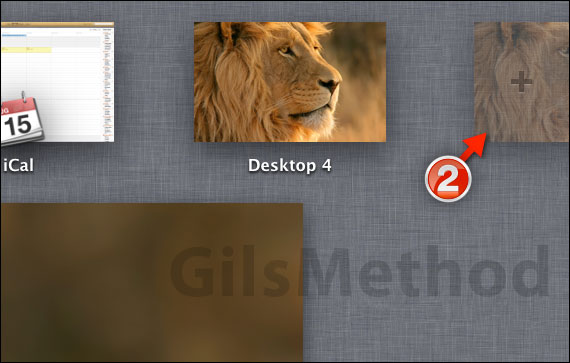
2. To create a new desktop, place your cursor on the top-right edge of the screen and you will notice that a new desktop will appear with a plus + sign.
Click on the semi-hidden desktop to create a new desktop.

You will notice that the new desktop will appear as thumbnail next to other desktops on the top row.
A. If you wish to close a desktop you are no longer using click the (X) on the top-left corner of the thumbnail.
Note: If you can’t see the (X), place your cursor over the thumbnail.
When you are ready to use a particular desktop, click on the desktop you wish to use from the row of desktops in Mission Control.



