
If you’re not a fan of Windows 7’s Aero Snap feature don’t worry, Microsoft provides users with a setting to disable this new feature. For those of you who may not know, Snap allows users to arrange open windows in Windows 7 with minimal effort. If you would like to place two windows side-by-side you can drag one window to an edge of the screen (left or right edge) and the window will automatically “Snap” to the edge it was dragged. Repeat for the other open window (opposite side) and both windows will be side-by-side. If you have any comments or questions please use the comments form at the end of the article.
Software/Hardware used: Windows 7 Ultimate.
How to Disable Snap in Windows 7
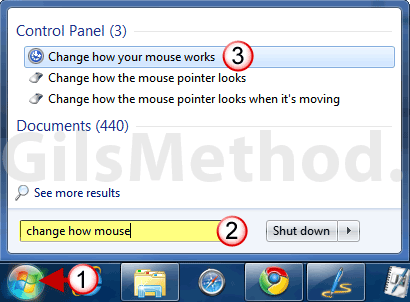
1. Click on the Windows Orb to open the Start Menu.
2. Enter change how mouse in the Search box.
3. Click on Change how your mouse works in the Control Panel section.
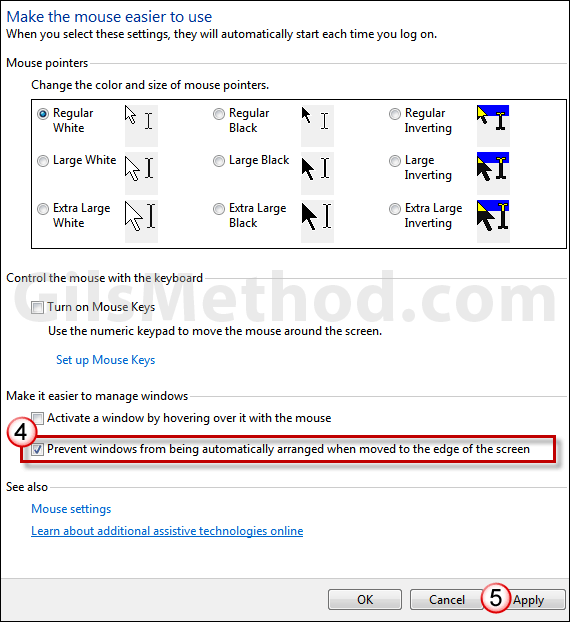
4. When the Make the mouse easier to use window opens, check Prevent windows from being automatically arranged when moved to the edge of the screen.
5. Click Apply to save the settings.
If you wish to re-enable this feature, simply repeat the steps above, uncheck Prevent windows from being automatically arranged when moved to the edge of the screen, and click Apply.



