
Unlike its Microsoft counterpart, Mac OS has the built-in ability to mount and read the contents of image files. Image files are usually used when duplicating a disc and other media. It is an easy to use container for multiple files and applications.
If you ever come across an image file in the the (.DMG) or (.ISO) formats (the most common image formats), you will be able to natively mount and access the information stored on the image. The guide below will show you how to mount and eject image files in Mac OS X.
Software/Hardware used: Mac OS 10.6.
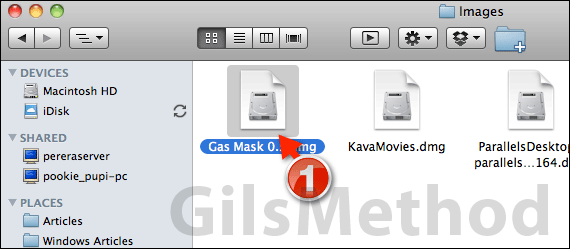
1. Double-click to mount the image file. In this case I am mounting a .DMG file, a format that is used by Mac developers to distribute their applications. However the same instructions will apply to other image files.
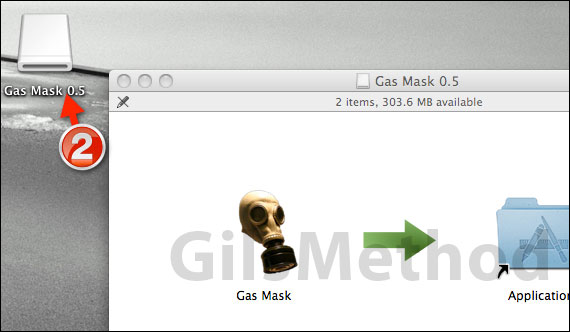
2. You will notice that when the image file is mounted it will appear as a drive on your computer. Double-click to open the drive with Finder to view the contents. In the case of a .DMG file containing an application for the Mac, you would drag the application to the Applications folder (this is how you install applications in Mac OS).
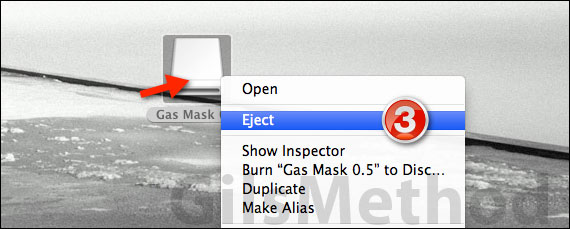
3. Once you have installed the application or you have accessed the files from the mounted image, right click on the image drive on your Mac and click Eject from the menu. This will unmount the image from your Mac.
If you have any comments or questions please use the comments form below.



