
See More About: , , , ,

How to Opt-Out and Disable iTunes Ping

by

So for the past day you’ve played around with Ping on iTunes and really don’t feel like dealing with yet another social network and you’re looking for a way to turn off Ping. The guide below is for those of you who opted-in for Ping and would now like to disable it. If you have any comments or questions please use the comments form at the end of this guide.

When you turn off Ping all of your activity and profile information will be removed immediately and permanently deleted after seven days. I guess they are giving users a turn-off-ping remorse period, just keep that in mind. However the reviews you have posted will remain active under your profile name unless you remove them in the Manage Reviews section of your account.

Note: I used iTunes 10 for the screenshots below.
howtooptoutdeleteturnofftunesping thumb How to Opt Out and Disable iTunes Ping

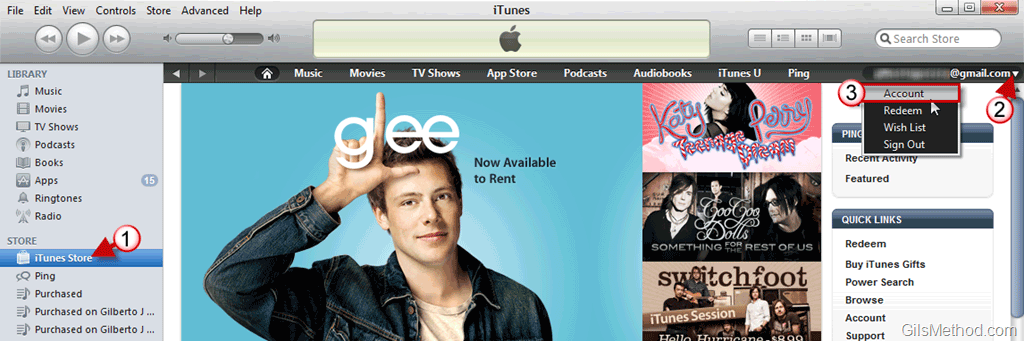
1. When iTunes loads open the iTunes Store.

2. Click on the small arrow next to your iTunes profile to open the menu.

3. Click on Account from the list.

Note: You may required to sign-in to your iTunes Account.
howtooptoutdeleteturnofftunespinga thumb How to Opt Out and Disable iTunes Ping

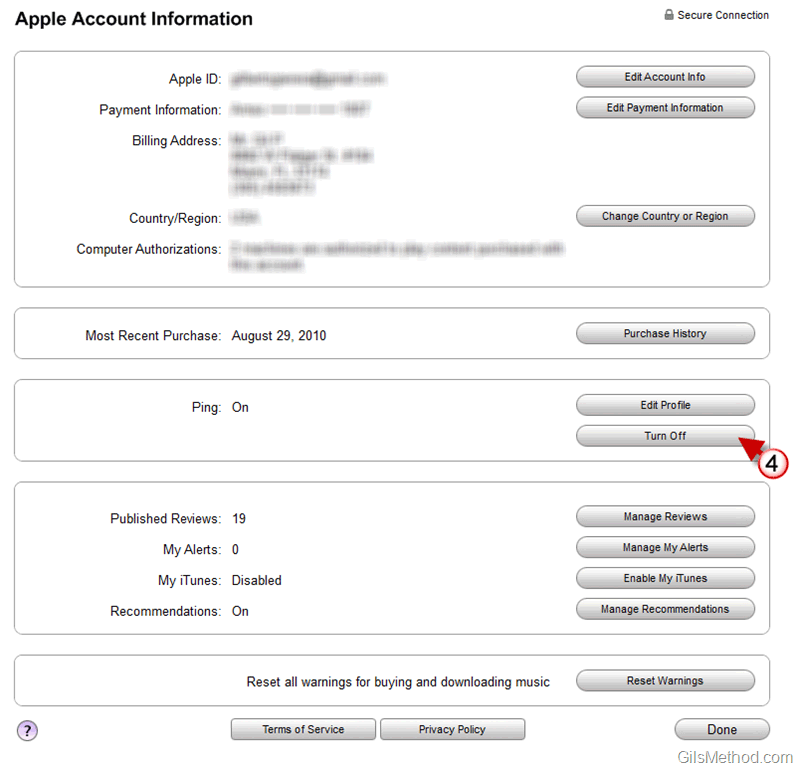
4. When the Apple Account Information page opens, click on the Turn Off button in the Ping section to turn off Ping.

howtooptoutdeleteturnofftunespingb thumb How to Opt Out and Disable iTunes Ping

5. Are you sure you want to turn off Ping? Click Turn Off to proceed.
howtooptoutdeleteturnofftunespingc thumb How to Opt Out and Disable iTunes Ping

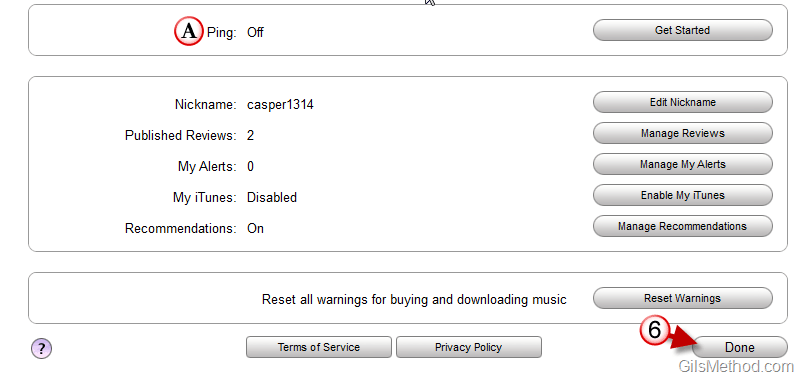
A. Confirm that Ping is turned Off.

6. Click Done when you are finished.

You have successfully deleted your Ping account.

See More About: , , , ,
Originally posted Sep 02, 2010

We close comments after 30 days on GilsMethod.com and ask that you post questions and issues on our Answers website.

This helps us better serve you by allowing us to keep track of unanswered questions that are usually hidden in long comment threads.

Answers.GilsMethod.com is a community-powered support website where you will be able to post questions, and other users including us will respond with expert advice.

So if you are having trouble with your PC, Mac, iPad, iPhone, or other piece of technology, head over to Answers.GilsMethod.com and ask away.

  • http://topsy.com/www.gilsmethod.com/how-to-opt-out-disable-itunes-ping?utm_source=pingback&utm_campaign=L2 Tweets that mention How to Opt-Out and Disable iTunes Ping — Topsy.com

    [...] This post was mentioned on Twitter by Richard Hay, Bar†. Bar† said: How to Opt-Out and Disable iTunes Ping http://t.co/Tw7eExQ [...]

  • http://squarewheelgames.com/ SquareWheel

    Well, mine just says “Get Started”. I want this bastard gone from my sidebar. More bloat, thanks Apple.

    Oh, and your icon sucks.

  • SideWinder

    Thanks for tip Gilberto.

    LMAO of your comment SquareWheel :D

  • http://www.overclock.net/other-software/822232-how-do-you-opt-out-ping.html#post10667591 How do you opt out of Ping? – Overclock.net – Overclocking.net

    [...] itunes lolz!!!!" answers… Ah, too late. Anyway, a real answer to your question is here: http://www.gilsmethod.com/how-to-opt…le-itunes-ping [...]

  • http://www.gilsmethod.com Gilberto J Perera

    Agreed I’m not a fan of the icon myself. I don’t think that there’s a way to disable or hide Ping from the iTunes window. It looks like it’s part of the iTunes store and can’t be changed…we’re just going to have to deal with the bloat.

  • http://www.gilsmethod.com Gilberto J Perera

    No problem glad you found it useful.

  • http://squarewheelgames.com/ SquareWheel

    I just downgraded to iTunes 9 myself, I’m none-too-pleased with iTunes 10.

  • http://squarewheelgames.com/ SquareWheel

    I just downgraded to iTunes 9 myself, I’m none-too-pleased with iTunes 10.

  • http://squarewheelgames.com/ SquareWheel

    I just downgraded to iTunes 9 myself, I’m none-too-pleased with iTunes 10.

  • Anonymous

    Fantastic. I don’t think I like the idea of automagically sharing what and when I’m listening to something. People need to find their own style and make their own choices, not copy off of trendsetters 24/7. For those that want to be introduced to music, the radio, and music charts are where they should explore. imho

  • shelley

    I wouldn’t have minded Ping had it actually given me some recommendations that made sense given my listed music genres. But recommending Selena Gomez and Kylie Minogue is just WRONG for somebody who has indicated that they like classical and jazz!

  • guest

    Thanks. would you by any chance know how to remove that very annoying ping icon…I have the ping turned to off but the icon still shows in my library when I click on any of my songs and honestly it drives me mad…

  • MelbourneLily

    Hello,
    I’ve still got Ping all over iTunes, and I’ve never even switched it on! Very frustrating Apple!

  • Nigel

    Thank you for this advice. However it does not solve another problem. I never opted in to Ping in the first place, because I have another life. However now tht I have upgraded to the new iTunes, every time I highlight a track in my music library, the little Ping button still appears. Since I have refused to sign up for Ping, it shld not be there shld it ?

    I suppose this another stunt from Cupiditytino to lock us in to there world view.

    Best Nigel

  • http://www.gilsmethod.com Gilberto J Perera

    Yeah pretty much, but the Ping icon being there doesn’t mean you are signed on…so if you opted out then there’s no need to worry about it.

  • http://www.gilsmethod.com Gilberto J Perera

    As long as it’s turned off. In other words, you’re not using it or opted in you’re good. Thanks.

  • http://www.gilsmethod.com Gilberto J Perera

    I’m sure that there is a registry hack somewhere, but I’m not familiar with it. If I do encounter it I’ll make sure to post it here. Thanks.

  • http://www.gilsmethod.com Gilberto J Perera

    I’m sure that there is a registry hack somewhere, but I’m not familiar with it. If I do encounter it I’ll make sure to post it here. Thanks.

  • http://www.gilsmethod.com Gilberto J Perera

    Shelley,

    One thing I’ve learned from any product that is new is that it is not perfect…give it some time maybe it will get better with recommendations. Thanks for sharing your feedback.

  • http://www.gilsmethod.com Gilberto J Perera

    Or Pandora ;)

  • pi

    If you go to the itunes store and choose the drop down arrow next to your name and choose sign out, the ping icon and the like dislike option will no longer appear when you click on your music. It’s not a perfect fix but it’s better.

  • http://www.gilsmethod.com Gilberto J Perera

    Pi,

    Thanks for the tip.

  • TheGooch

    “C:Program FilesiTunesiTunes.exe” /setPrefInt hide-ping-dropdown 1
    “C:Program FilesiTunesiTunes.exe” /setPrefInt show-store-link-arrows 1
    “C:Program FilesiTunesiTunes.exe” /setPrefInt disablePingSidebar 1

    Also, for anyone who does not want the iTunes store arrows enter this:
    “C:Program FilesiTunesiTunes.exe” /setPrefInt show-store-link-arrows 0

    where the command is the same as the 2nd one listed, and the “1″ is changed to a “0″

  • http://www.gilsmethod.com Gilberto J Perera

    Have you tried this? How do you revert it? Use 0′s instead? Would love to get some feedback as I’m planning to write a how-to on this. Thanks for the idea.

  • Snorkle

    Another way to remove the Icon is to Disable the Itunes store in the Drop down menu (Edit>Preference>Parental Control)

  • Gerri

    I apparently downloaded PING with the latest ITunes upgrade and now I can’t seem to access I Tunes anymore w/o the decline/agree screen for PING. Is there anyway to bypass this and access ITunes or do I have to set my computer back to an earlier date and update w/o PING? I definitely do not want PING!

  • http://www.gilsmethod.com/itunes-101-tweeting-ping-activity How to Keep iTunes 10.1 from Tweeting Your Ping Activity

    [...] Do you want to completely get rid of iTunes Ping? Check out How to Opt-Out and Disable iTunes Ping. [...]
