
Google’s announcement of a cloud printing service disappointed a lot of users who expected the Mobile and Chrome OS only feature to allow for printing from other operating systems. Fortunately, Oren Yomtov, a Chrome extension developer has put together an extension that allows Windows and Mac users to print from their computers to Google’s Cloud Print service.
If you’re not familiar with Google Cloud Print, read this, if you are then check out the instructions below to begin using Google Cloud Print on your Windows PC or Mac.
Limitations: You can only print Google Docs documents, Gmail Attachments, Gmail messages, and files opened in a browser window that end with .pdf, .doc, or .txt.
Software/Hardware used: Google Chrome 9 running on a Mac with the Google Cloud Print Extension.
Before you get started make sure to enable Google Cloud Print on your account.
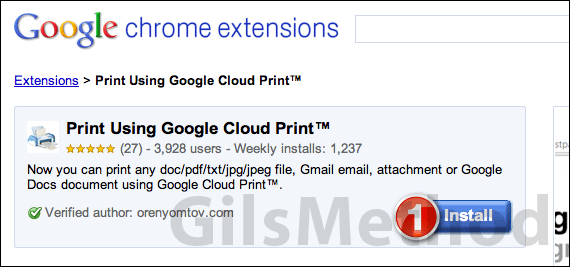
1. Head over to the Google Cloud Print extension page and click Install.
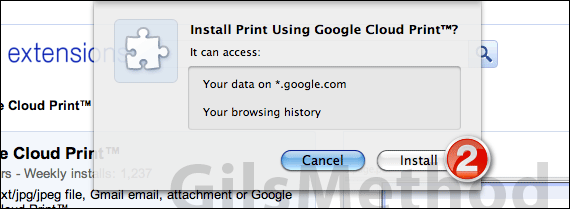
2. When prompted click Install.
Note: This extension will have access to your data on google.com and your browsing history.
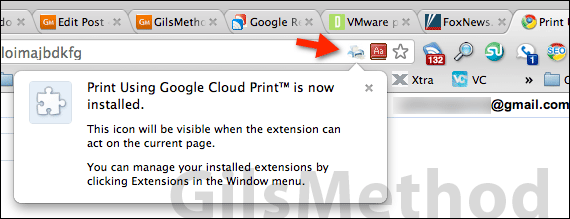
Once the extension is successfully installed you will see the message above.
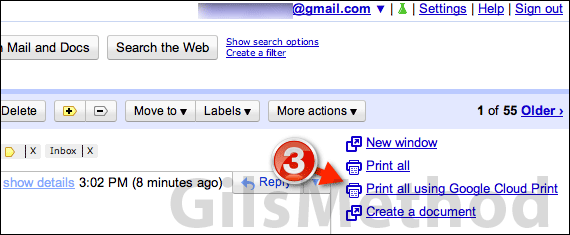
Next time you open an attachment in Chrome or a message in Gmail (see above) you will find a Print all using Google Cloud Print link under the Print all link which will allow you to print using this service.
3. Click the Print all using Google Cloud Print link to bring up the dialog box so that you may print to one of the configured printers.
If you have any trouble using this extension make sure that you’ve set up your Google Cloud Print account, that the extension is enabled and that you are trying to print supported file types. If you have any comments or questions please use the comments section below.



