
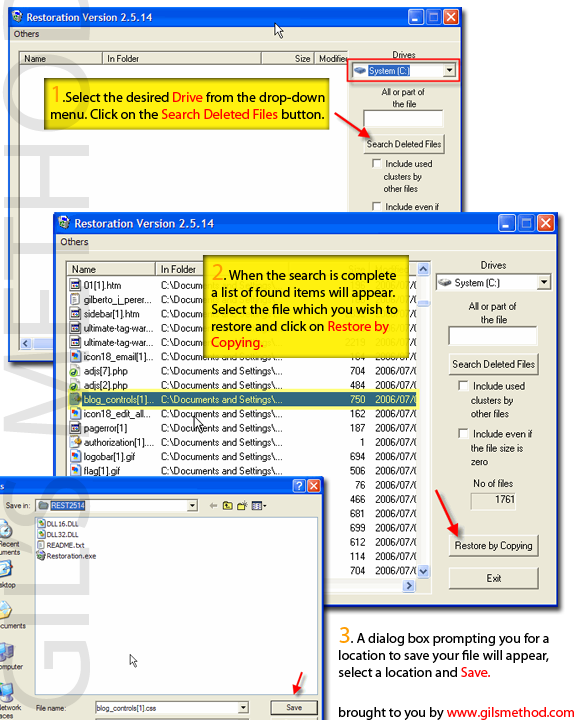
 Everybody has come across one of the most dreaded situations when using your computer, accidentally deleting files. For many out there, the battle was lost, files can no longer be seen by Windows when deleted from the Recycle Bin, do not loose hope! There are a slew of programs on the web that allow you to retrieve deleted files from your desktop. Below I will list a couple of the programs that I have stumbled upon during my searches on Google. I will also include a small how-to demontrating how to use one of the programs listed below. If you would like to see more tutorials on any of the programs liste below just let me know.
>Restoration Download (great thing about Restoration is that it does not require to be installed, so it would make a great addition to your collection of programs on your memory key)
>FreeUndelete 2.0 Download
>PC Inspector File Recovery Download
>VirtualLab Data Recovery Software v4.8.8 Download
For the sake of simplicity we will cover the steps necessary to restore your files using Restoration.
1. Download and install Restoration
2. Open the program, when loaded select the drive you’d like to restore from the drop-down menu on the top right.
3 Click on the Search Deleted Files button.
4. When the search is complete it will list all of the deleted files it could find, select the files you would like to restore and click on Restore by Copy, select a destination that is not the one you’re currently restoring from.
5. Now go check that directory [where you stored the restored files] to see how much of file was recovered.
6. Cross your fingers and good luck!


