
Click here to try Mozy for FREE!
Recommended: Click here repair PC errors
Click here to run a Free Registry scan
WebWatcher

How to Select Multiple Files Using Checkboxes in Vista

by Gilberto J Perera View Comments Share
Checkbox In Vista Explorer

If you are into checkboxes then this is the guide for you. Among the many ways that you can select multiple files in Windows Vista, there is an option that displays a checkbox on the top left corner of all files in Explorer. This method simplifies the selection of multiple files by allowing you to add a checkmarks to the files you would like to select. This is a good option for those of you who are not comfortable with holding down keys and are concerned with selecting the correct files. If you have any questions or comments, please post them below.

NOTE: I used Vista Ultimate to create this tutorial, this tutorial should apply to all versions of Vista.
Checkbox In Vista Explorer

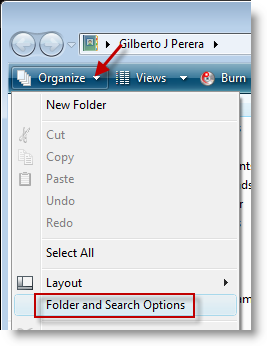
1. With and Explorer window open (not Internet Explorer, Windows Explorer – My Documents, My Computer, etc.), click on the Organize button located on the top left corner of the window, click on Folder and Search Options.
Checkbox In Vista Explorer

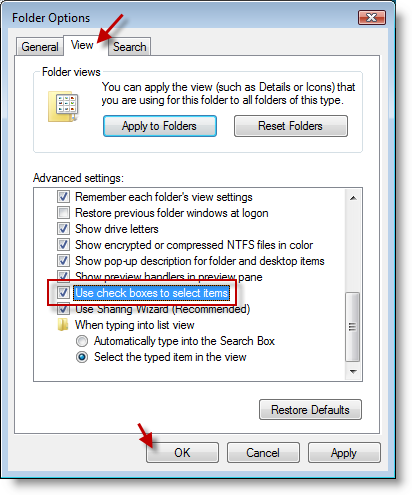
2. Click on the View tab in the Folder Options dialog box, scroll down and add a checkmark to the Use check boxes to select items checkbox, click OK

Checkbox In Vista Explorer

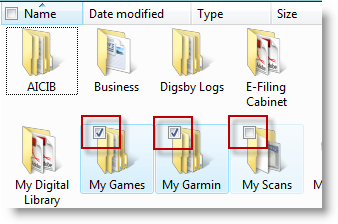
3. When you return to your Explorer window, whenever you place your cursor over a file a check box will appear. You can add check marks to select multiple files.

Article source Windows Vista Annoyances: Tips, Secrets, and Hackshow to How to Select Multiple Files Using Checkboxes in Vista


Do you like this article?

Related Posts

  1. How to Enable Checkboxes in Vista To Simplify Multiple File Selection
  2. How to Use Check Boxes to Select Files and Folders in Windows 7
  3. How to Display File Extensions in Vista
  4. How to Display Multiple Excel Windows in the Taskbar
  5. How to Disable and Enable Thumbnails in Vista
How-to

About the author

Gilbert is a Microsoft MVP, a full-time blogger, and technology aficionado. When Gilbert is away from his bike and his iPad, he's busy writing technology how-to's from his home-office in Miami, Florida on the latest programs and gadgets he can get his hands on. He's locally known as "the computer guy" and has spent the last 12 years helping family, friends, and GilsMethod.com visitors with their computer questions and problems. He was awarded the 2009 MVP award from Microsoft for his contributions in forums and blogs and is enjoying the new addition to his family.

Want more articles like this delivered for free to your inbox?

To receive the latest technology how-to's, news, and reviews, enter your email address below.

Sign up below

View Comments to “How to Select Multiple Files Using Checkboxes in Vista”

Leave a Reply

blog comments powered by Disqus

