
How many times have you found yourself wishing you hadn’t taken the time to check your iPhone for a text message you really didn’t care about?
I know I have, especially when I get those pesky marketing text messages.
If you’re looking for a way to single out text messages from certain individuals, say your wife or someone whose text message you do not want to miss, custom text tones may be the solution for you.
In iOS for the iPhone you have the option of setting not only a custom ringer by contact, but also the tone used when a text message arrives. In this guide I will show you how to set a custom tone for incoming text messages by contact.
Software/Hardware used: iPhone 4 running iOS 4.3.
Open a Contact to Modify
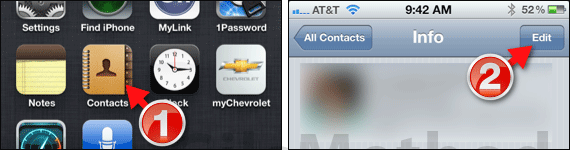
1. Tap to open Contacts on the Home screen.
2. Select a contact from the contacts list and tap Edit (the contact whose text tone you wish to modify).
Set a Custom Tone for the Selected Contact
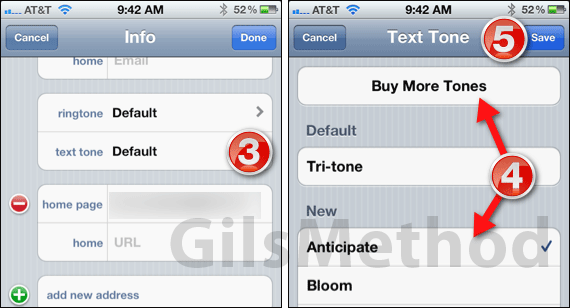
3. Swipe down the contact’s details page and tap text tone.
4. You have the option of selecting one of the 23 available tones on your iPhone or you can tap the Buy More Tones button to purchase a tone from iTunes.
5. When you are done setting a custom tone for the contact, tap the Save button.
Next time the contact you modified sends you a text message, the sound you hear will be the tone you selected for the specific contact.
If you have any comments or questions please use the comments form below.



