
I was recently working on a client’s website and ran into some issues with font availability on my Mac. The client had used a font for one of their logos and needed that I recreate the logo with this font, the problem was that I didn’t have the logo nor could I find it online…so after 20 minutes of instructions I was able to get the client to send the font to me.
Because this took so much of my time and it is something that I may run into in the future, I thought I would create a guide to help others who may encounter this issue and to have it as a backup should it arise again.
The method described below calls for the use of Font Book, but you can always head over to Library > Fonts / Fonts Disabled / Fonts Collection folders, but for the average computer the instructions below seemed to work best. If you have any comments or questions please use the comments form at the end of the guide.
Software/Hardware used: Mac OS X.
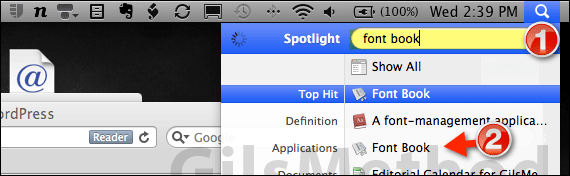
1. Click on the Spotlight Search icon and enter Font book in the search box.
2. Click on Font Book in Applications from the search results.
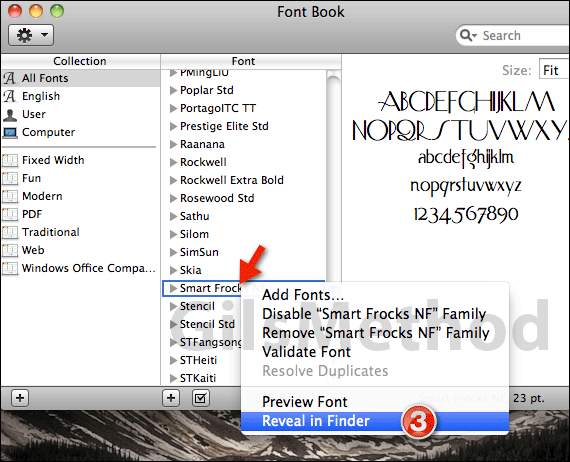
3. When the Font Book application opens locate the font you wish to copy and right-click it. Click Reveal in Finder from the menu.
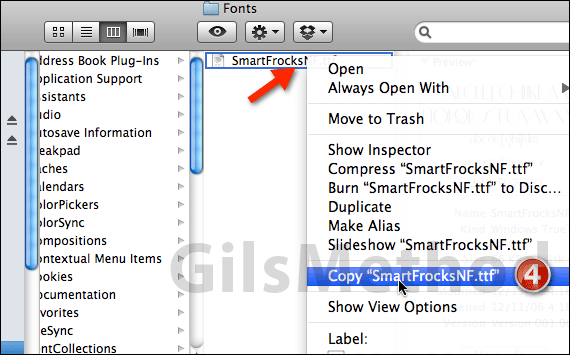
4. When the Finder window opens you should see the font you selected. Right-click the font file and select Copy “font name” from the menu.
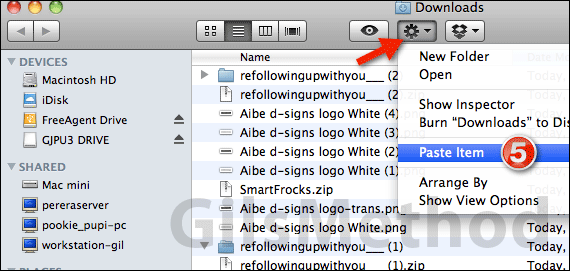
5. Go to the location where you wish to save the copied font file, click the options icon and click Paste Item from the menu.
You’ve saved the font file in an accessible location where you can send it via email or share it using whichever method works best for you. If you have any comments or questions please use the comments form below.



